Under the Policy
Your policy outputs an action. Everything between that action and the world is here: rotations and kinematics, dynamics and simulators, motors, servo loops, force control, planning, sensors and filters. Each is built from first principles, and each chapter has a live lab.
Chapter 0 · Start here
The map
The one ideaA robot is a loop: sense, estimate, decide, move, push on the world, sense again. Your policy is one box in that loop. This book is about all the other boxes, and they share one idea: compare where you are with where you want to be, and act on the difference.
When a learned policy picks up a cup, it emits an action perhaps 30 times a second. Underneath, much more happens. Encoders and cameras measure the world, and filters turn those measurements into a state. A trajectory generator turns each action into a smooth stream of targets. A servo loop running a thousand times a second turns targets into torque, and a current loop inside the motor turns torque into amps. The world answers with gravity, inertia and contact forces, and the sensors measure the result. Every one of these layers can make a good policy look bad, and every one can be understood from first principles in an afternoon.
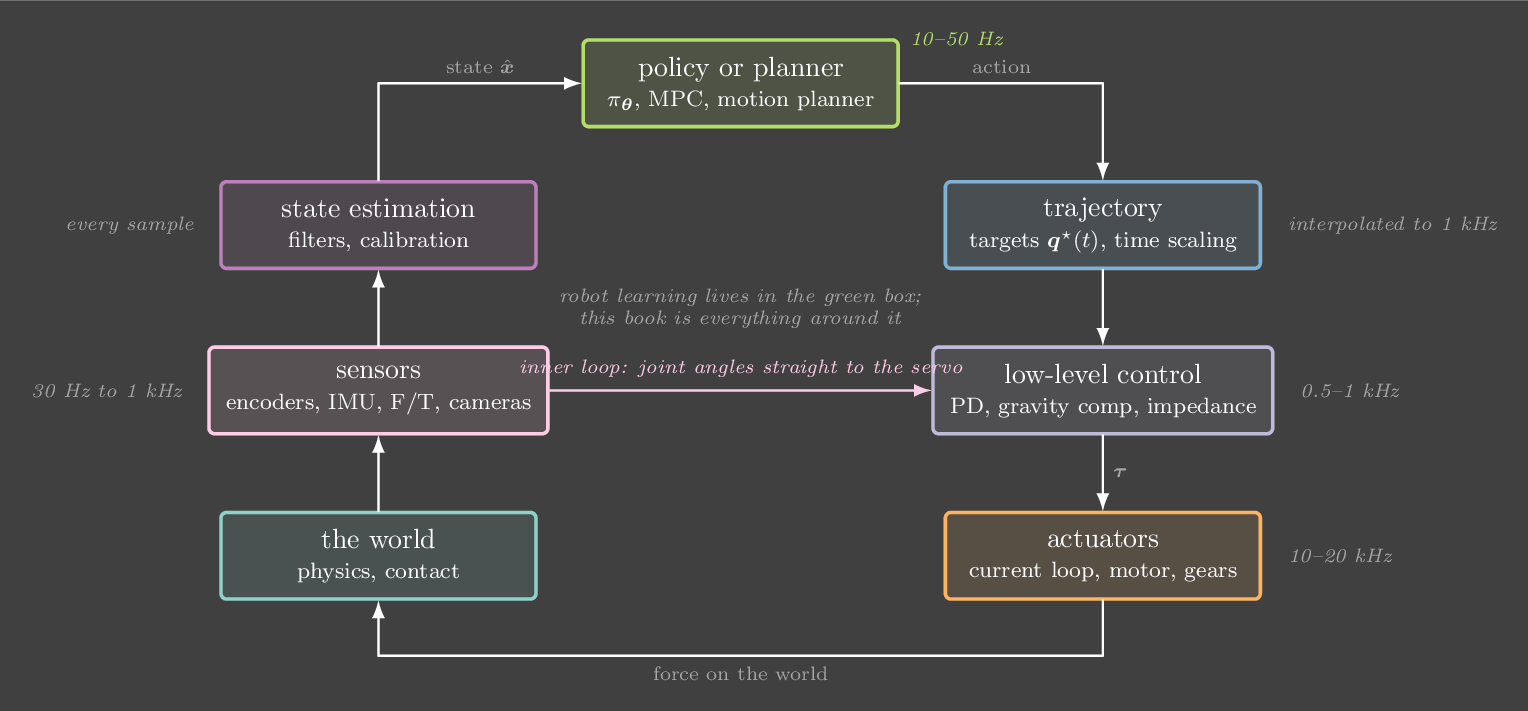
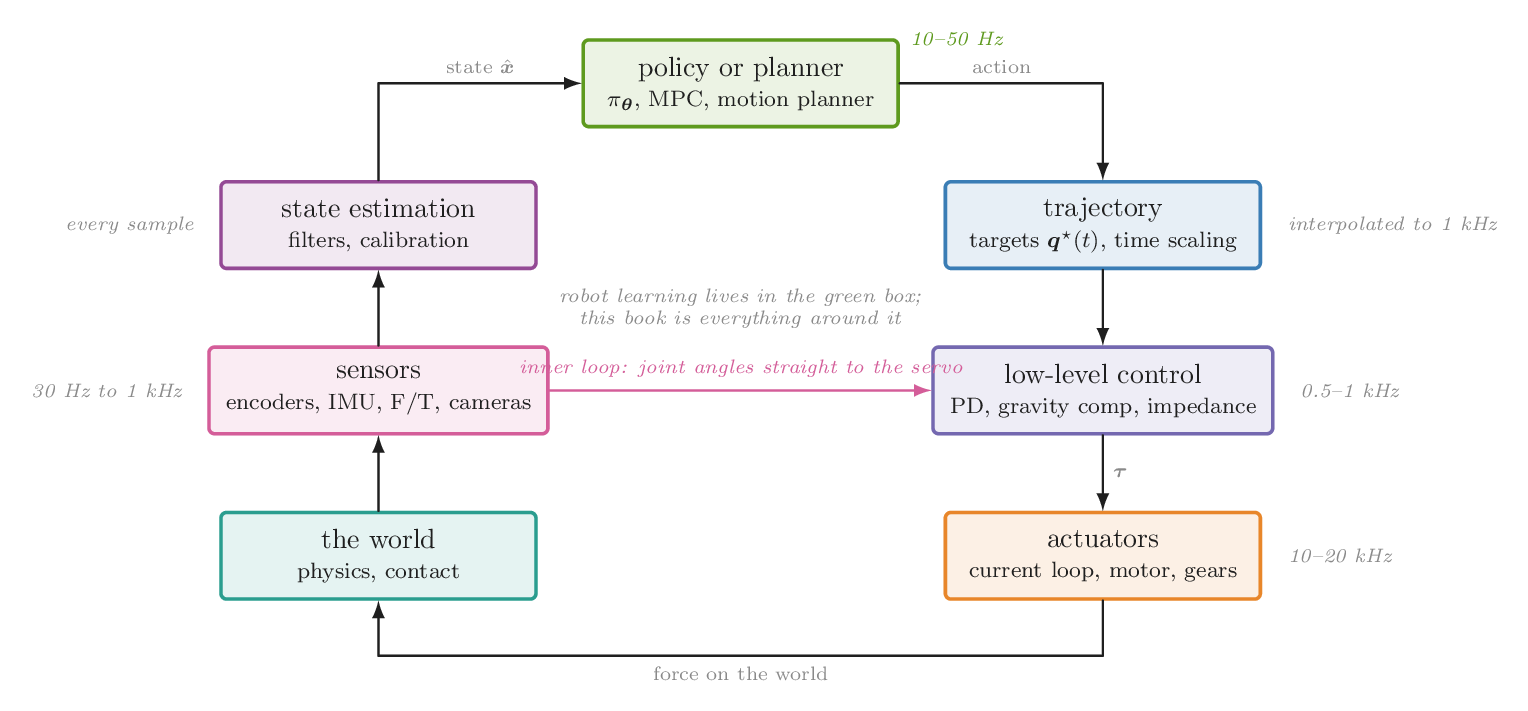
What each part covers
| Part | The question it answers | Where it sits in the loop |
|---|---|---|
| I | Why feedback works, and what P, D and I each do. Taught on a single joint. | low-level control |
| II | How to describe where a robot is: rotations, frames, forward and inverse kinematics, Jacobians. | every box that talks about poses |
| III | Why it moves the way it does: dynamics, how simulators integrate them, and what motors and gears add. | the world and the actuators |
| IV | How to use a model to control better: gravity compensation, computed torque, impedance, force control, grasping. | low-level control |
| V | How to make motion: time-scaled trajectories, and planning around obstacles. | trajectory, planner |
| VI | How to know the state: sensors and cameras, filtering, and identifying the robot's own parameters. | sensors and estimation |
| VII | How optimizing, planning and learning give the same kind of feedback law, and how to carry it from sim to a real robot. | policy or planner |
| VIII | What real hardware adds: clocks and delay, wheeled bases, and the SO-101 on your bench. | the whole loop |
The control ladder
Part I, Part IV and Part VII form the book's spine. A controller is a function from where I am and where I want to be to what I do. You need one because your model of the world is always a bit wrong. A command computed in advance drifts as soon as the world disagrees with the model, and feedback measures the drift and pushes back against it. Each controller on the ladder is that idea with more knowledge added. React to error. Add what you know about the robot. Pick the gains by optimizing a cost instead of by hand. Plan with a model. Fit the whole feedback law from data. Robot learning sits at the top, and the rungs underneath are still running under your policy every time it acts.
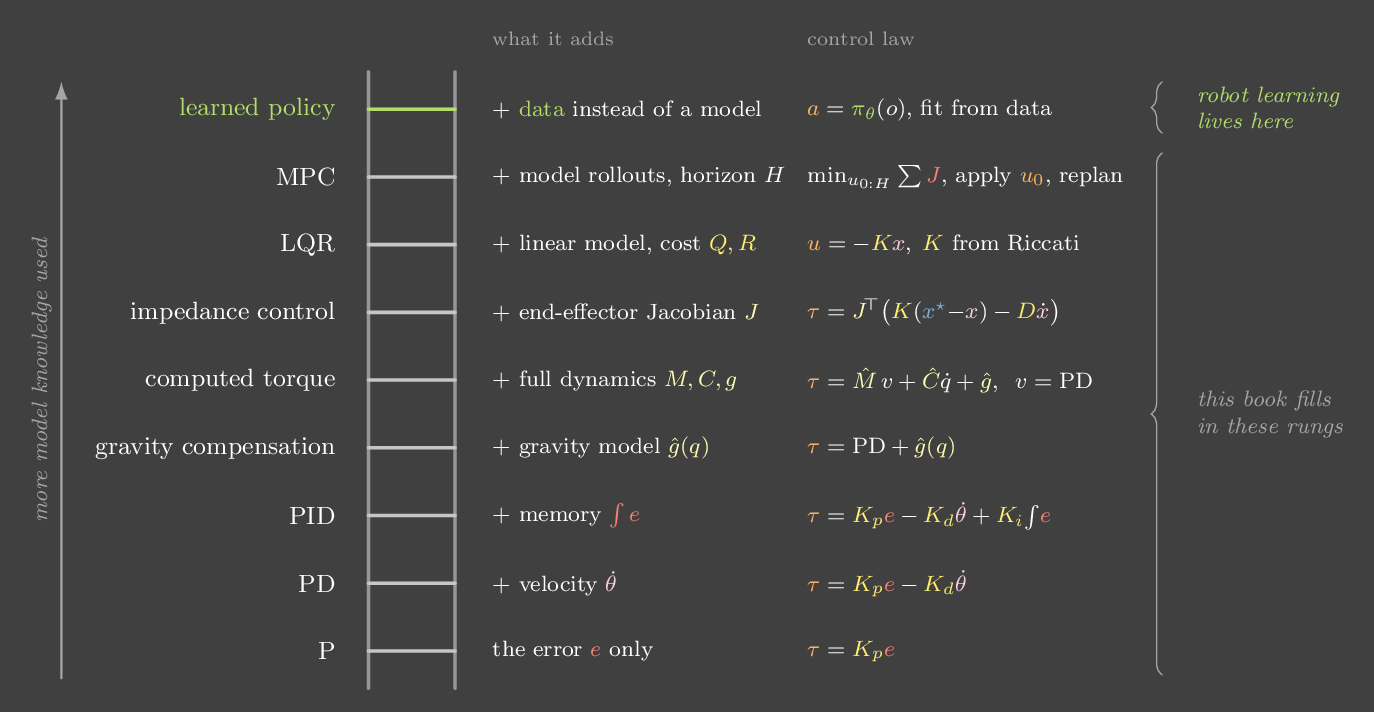
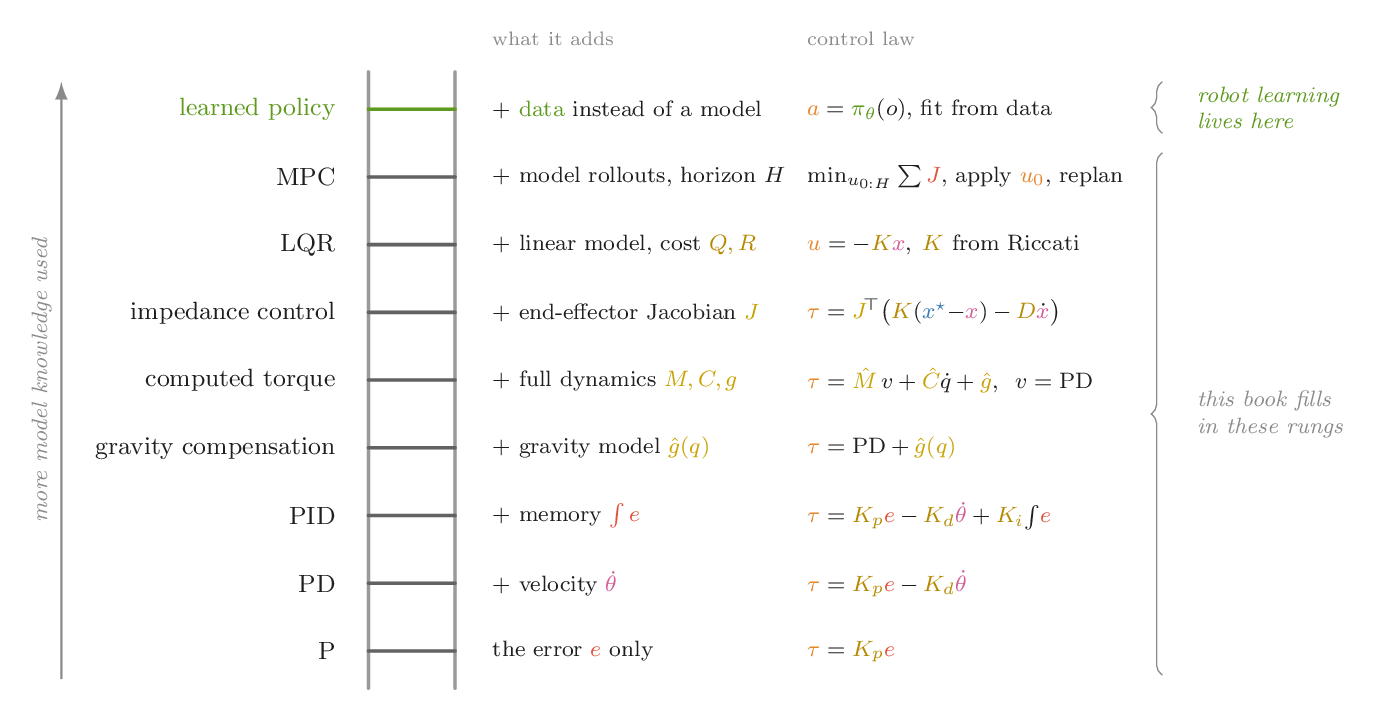
- 2P: springknows only the error
- 3PD: spring + damperadds velocity
- 4PIDadds memory of past error
- 13Gravity compensationadds a model of gravity, ĝ(q)
- 14Computed torqueadds the full dynamics M, C, g
- 15Impedanceadds the Jacobian, works at the hand
- 23LQRadds a cost; gains come from optimizing it
- 24MPCadds a horizon; plans with the model
- 25Learned policyreplaces the model with data
Routes through the book
The chapters are short and build on each other, but you don't need all of them at once. Pick a route by what you are working on, and follow the cross-references when a chapter leans on an earlier one.
- The core path, about two weeksChapter 1 to Chapter 4, then Chapter 5, Chapter 6, Chapter 7, Chapter 8, Chapter 10, Chapter 13, Chapter 14, Chapter 15, Chapter 23, Chapter 24, Chapter 25, Chapter 27 and Chapter 29.
- ManipulationAdd Chapter 9, Chapter 16, Chapter 17, Chapter 18 and Chapter 19.
- Getting a policy onto hardwareChapter 12, Chapter 11, Chapter 20, Chapter 21, Chapter 22, Chapter 26 and Chapter 27.
- World models and planningChapter 10, Chapter 11, Chapter 23, Chapter 24, Chapter 22 and Chapter 19.
How to read the pictures
Colour carries meaning, and it means the same thing in every figure, every lab and every equation. Once you learn it, you can read a diagram without its labels.
Coordinate frames are the one exception. They follow the convention every robotics tool uses: x red, y green, z blue.
Throughout Part I the robot is a single joint: a 1 kg mass on a 0.5 m arm, with the angle θ measured from hanging straight down. Its inertia is \(I = ml^2 = 0.25\ \text{kg·m}^2\). Gravity pulls it back with torque \(mgl\sin\theta\), which peaks at 4.9 N·m when the arm is horizontal. Later parts add a two-link arm (0.4 m and 0.35 m links) and a cart-pole. Every lab uses these numbers, so results carry over from chapter to chapter.
Chapter 1 · Part I · Feedback
Why feedback
The one ideaA plan computed in advance is only as good as the model it came from. Feedback measures what actually happened and corrects it, so the model only has to be roughly right.
Suppose you want the arm to rise from hanging to horizontal in 1.2 seconds. If you know the physics exactly, you can compute the torque profile that does it: enough to accelerate the inertia, plus enough to hold the arm up against gravity. Then you replay that torque, never looking at the arm. This is open-loop control.
Now give the arm a 20% heavier payload than the plan assumed. The planned torque was exactly enough for the lighter arm, so the heavier arm never quite gets up. When the plan says "hold", its torque is too small to hold the heavier arm against gravity, so it falls and swings. Nothing in the loop notices, because nothing is looking.
Closed-loop control adds a measurement and a correction. You compare the measured angle with the planned one and push in proportion to the difference. The error is the controller's signal, so a wrong model just produces a little error that the loop works against.
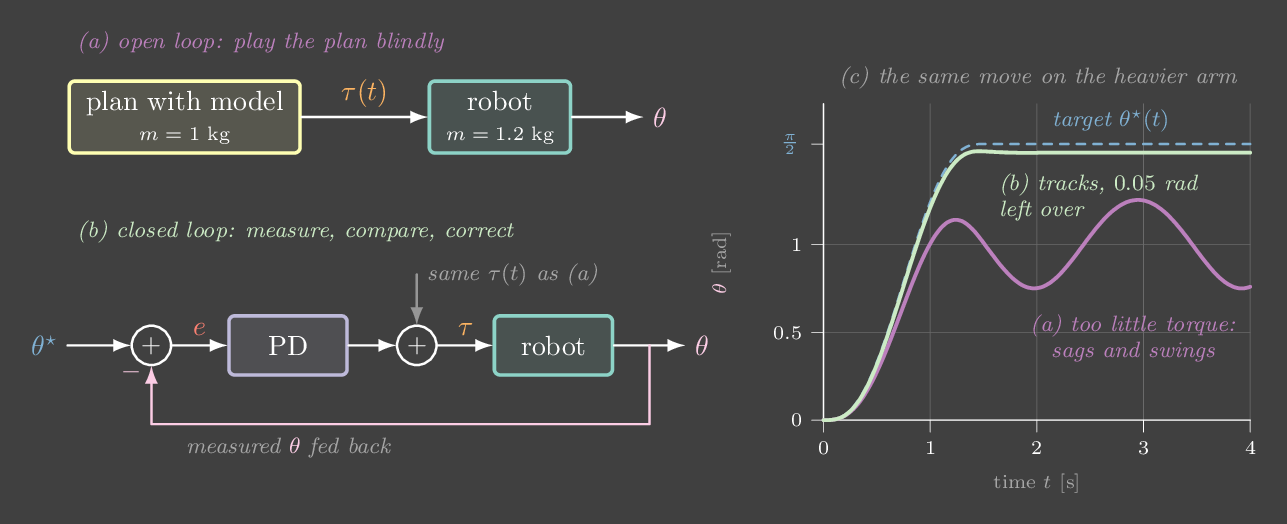
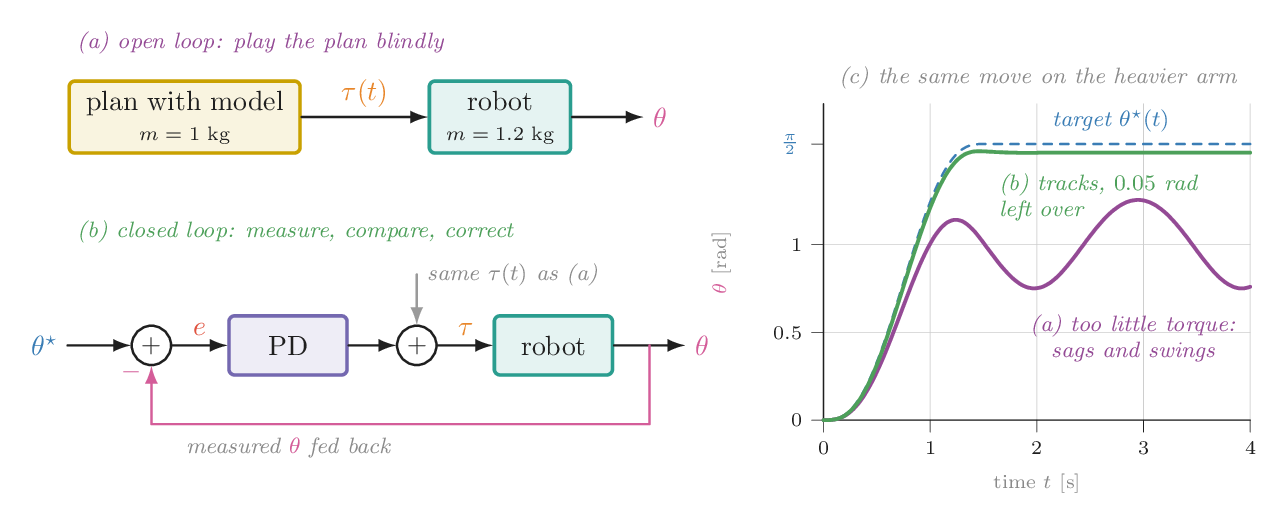
Replay a plan, then close the loop
The arm repeats a move: up to 90°, hold, back down to 0°. The planned torque assumes a 1 kg arm. The real mass is set by the slider.
Try this
- With the real mass at 1.20 kg and open loop, watch the arm fall short and then swing. Why does it keep swinging long after the plan says "hold"?
- Set the real mass to exactly 1.00 kg. Open loop now works, until you press Push. A plan has no way to recover from a disturbance it did not predict.
- Switch to closed loop and drag the mass anywhere from 0.5 to 1.6 kg. The same gains handle all of them.
The open-loop arm swings forever at 1.2 kg. What is missing?
Without a measurement the command cannot depend on the arm's state, so nothing removes the energy of the swing. Even a perfect plan would need the model, the start state and every disturbance to be exactly right. Feedback makes the command a function of the state.
Chapter 2 · Part I · Feedback
P: a virtual spring
The one ideaProportional control, \(\tau = K_p e\), is literally a spring attached between the joint and the target. A spring stores energy but never removes it, so P alone oscillates.
The simplest feedback law pushes back in proportion to the error:
That is Hooke's law. The joint behaves as if a torsional spring of stiffness \(K_p\) connected it to the target. Turn gravity off for a moment and write Newton's law for the joint:
This is a harmonic oscillator with natural frequency \(\omega_n = \sqrt{K_p / I}\). With \(K_p = 20\) and \(I = 0.25\), \(\omega_n \approx 8.9\) rad/s, so the joint swings through the target about 1.4 times a second. It keeps doing that forever. The spring turns kinetic energy into potential energy \(\tfrac12 K_p e^2\) and back again, and nothing in \(\tau = K_p e\) takes energy out.
Raising \(K_p\) does not fix this. A stiffer spring pulls harder, so the joint arrives sooner, overshoots by the same amount and oscillates faster.
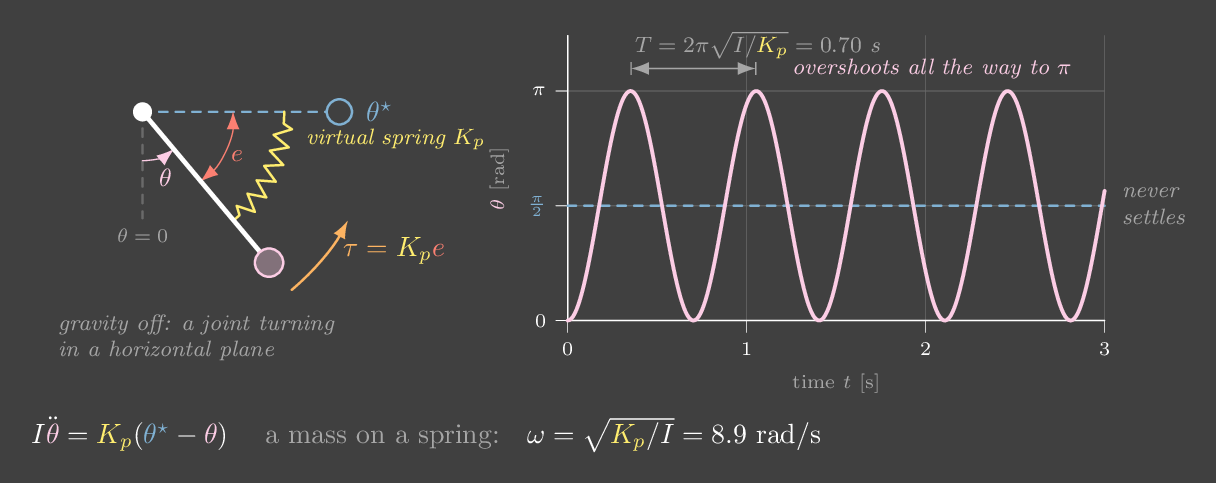
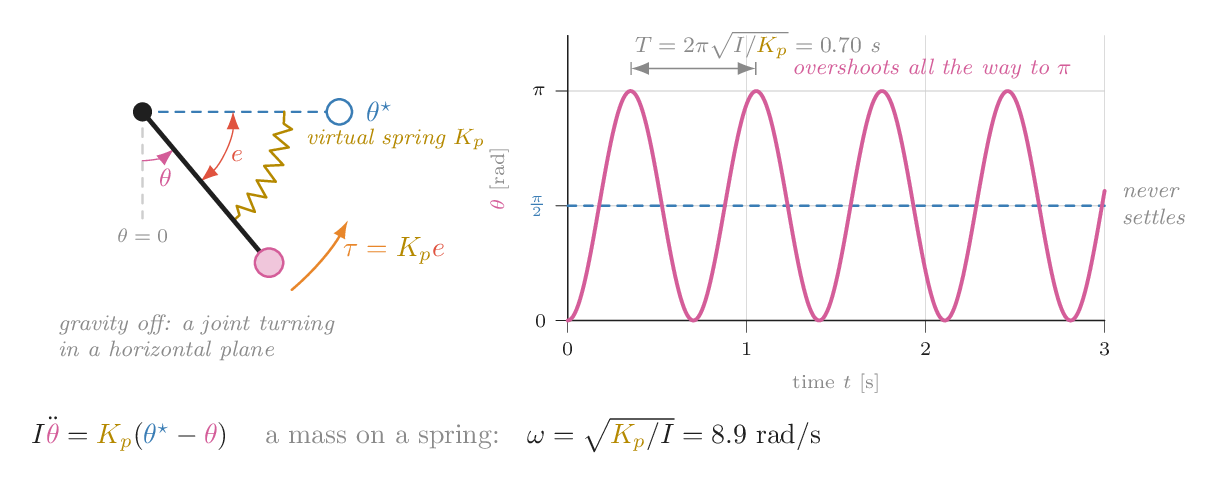
A spring and nothing else
Gravity and friction are off. The gold coil is the virtual spring. Click or drag in the left panel to place the target yourself.
Try this
- Predict first: if you quadruple \(K_p\) from 10 to 40, what happens to the oscillation period? Then check. (√4 = 2, so the period halves.)
- Is there any \(K_p\) that makes the joint settle? Watch the amplitude, not the frequency.
- Set \(K_p = 0\). The torque arrow vanishes, and the joint keeps whatever velocity it had.
Run it yourself: P control in NumPy
import numpy as np
m, l, I, dt = 1.0, 0.5, 0.25, 1e-3
Kp, theta_star = 20.0, np.pi / 2
th, om, log = 0.0, 0.0, []
for k in range(5000):                  # 5 s
    tau = Kp * (theta_star - th)       # the spring
    om += tau / I * dt                 # no gravity, no friction
    th += om * dt                      # semi-implicit Euler keeps energy
    log.append(th)
print(f"min {np.degrees(min(log)):.1f} deg, max {np.degrees(max(log)):.1f} deg")
# swings between 0 and 180 deg forever: the target 90 deg is only the centreYou double \(K_p\). What changes?
\(\omega_n = \sqrt{K_p/I}\), so doubling \(K_p\) multiplies the frequency by \(\sqrt2\). Without a term that removes energy, the amplitude stays the same.
Chapter 3 · Part I · Feedback
D: a virtual damper
The one ideaAdding \(-K_d\dot\theta\) attaches a damper, which turns motion into heat. A PD-controlled joint is a spring–damper, and most of practical robot control is choosing that spring and that damper.
To stop the oscillation we need a torque that always opposes motion: a shock absorber. The derivative term does exactly that:
The damper removes power \(K_d\dot\theta^2\) every instant the joint moves, so the energy stored in the spring drains away. How fast it drains, compared with how fast the spring oscillates, is the damping ratio:
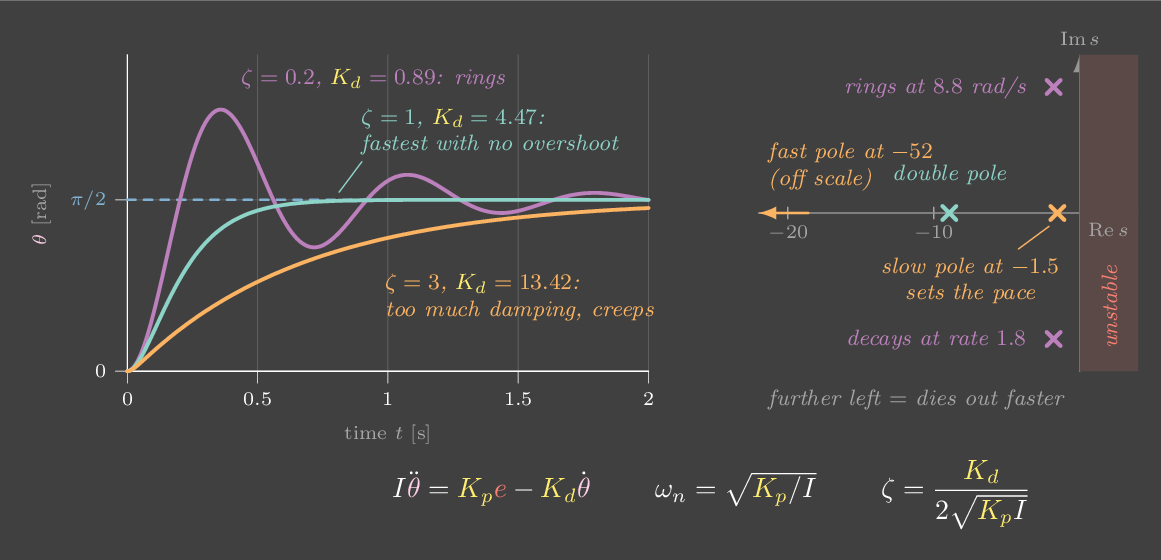
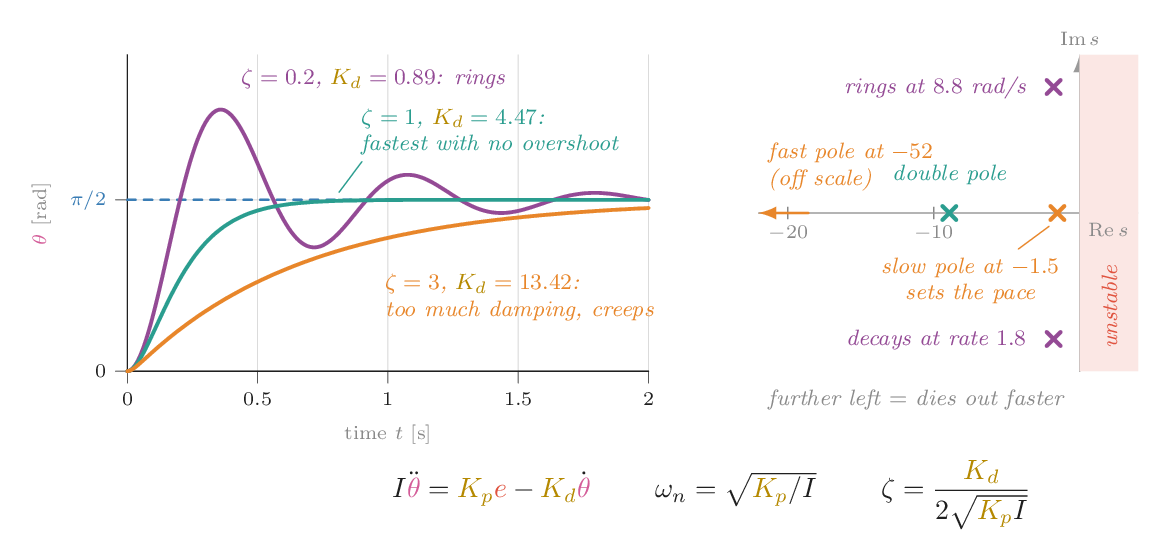
Three regimes follow. With \(\zeta < 1\) the joint is underdamped: it rings a few times before settling. At \(\zeta = 1\) it is critically damped, the fastest approach that never overshoots. With \(\zeta > 1\) it is overdamped: it never overshoots and gets slower the more damping you add, as if moving through honey. For our joint with \(K_p = 20\), critical damping is \(K_d = 2\sqrt{20 \cdot 0.25} \approx 4.5\).
The same story appears as poles, the roots of \(Is^2 + K_d s + K_p = 0\). Each pole is a mode \(e^{st}\). Its real part sets how fast the mode decays, and its imaginary part sets how fast it oscillates. Poles in the left half-plane decay. Poles on the imaginary axis, which is pure P control, oscillate forever.
Tune a spring–damper
Still no gravity. The small panel on the right plots the two closed-loop poles live as you move the sliders.
Try this
- Find critical damping for \(K_p = 20\) by eye: the fastest step with no overshoot. Compare with the readout (ζ ≈ 1).
- Watch the poles as \(K_d\) rises: they slide left together, meet on the real axis at ζ = 1, then split apart. One moves left and one creeps back toward zero, and that slow pole is why overdamped feels sluggish.
- Raise \(K_p\) to 60 and find the new critical \(K_d\). It grows like \(\sqrt{K_p}\), not like \(K_p\).
Two practical details. First, take the derivative of the measurement, \(-K_d\dot\theta\), rather than of the error. If the target jumps, \(\dot e\) is an impulse, and differentiating it produces a "derivative kick". Second, \(\dot\theta\) usually comes from differencing encoder readings, which amplifies noise. A large \(K_d\) therefore buys damping at the price of jitter. You will feel that on a real servo in Chapter 29.
Your joint overshoots and rings for a while. Which change helps most directly?
Ringing means ζ is too small. ζ grows with \(K_d\) and shrinks as \(K_p\) grows, since \(\zeta = K_d / 2\sqrt{K_pI}\).
Chapter 4 · Part I · Feedback
I: memory of error
The one ideaA spring needs to be stretched to push. Under a constant load like gravity, PD settles where the stretch exactly balances the load, short of the target. Integrating the error builds up a torque that removes that offset.
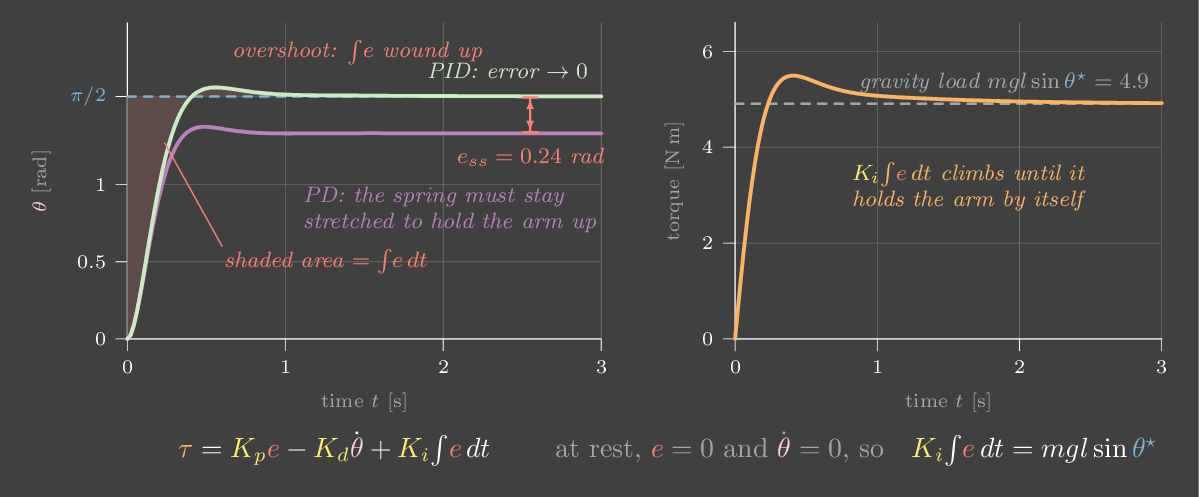
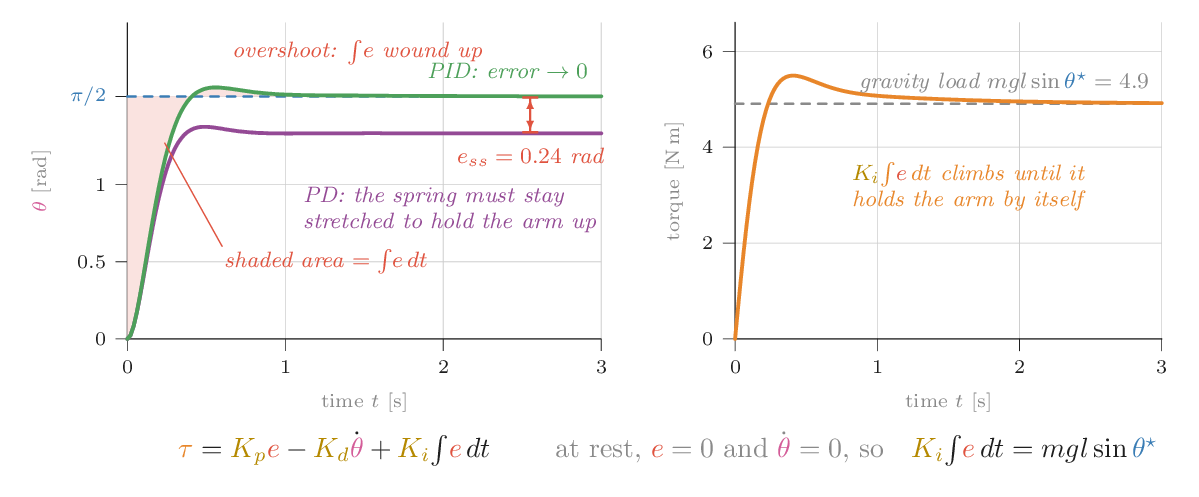
Turn gravity back on and ask the arm to hold horizontal. At rest, \(\dot\theta = 0\), so the damper does nothing and the spring alone must balance gravity:
The spring can only push if it is stretched, so the arm must sag. With \(K_p = 20\) and \(\theta^\star = 90°\) it settles about 14° low. A stiffer spring sags less, but no finite stiffness gets the sag to zero.
The integral term adds a memory:
While any error remains, the integral keeps growing, and so does the torque it adds. The only way for the system to come to rest is with \(e = 0\) and the integral term holding exactly \(mgl\sin\theta^\star\). The integral learns the load.
The memory has a cost. If the motor is saturated, because you asked for more torque than it can give, the error stays large and the integral keeps growing even though the extra torque cannot be delivered. When the arm finally arrives, the stored-up integral overshoots badly and takes a long time to unwind. This is integrator windup. The usual fix is to stop integrating while the output is saturated.
Sag, integrate, wind up
Gravity is on. In the torque plot, the dashed yellow line is the torque gravity needs at the current angle, and the gold line is what the integral term is supplying.
Try this
- With \(K_i = 0\), read the sag at 90°. Double \(K_p\): roughly how much does the sag shrink? (About half, since \(e_{ss} \approx mgl/K_p\) for small sag.)
- Set \(K_i = 40\). Watch the gold line climb until it matches the yellow dashed one, at which point the error is zero.
- Windup: set the torque limit to 6 N·m and \(K_i = 100\). The arm overshoots after each step. Now tick anti-windup and compare.
- Set \(K_d = 1\) and \(K_i = 120\). The loop goes unstable: the integral adds lag, and this loop is stable only while \(K_dK_p > IK_i\).
Why can PD never hold a horizontal arm exactly at its target?
At rest \(\dot\theta = 0\), so the D term is zero, and \(K_pe\) must equal the gravity torque. That needs \(e \ne 0\). The integral term, or a gravity model (next chapter), supplies that torque without needing an error.
Chapter 5 · Part II · Describing motion
Rotations
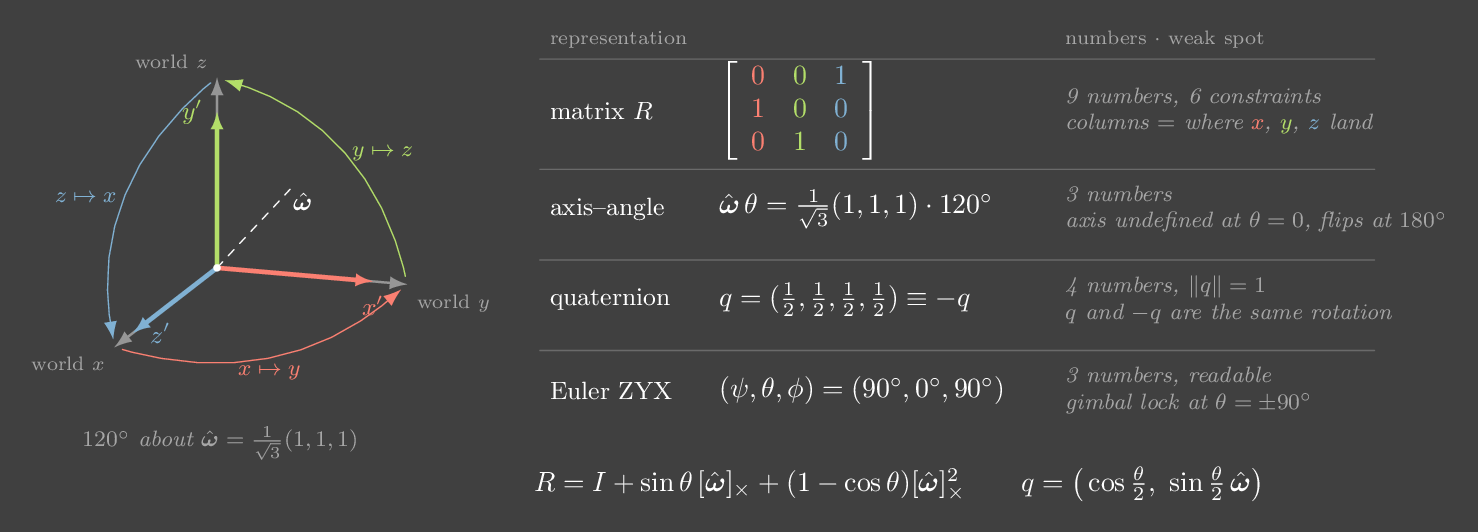
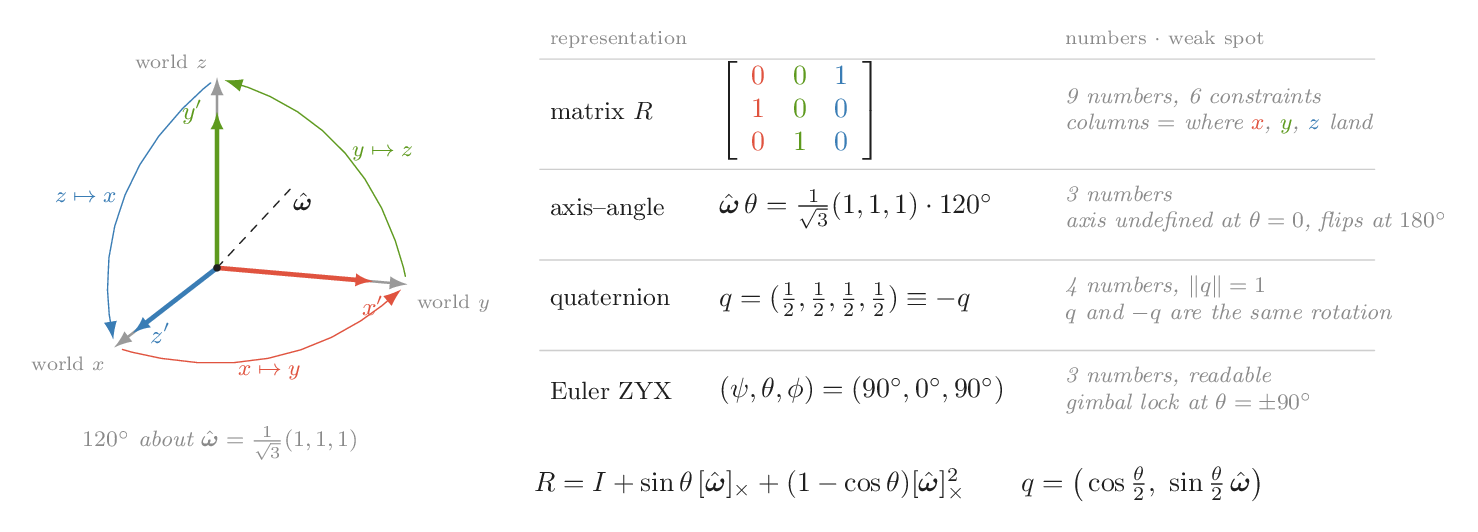
The one ideaA rotation matrix is just the rotated axes, written as columns. Euler angles, axis–angle and quaternions are compressed ways to store those same columns, and each compression has one place where it breaks.
Part I used a single joint, where orientation was one angle. A gripper in 3-D has an orientation too, and that turns out to be the hardest piece of bookkeeping in robotics. Positions add like vectors. Orientations do not: turning 90° about one axis and then 90° about another gives a different result from doing it in the other order. This chapter sets up the language. Chapter 6 adds position, and Chapter 7 uses both to say where a robot's hand is.
One convention first. Every frame in this book is drawn with x red, y green and z blue, the convention RViz and most robotics tools use. This is the one place where red does not mean error.
The matrix is the axes
Attach a frame to a rigid body. Its orientation relative to the world is fully described by where its three unit axes point, written in world coordinates. Stack those three vectors as columns and you have the rotation matrix:
Multiplying a body-frame vector by \(R\) adds up "this much along the body x axis, this much along body y, this much along body z", which is exactly the vector in world coordinates. The columns are orthonormal, so \(R^\top R = I\) and the inverse is free: \(R^{-1} = R^\top\). The determinant is \(+1\). A determinant of \(-1\) would be a mirror image, which no physical motion can produce. Matrices with these two properties form the group \(SO(3)\).
A rotation has three degrees of freedom, but the matrix stores nine numbers held together by six constraints. Every other representation is an attempt to store only three or four numbers. None of them can do it without a catch.
Order matters
Composition is matrix multiplication, and matrix multiplication does not commute. There are two ways to read a product such as \(R = R_z(90°)\,R_x(90°)\). Read right to left, it rotates about the world x axis first and then the world z axis. Read left to right, it rotates about z first and then about the body's new x axis. Both readings give the same matrix. The rule to remember is that premultiplying rotates about world axes and postmultiplying rotates about body axes. Swap the order here and you get a different orientation altogether. Many "my arm moved the wrong way" bugs come from this.
Euler angles and gimbal lock
The most readable compression is three angles about fixed axes in a fixed order. Robotics usually uses ZYX, also called yaw–pitch–roll:
Yaw turns about world z, pitch about the yawed y axis, and roll about the body's own x axis. The trouble arrives at pitch \(\theta = \pm 90°\). There, the body x axis points straight along world z, so roll and yaw turn about the same axis, and only their difference \(\psi - \phi\) matters. One degree of freedom has vanished from the parameterization, even though the body can still turn in every direction. Near that pitch, a small physical rotation can require a huge jump in yaw and roll. This is gimbal lock, named after the nested gimbals of old inertial navigation platforms. Every three-angle convention has such a singular pose somewhere. Also, "Euler angles" means at least twelve different conventions, so always check which one you have.
Axis–angle, and the exponential map
Euler's rotation theorem says every rotation is a single turn by some angle \(\theta\) about some unit axis \(\hat\omega\). Store the product \(\hat\omega\theta\), and you have the three-number rotation vector. Rodrigues' formula turns it back into a matrix:
where \([\omega]_\times\) is the skew-symmetric matrix with \([\omega]_\times v = \omega \times v\). The second form is the important one. Skew matrices are the tangent space of rotations, called \(\mathfrak{so}(3)\), and they are where angular velocities live: a body spinning at \(\omega\) rad/s obeys \(\dot R = [\omega]_\times R\). The matrix exponential maps that tangent space onto \(SO(3)\), and the logarithm goes back. The angle of the relative rotation, \(\theta = \arccos\big((\operatorname{tr}(R_a^\top R_b) - 1)/2\big)\), is the natural distance between two orientations. The rotation vector is ideal for small changes. It breaks at large ones: at \(\theta = 0\) the axis is undefined, and at 180° the vector jumps from \(\pi\hat\omega\) to \(-\pi\hat\omega\).
Quaternions
A unit quaternion stores the axis and the half angle:
Four numbers, one constraint, and no singular pose anywhere. Composition is the quaternion product, which costs fewer operations than a matrix product, and drift is fixed by renormalizing. The catch is the half angle. Turning by \(\theta + 360°\) flips the sign of every component, so \(q\) and \(-q\) describe the same rotation. Unit quaternions cover \(SO(3)\) twice. That makes them the best format for storing and interpolating orientations, as long as every comparison accounts for the sign.
Interpolation shows why. To go smoothly from orientation A to orientation B, slerp (spherical linear interpolation) moves along the great circle between \(q_A\) and \(q_B\) on the unit sphere, flipping one sign first if needed so that it takes the short way. The result is a constant-speed turn about one fixed axis. Interpolating Euler angles linearly instead takes a strange, longer path, because equal steps in angle space are not equal steps in rotation.
Turn a frame, lose an axis
The body frame (bold, inside a flat box) is set by ZYX Euler angles. The dashed gold lines are the three axes the sliders turn about, in world coordinates. Drag the picture to orbit the view. The panel below shows the same orientation as a matrix, a quaternion and an axis–angle.
Try this
- Check the matrix columns against the picture. The first column is where the red x′ arrow points, and so on.
- Press Pitch to 90°, then move yaw and then roll. They spin the body about the same axis, and the readout's determinant drops to 0. Only yaw − roll matters now: (30°, 90°, 10°) and (50°, 90°, 30°) are the same orientation.
- Back off to pitch 80°. Try to rotate the box slightly about its own z axis using only the sliders. It takes a large swing of both yaw and roll, because that direction is the one the angles are about to lose.
- Switch to interpolation. The goal (180°, 20°, 180°) is just a 160° turn about the y axis. Slerp turns exactly 160° about y. Euler-angle lerp wanders and turns 232° in total to get there.
- Watch the quaternion as you drag yaw past ±180°. The components stay continuous even where the Euler angles wrap around. The panel always shows the cover with \(w \ge 0\), and \(-q\) next to it is the same rotation.
Run it yourself: rotations with SciPy
import numpy as np
from scipy.spatial.transform import Rotation as R, Slerp

r = R.from_rotvec(np.deg2rad(120) * np.ones(3) / np.sqrt(3))   # axis-angle
print(r.as_matrix().round(3))           # columns: where x, y, z land
print(r.as_quat())                      # SciPy order is (x, y, z, w)!
print(r.as_euler("ZYX", degrees=True))  # yaw, pitch, roll = [90, 0, 90]

# composition: A * B applies B first, so this is Rz(90) Rx(90)
A, B = R.from_euler("z", 90, degrees=True), R.from_euler("x", 90, degrees=True)
print(np.allclose((A * B).as_matrix(), r.as_matrix()))  # True

# gimbal lock: at pitch 90 deg only yaw - roll survives (SciPy warns)
print(R.from_euler("ZYX", [30, 90, 10], degrees=True).as_euler("ZYX", degrees=True))

# slerp between two orientations
key = R.from_euler("ZYX", [[0, 0, 0], [180, 20, 180]], degrees=True)
print(Slerp([0, 1], key)(0.5).as_rotvec(degrees=True)) # halfway: 80 deg about yYou train a policy to output quaternions with plain MSE. In your demos the gripper's quaternion sometimes flips sign between episodes. What happens?
\(q\) and \(-q\) are the same rotation but opposite points in \(\mathbb{R}^4\). MSE averages them toward the origin, which is not a rotation at all. Canonicalize the sign (for example \(w \ge 0\)), use a sign-invariant loss, or switch to the continuous 6-D representation.
Chapter 6 · Part II · Describing motion
Frames and transforms
The one ideaA pose is a transform. \(T_{ab}\) takes coordinates in frame {b} and returns them in frame {a}. Write chains so that neighbouring subscripts match and cancel, and most frame bugs become typos you can see.
A robot is a pile of coordinate frames: the world, the robot's base, each link, the gripper, every camera, every object it has detected. Each sensor reports in its own frame. Each controller wants its inputs in some other frame. Most of the code in a working robot stack converts between frames, and much of its debugging time goes on getting that conversion wrong. This chapter makes the conversion mechanical.
One matrix for rotation and translation
The pose of frame {b} relative to frame {a} has two parts: the rotation \(R_{ab}\) ({ch:rotations}), whose columns are {b}'s axes written in {a}, and the position \(p_{ab}\) of {b}'s origin, written in {a}. Mapping a point from {b} coordinates to {a} coordinates means rotating it and then shifting it, \(p_a = R_{ab}\,p_b + p_{ab}\). Pack both into one 4×4 matrix and append a 1 to the point:
These homogeneous transforms form the group \(SE(3)\). The trailing 1 is what makes the translation apply. A direction (a velocity, a force, a surface normal, the difference of two points) gets a trailing 0 instead, so it is rotated but never shifted. Treating a direction as a point is a classic bug: the arrow ends up displaced by the frame's offset.
Subscripts cancel
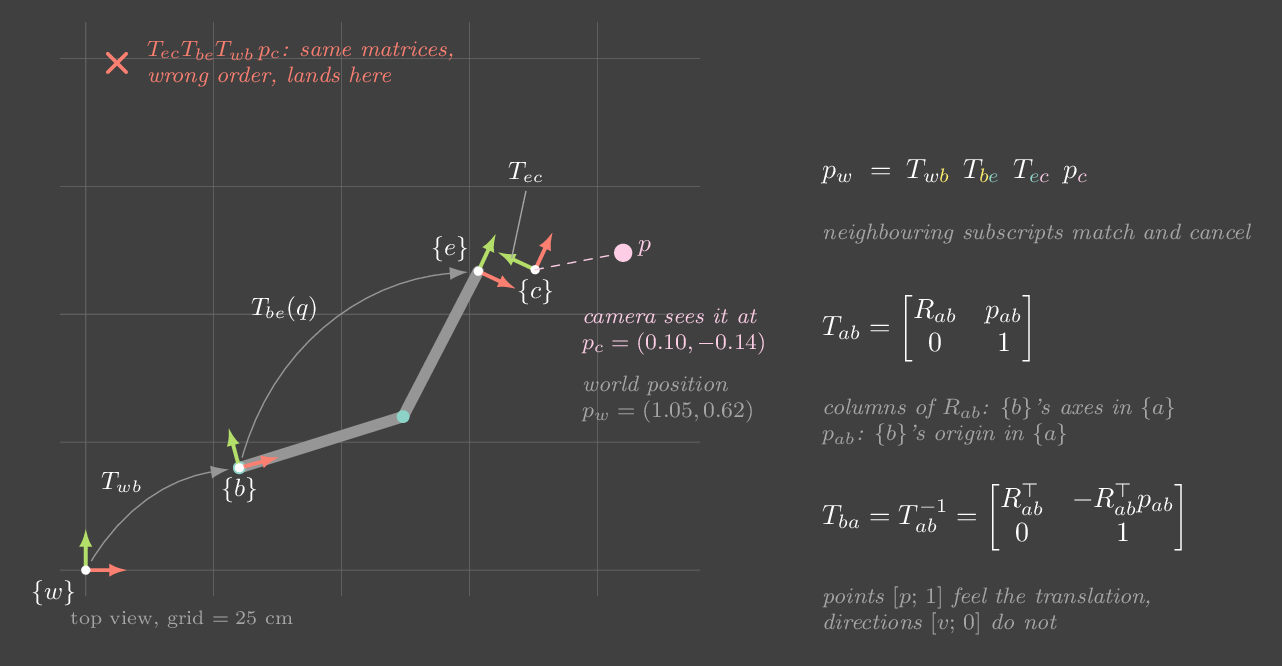
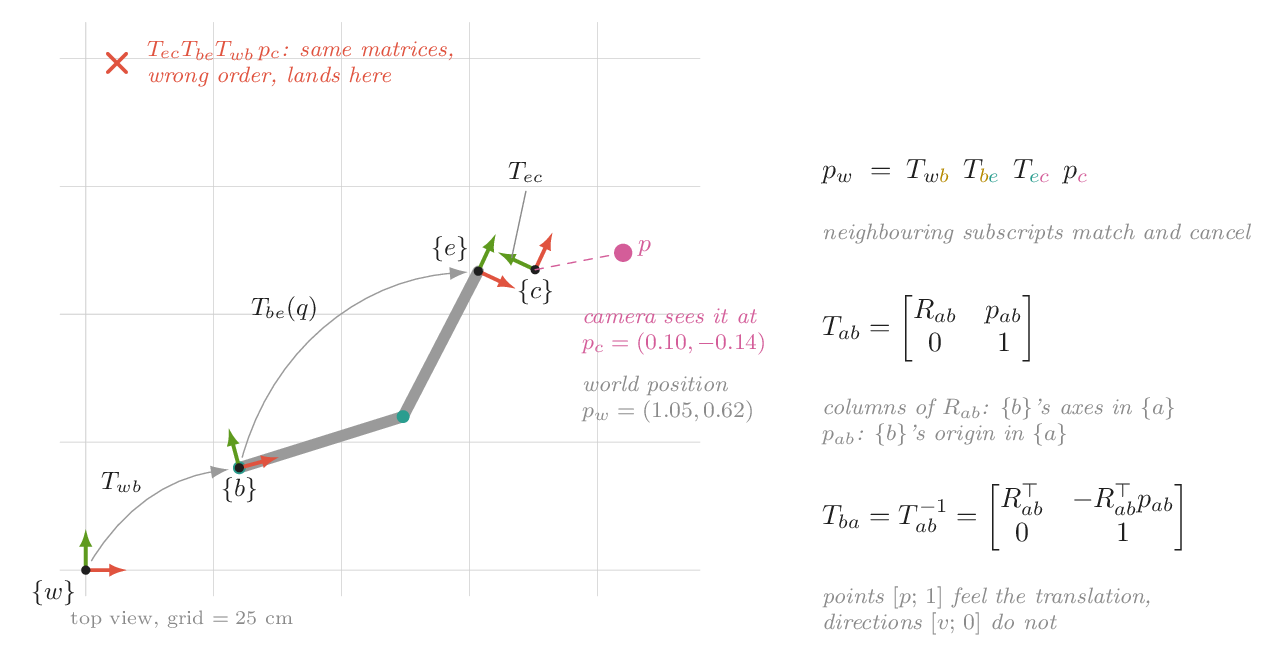
The notation is chosen so that composition reads like fractions. If you know the pose of {b} in {a} and of {c} in {b}, then
The inner subscripts must match, and they cancel. If you ever write \(T_{ab}T_{cd}\) with \(b \ne c\), the code is wrong, however plausible it looks. Inverting swaps the subscripts, \(T_{ba} = T_{ab}^{-1}\), and the inverse has a closed form, because the rotation part inverts by transposing:
Note the \(-R^\top p\). Negating \(p\) alone is wrong whenever the frame is rotated. It is another bug that only shows up once things are no longer axis-aligned.
A real chain
The figure is the everyday case. The wrist camera detects an object, and the controller needs it in the robot's base frame:
Each factor has a different source. \(T_{be}(q)\) changes every time the arm moves. It comes from the joint angles through forward kinematics ({ch:fk}). \(T_{ec}\) is fixed by how the camera is bolted on, and it is measured by hand–eye calibration ({ch:sensors}). A static transform like \(T_{wb}\) is measured once. ROS keeps all of these in a tf tree: each edge is a transform between a parent and a child frame, stamped with a time, and a lookup composes the edges along the path between two frames.
The time stamp matters. If the arm moves the camera at 0.5 m/s, and you pair a camera image with a \(T_{be}\) from 30 ms earlier, the object lands 15 mm from where it really is. That is enough to miss a grasp. Look up the transform at the image's timestamp, not "the latest".
The usual bugs
- Wrong order. \(T_{ec}T_{be}\) instead of \(T_{be}T_{ec}\). Check that the subscripts cancel.
- Wrong direction. Using \(T_{ab}\) where \(T_{ba}\) was needed. Libraries disagree on whether "the transform from a to b" maps points from a to b or gives b's pose in a, so write subscripts in your variable names:
T_base_cam. - Mixed conventions. Millimetres and metres. Quaternions stored as \((w, x, y, z)\) in one library and \((x, y, z, w)\) in another. One tool using an optical camera frame (z forward, y down) and another using a robot camera frame (x forward, z up).
- Points vs directions. Translating a velocity or a force by the frame offset.
Velocities between frames
A frame's velocity has an angular part \(\omega\) and a linear part \(v\). Stacked, they form a 6-vector called a twist. Twists change frame with a 6×6 matrix built from the same \(R\) and \(p\), the adjoint \(\mathrm{Ad}_{T}\). The \(p\) appears because spinning about a distant axis moves a point linearly: \(v_a = R v_b + p \times (R\,\omega_b)\). You will meet this again when {ch:jacobians} relates joint speeds to hand speeds.
A frame chain you can bend
Seen from above. The sliders set the base pose in the world, the gripper pose in the base, and the camera angle on the gripper. The pink object sits on the table: drag anywhere to move it. The camera's reading \(p_c\) is computed through the inverse chain, and the right-hand panel shows every matrix.
Try this
- Move the base. The object stays where it is in the world, but \(p_c\) changes, because the camera moved with the base. \(T_{wc}\,p_c\) still reproduces the object's world position exactly.
- Watch the red ✗: the same matrices, multiplied as \(T_{ec}T_{be}T_{wb}\). Set every angle to 0 and the ✗ jumps onto the object. Without rotation, translations commute, so the wrong order gives the right answer. Bugs like this survive tests that only use axis-aligned frames.
- Compare the last two lines of the panel. The same numbers treated as a direction (\(w = 0\)) only get rotated. Their result does not depend on any slider that moves an origin.
- Tick "Move the arm". The camera's reading changes every frame while the object stays still. A tf lookup at the wrong time gives you exactly this kind of mismatch.
Run it yourself: SE(3) in NumPy
import numpy as np
from scipy.spatial.transform import Rotation as R

def make_T(rot, p):                  # rot: 3x3, p: (3,)
    T = np.eye(4); T[:3, :3] = rot; T[:3, 3] = p; return T

def inv_T(T):                        # [R p; 0 1]^-1 = [R^T, -R^T p; 0 1]
    Ri = T[:3, :3].T
    return make_T(Ri, -Ri @ T[:3, 3])

T_wb = make_T(R.from_euler("z", 15, degrees=True).as_matrix(), [0.30, 0.20, 0.0])
T_be = make_T(R.from_euler("z", -40, degrees=True).as_matrix(), [0.55, 0.25, 0.30])
T_ec = make_T(R.from_euler("z", 90, degrees=True).as_matrix(), [0.10, 0.05, 0.0])

p_c = np.array([0.103, -0.142, 0.0, 1.0])        # object, seen by the camera
T_wc = T_wb @ T_be @ T_ec                         # subscripts cancel: wb . be . ec
print((T_wc @ p_c)[:3].round(3))                  # about [1.05 0.62 0.30]
print(np.allclose(inv_T(T_wc) @ T_wc, np.eye(4))) # True
v_c = np.array([1.0, 0.0, 0.0, 0.0])              # a direction: w = 0
print((T_wc @ v_c)[:3].round(3)) # rotated by 65 deg, not shiftedYour wrist camera reports an object at \(p_c\). Which expression gives it in the robot base frame?
Only the first chain cancels cleanly: \(b\,e \cdot e\,c \cdot c\). The second puts the factors in the wrong order. The third uses the inverse of each transform, which maps the other way.
Chapter 7 · Part II · Describing motion
Forward kinematics
The one ideaForward kinematics is a product of transforms, one per joint. Joint angles go in, and exactly one hand pose comes out. Going the other way, from a hand pose to joint angles, is the hard direction, and it can have several answers or none.
A robot arm is a chain of rigid links joined by motors. The motors' encoders measure joint angles, the vector \(q\), which is the configuration of the robot. A task cares about the hand: where the gripper is and which way it points, a pose in \(SE(3)\). Forward kinematics (FK) is the map between the two:
The space of \(q\) is joint space. The space of hand poses is task space. Almost every question in this part of the book is about how the two relate: how velocities map ({ch:jacobians}), and how to invert the map ({ch:ik}).
A product of per-joint transforms
Put a frame on every link. Moving from one link's frame to the next takes a fixed offset, where the link's geometry sits, plus a rotation by that joint's angle. Each step is a homogeneous transform from {ch:transforms}, and by the subscript rule they simply multiply:
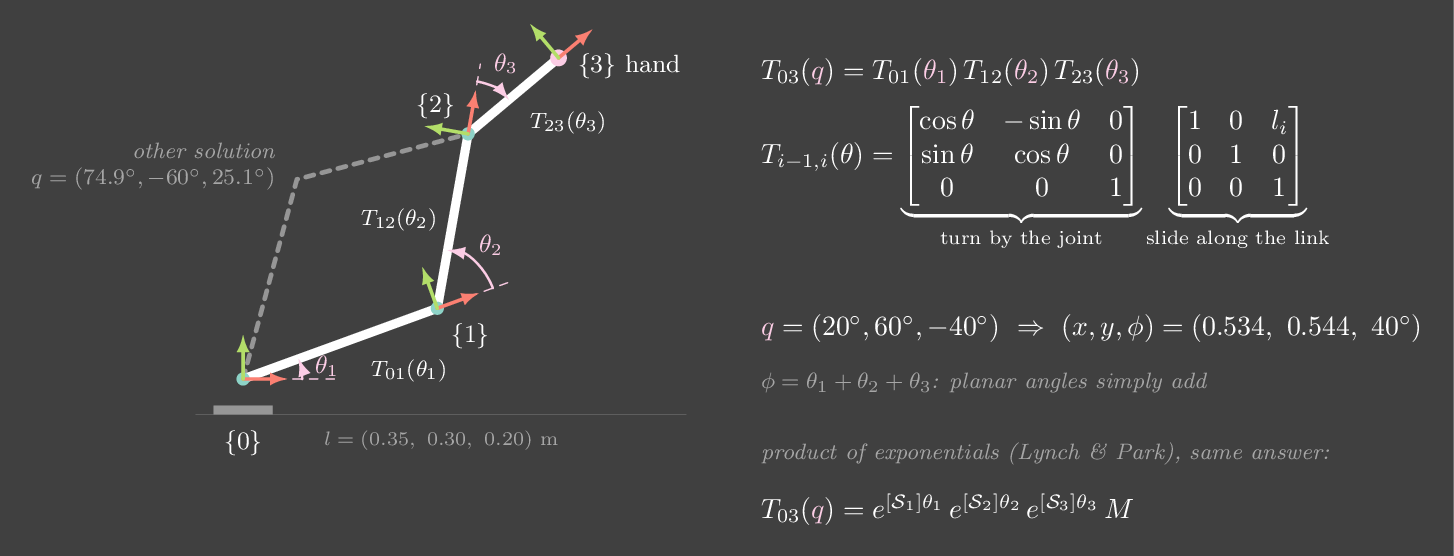
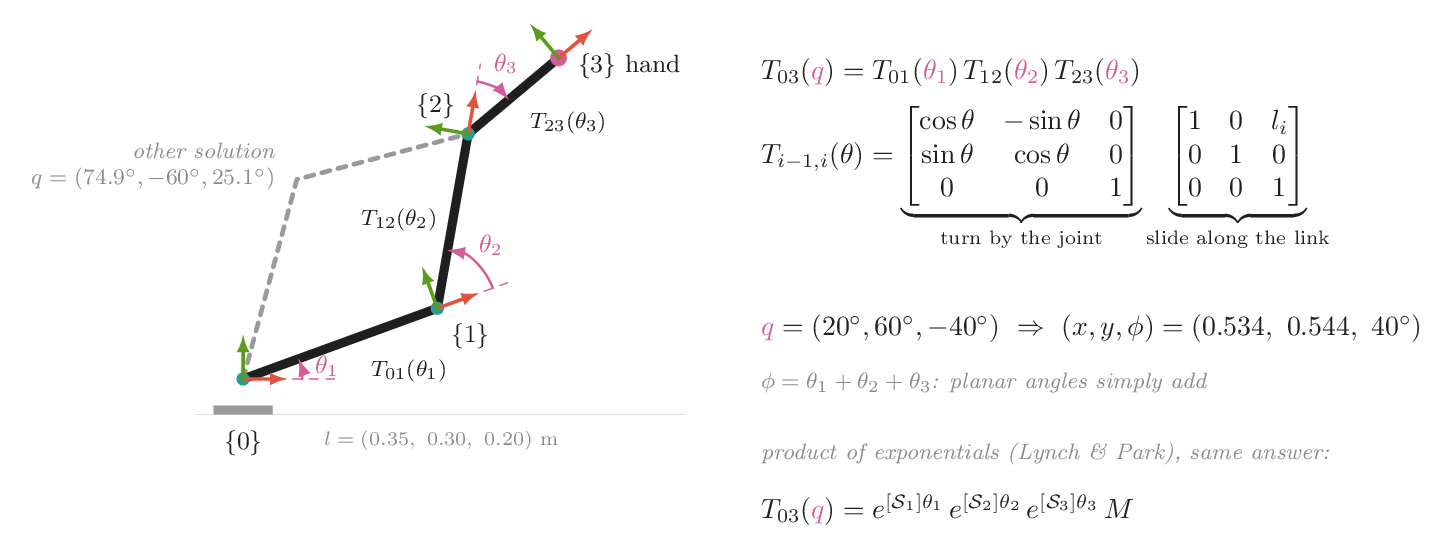
For a planar arm each factor is "turn by the joint, then slide along the link". Multiplying three of them gives the familiar closed form
with \(c_{12} = \cos(\theta_1 + \theta_2)\) and so on. With link lengths \((0.35, 0.30, 0.20)\) m and \(q = (20°, 60°, -40°)\), the hand sits at \((0.534, 0.544)\) m, pointing at 40°. FK is cheap: a handful of sines and cosines per joint, no search, no iteration, one answer.
Conventions: DH, product of exponentials, URDF
For a 3-D arm, someone has to decide where each link's frame goes. The classical Denavit–Hartenberg convention places frames by strict rules, so that each joint is described by four numbers \((a, \alpha, d, \theta)\): a link length, a twist, an offset, and the joint angle. It is compact, but it comes in two incompatible variants ("standard" and "modified"), and placing the frames by hand is error-prone.
Lynch and Park's product of exponentials avoids per-link frames altogether. Write down the hand pose \(M\) with every joint at zero, and each joint's screw axis \(\mathcal S_i\): the direction of its rotation axis, and a point on it, both in the base frame. Then
Each exponential is the rigid motion of turning about one joint's axis by its angle: the same exponential map as for rotations in {ch:rotations}, extended to include translation. The planar arm in the code below gives the same matrix both ways.
In practice you rarely derive FK by hand. The robot comes with a URDF (Unified Robot Description Format), an XML file that lists links and joints. Each joint names a parent and a child link. Its <origin> gives the fixed transform from the parent's frame to the joint, as xyz plus rpy angles (roll, pitch and yaw about fixed axes, which is the ZYX convention from {ch:rotations}), and its <axis> says what it turns about. URDF groups each step as "slide, then turn" rather than "turn, then slide". That is the same chain, cut at different places. Libraries such as Pinocchio, PyBullet, MuJoCo and ikpy read the file and compute FK for you.
<joint name="elbow" type="revolute">
  <parent link="upper_arm"/>  <child link="forearm"/>
  <origin xyz="0.35 0 0" rpy="0 0 0"/>   <!-- the upper arm is 0.35 m long -->
  <axis xyz="0 0 1"/>                      <!-- turn about the local z axis -->
  <limit lower="-2.6" upper="2.6" effort="3" velocity="4"/>
</joint>
Workspace
The set of positions the hand can reach is the reachable workspace. For our arm without joint limits it is a disc of radius \(l_1 + l_2 + l_3 = 0.85\) m. Reaching a point is not the same as reaching it in every orientation. The dexterous workspace is where the hand can take any orientation. For the hand to point in every direction from a position \(p\), the wrist has to be able to trace a whole circle of radius \(l_3 = 0.2\) m around \(p\). That only works where \(|p| \le 0.15\) m or \(0.25 \le |p| \le 0.45\) m, a small fraction of the reachable disc. Joint limits shrink it much further. Real tasks such as pouring, inserting or turning a handle need orientation, so the dexterous workspace is often the one that matters.
The map from joint space to task space is not one-to-one. In the figure, two configurations give the same hand pose, "elbow up" and "elbow down". When the robot has more joints than the task has dimensions, for example three joints for a 2-D position, a whole continuous family of configurations gives the same hand position. That redundancy is a resource, and {ch:ik} uses it.
Drive a three-link arm
Set the joints with the sliders. Every joint carries a small frame. Pink dots are positions the hand can reach. The mint shading is where it can reach in every orientation. The dashed arm is the other configuration that gives the same hand pose. The panel multiplies the three per-joint transforms live.
Try this
- Check the panel. The last column of \(T_{03}\) is the hand position in the readout, and its first column is the hand's x axis, at angle \(\theta_1 + \theta_2 + \theta_3\).
- Change \(\theta_3\) only. The hand turns and moves on a circle of radius 0.2 m, while frames {0}–{2} stay still. Each factor only affects the frames after it.
- Look at the mint region. It is a small disc around the shoulder plus a ring from 0.25 to 0.45 m. Predict why there is a gap between 0.15 and 0.25 m. (The wrist would need to pass within 0.05 m of the shoulder, closer than the first two links can fold.)
- Tighten the joint limits to ±160°, then ±150°. The dexterous region nearly disappears, and below about ±145° it is gone. The dots still fill most of the disc, but no point allows every orientation.
- Drive \(\theta_2\) to 0. The arm is straight, the dashed twin merges with it, and the two IK solutions become one. That pose is a singularity, the subject of {ch:jacobians}.
Run it yourself: FK two ways
import numpy as np
from scipy.linalg import expm

L = [0.35, 0.30, 0.20]

def T_joint(theta, l):               # turn by theta, then slide l along the new x
    c, s = np.cos(theta), np.sin(theta)
    return np.array([[c, -s, l * c], [s, c, l * s], [0, 0, 1]])

def fk(q):
    T = np.eye(3)
    for theta, l in zip(q, L):
        T = T @ T_joint(theta, l)
    return T

q = np.deg2rad([20, 60, -40])
T = fk(q)
print(T[:2, 2].round(3), np.degrees(np.arctan2(T[1, 0], T[0, 0])))  # [0.534 0.544] 40.0

# product of exponentials: screw axes at the home pose (all joints at 0)
def screw(x_axis):                   # revolute joint at (x_axis, 0), as a 3x3 se(2) matrix
    return np.array([[0, -1, 0], [1, 0, -x_axis], [0, 0, 0]])
S = [screw(0.0), screw(L[0]), screw(L[0] + L[1])]
M = np.array([[1, 0, sum(L)], [0, 1, 0], [0, 0, 1]])   # hand pose at home
T_poe = expm(S[0] * q[0]) @ expm(S[1] * q[1]) @ expm(S[2] * q[2]) @ M
print(np.allclose(T, T_poe)) # TrueWhy is the dexterous workspace smaller than the reachable workspace?
For a fixed hand position, each hand orientation puts the wrist somewhere on a circle of radius \(l_3\). Every orientation is possible only if the first links can reach that entire circle. Near the outer edge, or near the folded-up inner hole, they cannot. This holds even without joint limits.
Chapter 8 · Part II · Describing motion
Velocity and the Jacobian
The one ideaThe Jacobian is the linear map from joint velocities to hand velocity, and it changes with the pose. Its shape tells you which directions the hand moves easily, which directions it cannot move at all, and, through its transpose, which forces the joints can resist.
Forward kinematics (Chapter 7) gives the hand position as a function of the joint angles, \(x = f(q)\). Control and learning mostly need the next question: if the joints move a little, how does the hand move? Differentiate. For the two-link arm with link lengths \(l_1 = 0.4\) and \(l_2 = 0.35\) m,
\(J(q)\) is a 2×2 matrix of partial derivatives, \(J_{ij} = \partial x_i/\partial q_j\). Locally, near the current pose, the arm is linear: \(\Delta x \approx J\,\Delta q\). This is the same local linearization you use when you backpropagate through a network, and autograd will compute it for you from any differentiable forward kinematics.
What the columns mean
Column \(j\) is the hand velocity you get when only joint \(j\) turns, at 1 rad/s. For a revolute joint that velocity is perpendicular to the line from the joint to the hand, and its length equals the distance between them. Turning the shoulder swings the hand around the shoulder, so the first column has length \(\|x\|\). Turning the elbow swings the hand around the elbow, so the second column has length \(l_2\). Every hand velocity the arm can produce is a combination of these two arrows. The lab draws both of them at the hand.
Singularities
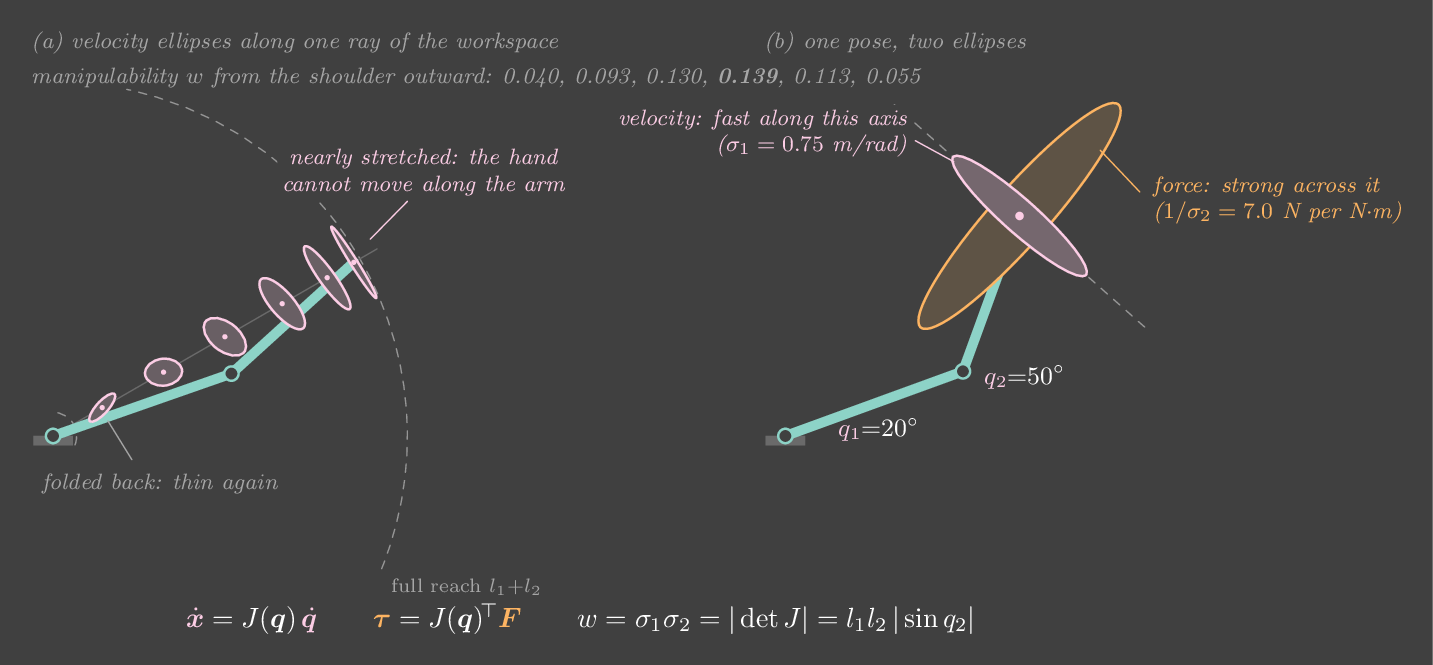
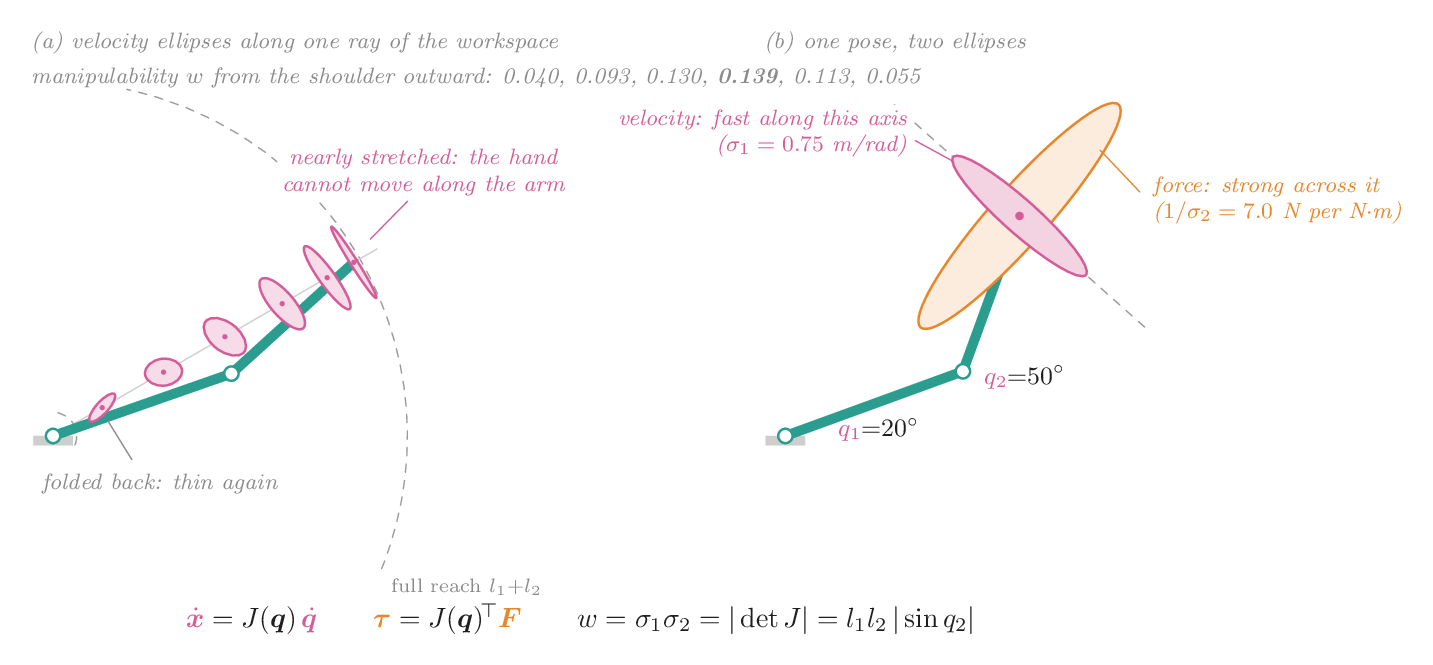
The determinant of this \(J\) is \(\det J = l_1 l_2 \sin q_2\). It is zero when \(q_2 = 0\), with the arm fully stretched, or \(q_2 = \pi\), with the arm folded back on itself. At those poses the two columns are parallel: both joints can only move the hand sideways, at right angles to the arm, and nothing moves it along the arm. The hand has lost a direction. That pose is a singularity. It is not a fault in the arm. It is what full stretch means geometrically.
The singular value decomposition says this precisely. Write \(J = U\Sigma V^\top\). A circle of joint velocities with \(\|\dot q\| = 1\) maps to an ellipse of hand velocities whose semi-axes have lengths \(\sigma_1 \ge \sigma_2\), pointing along the columns of \(U\). The manipulability \(w = \sigma_1\sigma_2 = \sqrt{\det JJ^\top}\) measures the ellipse's area. For this arm \(w = l_1 l_2|\sin q_2|\). It is largest, 0.14 m², with the elbow at 90°. It falls to 0.024 at \(q_2 = 10^\circ\), and to zero at full stretch.
Inverting the map is where it bites. To move the hand at a chosen velocity you need \(\dot q = J^{-1}\dot x\), and \(J^{-1}\) has \(1/\sigma_2\) in it. In the lab the hand is driven straight out from the shoulder at 10 cm/s. Halfway out, the joints turn at about 0.3 rad/s. At 0.70 m from the shoulder they need 0.7 rad/s. With the elbow at 4° they need 7 rad/s. Below 1° they hit the 30 rad/s motor limit, and the hand can no longer keep up. Nothing about the commanded hand motion was extreme. The arm simply ran out of ways to produce it.
Forces go the other way
The same matrix maps forces in the opposite direction. Power is the same counted at the hand or at the joints, \(F^\top \dot x = \tau^\top\dot q\). Substitute \(\dot x = J\dot q\), and since this holds for every \(\dot q\),
This is the law impedance control uses (Chapter 15) to turn a virtual spring at the hand into joint torques. It has a dual ellipse. The hand forces you can produce with joint torque \(\|\tau\| = 1\) form an ellipse with the same axes, but with lengths \(1/\sigma_1\) and \(1/\sigma_2\). The directions in which the hand moves slowly are the directions in which it pushes hard, like a lever. At full stretch the radial force axis becomes infinite. A push along a straight arm is carried by the links themselves and needs no joint torque at all. That is why you lock your elbow to push a heavy door.
Jacobians of real arms
A 6-joint arm in 3D has a 6×6 Jacobian, mapping \(\dot q\) to the hand's twist: its angular velocity \(\omega\) stacked on its linear velocity \(v\). Each column is the screw axis of one joint, moved to the current pose. You can express that twist in the base frame, which gives the space Jacobian, or in the hand's own frame, which gives the body Jacobian. The two are related by the adjoint of the hand pose \(T\) from Chapter 6, \(J_b = \mathrm{Ad}_{T^{-1}}J_s\). Singularities in 3D are richer, including wrist singularities where two wrist axes line up, but the story is the same: \(\sigma_{\min}\to 0\), and some hand motion becomes impossible.
Ellipses at the hand
A two-link arm seen from above. The pink ellipse is the hand velocity for joint speed 1 rad/s, and the orange one is the hand force for joint torque 1 N·m. The two arrows at the hand are the columns of \(J\). It opens driving the hand straight out at constant speed. Switch to "You" and drag the hand, or use the sliders.
Try this
- Watch the joint-speed plot as the hand drives outward. For most of the run both joints turn slowly, under about 0.7 rad/s. Then, in the last fraction of a millimetre, they spike to the 30 rad/s limit. The hand speed never changed. Only \(1/\sigma_2\) did.
- Switch to "You" and set the elbow to 90°. The manipulability reads 0.140 m², the maximum. Set it to 10°: 0.024.
- Now move only the shoulder \(q_1\). The ellipses rotate with the arm but never change shape. Manipulability depends only on \(q_2\), since \(w = l_1 l_2|\sin q_2|\).
- Drag the hand toward full stretch and watch the orange ellipse grow along the arm until it is clipped. Radial pushes cost no torque there.
- Fold the arm back (elbow near ±170°). It is a second singularity, and the pink ellipse is thin again.
Run it yourself: the Jacobian, numerically and by SVD
import numpy as np
l1, l2 = 0.4, 0.35
def fk(q):
    return np.array([l1*np.cos(q[0]) + l2*np.cos(q[0]+q[1]),
                     l1*np.sin(q[0]) + l2*np.sin(q[0]+q[1])])

def jac_numeric(q, h=1e-6):                 # central differences, one column per joint
    return np.stack([(fk(q + h*e) - fk(q - h*e)) / (2*h) for e in np.eye(2)], axis=1)

q = np.radians([20, 50])
J = jac_numeric(q)
U, s, Vt = np.linalg.svd(J)
print("sigma:", s.round(3), " manipulability:", s.prod().round(4),
      " l1 l2 sin q2:", round(l1*l2*np.sin(q[1]), 4))
print("joint speed for 10 cm/s along u2:", np.linalg.solve(J, 0.1*U[:, 1]).round(2))
print("hand force from 1 N·m at each joint:", np.linalg.solve(J.T, [1, 1]).round(2))The two-link arm is fully stretched out. Which way can the hand not move?
With \(q_2 = 0\), both columns of \(J\) point at right angles to the arm, so every joint motion moves the hand sideways. The radial direction is lost, and \(\sigma_2 = 0\) belongs to it.
Chapter 9 · Part II · Describing motion
Inverse kinematics
The one ideaInverse kinematics finds joint angles that put the hand at a target. A two-link arm has a closed-form answer, and it has two of them. General arms are solved by iterating on the Jacobian, which makes IK a least-squares problem, with the same failure modes as regression and the same fixes.
Forward kinematics answers "where is the hand, given the joints?" (Chapter 7). Robots are usually told the opposite: put the gripper here. Solving \(f(q) = x^\star\) for \(q\) is inverse kinematics (IK). It is harder than the forward direction for three reasons. The equations are nonlinear. There may be several solutions, or infinitely many. And the target may be out of reach, so there may be none.
The closed form for two links
For the two-link arm, the law of cosines on the triangle shoulder–elbow–hand gives the elbow angle directly:
Both signs of \(q_2\) work, so every reachable point has two solutions, elbow up and elbow down. If \(|\cos q_2| > 1\) the target is out of reach and there is no solution at all. Closed forms like this exist for many industrial arms, which are designed so that one exists (a "spherical wrist"). For anything else, you iterate.
IK as optimization
Define the error \(\class{k-err}{e} = x^\star - f(q)\) and minimize \(\tfrac12\|e\|^2\). Linearize around the current guess, \(f(q+\Delta q) \approx f(q) + J\Delta q\) (Chapter 8), and you have a linear least-squares problem at each step: find \(\Delta q\) with \(J\Delta q \approx e\). There are three classic ways to take the step.
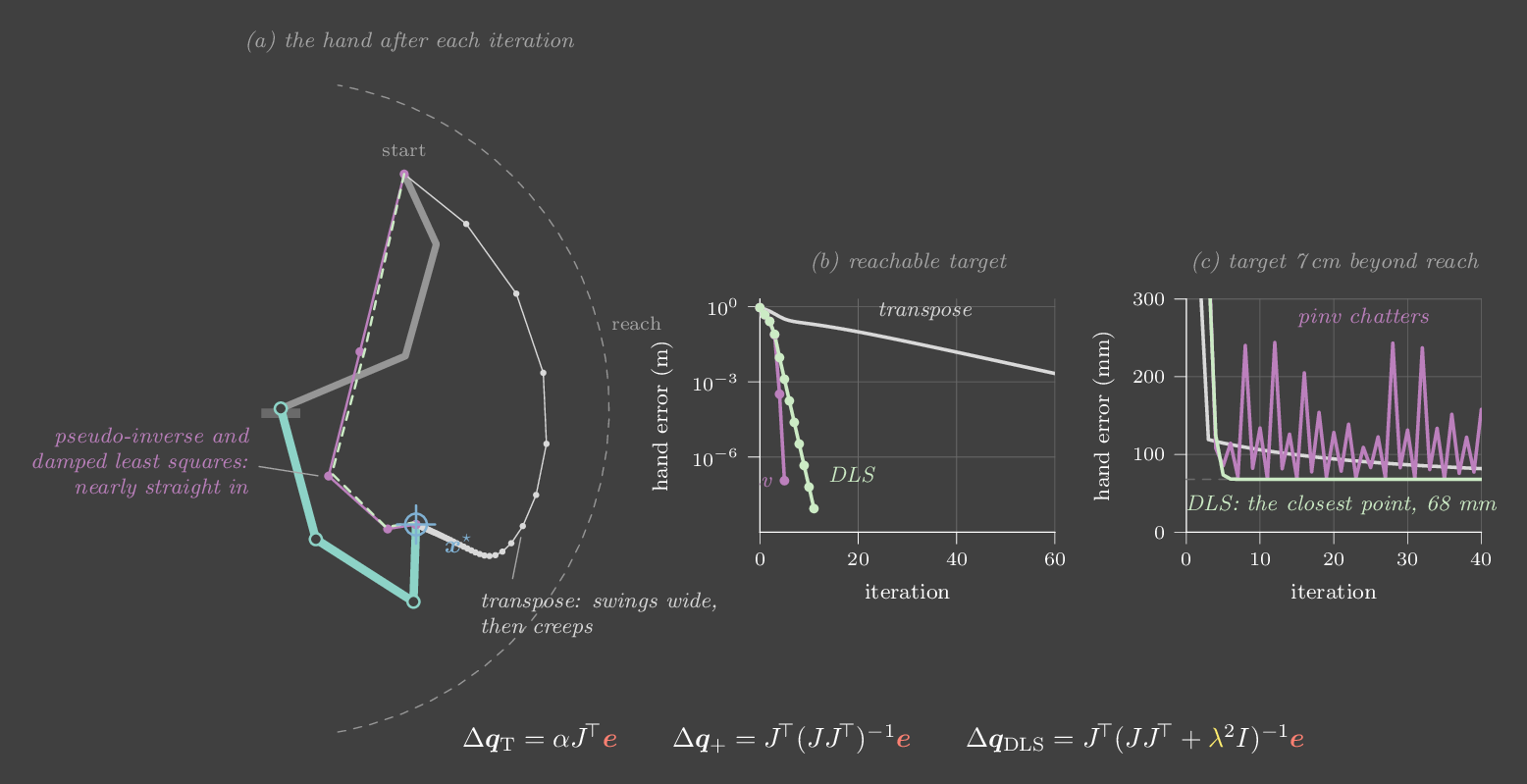
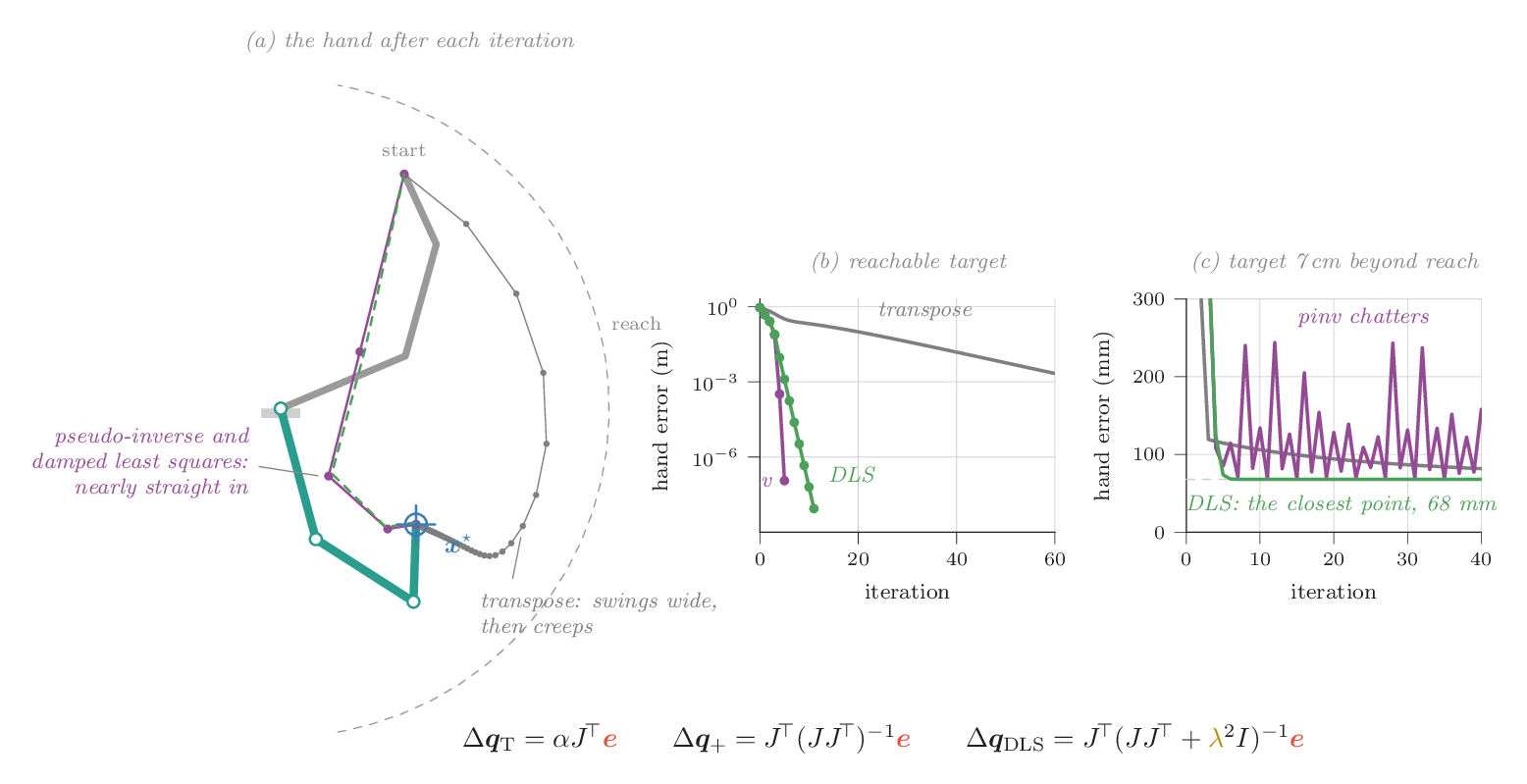
Jacobian transpose. The gradient of \(\tfrac12\|e\|^2\) with respect to \(q\) is \(-J^\top e\). So \(\Delta q = \alpha J^\top e\) is plain gradient descent. It needs no matrix inverse and never blows up. Like gradient descent on an ill-conditioned problem, it is slow, and its speed is set by the condition number \(\sigma_1/\sigma_2\). In the lab it needs about 68 iterations to get within 1 mm.
Pseudo-inverse. Solve the linearized problem exactly. Our lab arm has three links in a plane (0.35, 0.30 and 0.20 m), so \(J\) is 2×3 and \(J\Delta q = e\) has infinitely many solutions. The one with the smallest \(\|\Delta q\|\) is \(\Delta q = J^{+}e\), with \(J^{+} = J^\top(JJ^\top)^{-1}\). This is Gauss–Newton, and near the answer it converges quadratically. In the lab it reaches 1 mm in 4 iterations and 1 µm in 5. But \(J^{+}\) contains \(1/\sigma_2\). If the target is out of reach, the arm ends up stretched toward it, \(\sigma_2 \to 0\), and the steps explode. The arm flails, and the error bounces between 70 and 270 mm without settling.
Damped least squares. Add a penalty on the step size:
This is ridge regression, applied to one step of IK. Along each singular direction, the gain changes from \(1/\sigma\) to \(\sigma/(\sigma^2+\lambda^2)\). Where \(\sigma \gg \lambda\), that is nearly the pseudo-inverse. Where \(\sigma \ll \lambda\), it shrinks to a small, Jacobian-transpose-like step. In numerical optimization the same idea is called Levenberg–Marquardt. With \(\lambda = 0.1\), the lab reaches 1 mm in 6 iterations. On the unreachable target it settles calmly at the closest reachable point, 68 mm short, by iteration 8. Too little damping is not enough: at \(\lambda = 0.05\), it chatters between 76 and 89 mm, like the pseudo-inverse.
Redundancy and the null space
Three joints for two task coordinates means one joint's worth of freedom is left over. With the hand fixed, the elbow can still swing through a whole family of poses. This is self-motion, and it lives in the null space of \(J\): any \(\dot q\) with \(J\dot q = 0\) moves the joints but not the hand. The projector \(N = I - J^{+}J\) keeps only that part of a vector, so you can add a second goal without disturbing the first:
Here \(h\) is anything you would like more of: a comfortable posture, distance from joint limits or obstacles, manipulability. In the lab, \(\bm z\) pulls the elbow toward an angle you choose. The elbow swings there while the hand error stays at zero to the micrometre. A 7-DoF arm such as a Franka Panda uses its one spare joint the same way.
Real solvers add two things. The first is joint limits, handled either by clamping each step or, in modern libraries, by solving each step as a small quadratic program with limits as constraints. The second is orientation. In 3D the error includes a rotation, measured with the logarithm of \(R^\star R^\top\) (Chapter 5), and \(J\) becomes 6×n.
Watch the solvers iterate
A 3-link arm. Click or drag to place the blue target. The solver takes 12 iterations a second, so you can watch each step. Dots mark the hand after each iteration, and the plot shows the error on a log scale. Switching solver reruns the same problem from the same start, so the curves are comparable.
Try this
- Press Race all three. The pseudo-inverse and damped least squares finish in a handful of iterations. The transpose is still creeping, tens of iterations later. That gap is first-order versus second-order optimization.
- Press Unreachable target with the pseudo-inverse selected. The arm thrashes, and the "‖Δq‖ wanted" readout jumps to several radians. Switch to damped least squares: it settles at the edge, pointing at the target.
- On the unreachable target, lower \(\lambda\) to 0.05 and watch damped least squares start to chatter too. Raise it to 0.3: calm, but a reachable target now takes about twice as many iterations. The bias–variance trade-off of ridge regression, in one knob.
- Place a reachable target, then tick the null-space goal and move the preferred elbow angle. The arm reshapes itself while the hand error stays at 0.00 mm.
Run it yourself: damped least squares IK with a null-space goal
import numpy as np
L = np.array([0.35, 0.30, 0.20])

def fk(q):
    a = np.cumsum(q)
    pts = np.vstack([[0, 0], np.cumsum(np.c_[L*np.cos(a), L*np.sin(a)], axis=0)])
    return pts                                  # base, elbow 1, elbow 2, hand

def jac(q):
    p = fk(q); e = p[-1]
    return np.array([[-(e[1]-p[j, 1]) for j in range(3)],
                     [  e[0]-p[j, 0]  for j in range(3)]])

def ik(target, q, lam=0.1, q2_pref=None, iters=50):
    for _ in range(iters):
        e = target - fk(q)[-1]
        J = jac(q)
        dq = J.T @ np.linalg.solve(J @ J.T + lam**2 * np.eye(2), e)   # ridge step
        if q2_pref is not None:                                         # null-space goal
            z = np.array([0, 0.3*(q2_pref - q[1]), 0])
            dq += z - np.linalg.pinv(J) @ (J @ z)
        q = q + dq
    return q, np.linalg.norm(target - fk(q)[-1])

q, err = ik(np.array([0.35, -0.30]), np.array([0.4, 0.9, 0.7]), q2_pref=np.radians(-60))
print(np.degrees(q).round(1), f"error {err*1000:.4f} mm")The target is 7 cm beyond reach. Which solver is most likely to make the arm thrash?
Reaching toward an unreachable target stretches the arm, so \(\sigma_2 \to 0\). The pseudo-inverse multiplies the error by \(1/\sigma_2\) and takes enormous steps. The transpose multiplies by \(\sigma\), so it only slows down. Damping caps the gain at \(1/(2\lambda)\).
Chapter 10 · Part III · Dynamics and simulation
Dynamics from energy
The one ideaWrite down the kinetic and potential energy, and calculus gives you the equations of motion. For every arm they take the same shape, \(M(q)\ddot q + C(q,\dot q)\dot q + g(q) = \tau\), and that shape has structure you can rely on: a positive-definite inertia matrix, an exact energy balance, and linearity in the physical parameters.
Kinematics tells you where the hand is for a given set of joint angles. Dynamics tells you how the joints accelerate when you apply torques. You need it for three things later in the book. Computed torque (Chapter 14) inverts it. A simulator (Chapter 11) integrates it. System identification (Chapter 22) fits its parameters from data.
One joint: Newton is enough
For the single joint of Part I, Newton's second law for rotation does the job. Torque equals inertia times angular acceleration, and gravity contributes a torque of its own:
For two links, Newton becomes awkward. The upper arm pushes on the forearm through the elbow, the forearm pushes back, and you have to solve for those internal forces even though you never wanted them. Lagrange's method skips them.
Lagrange: energy in, equations out
Pick coordinates that describe the configuration completely and without redundancy. For an arm these are the joint angles \(q\). Write the kinetic energy \(T(q,\dot q)\) and the potential energy \(V(q)\), and form the Lagrangian \(\mathcal L = T - V\). The equations of motion are then
Internal forces never appear, because they do no work on the coordinates you chose. Check the method on the pendulum. With θ measured from hanging down, \(T = \tfrac12 ml^2\dot\theta^2\) and \(V = -mgl\cos\theta\). Then \(\partial\mathcal L/\partial\dot\theta = ml^2\dot\theta\), whose time derivative is \(ml^2\ddot\theta\), and \(\partial\mathcal L/\partial\theta = -mgl\sin\theta\). Subtracting gives \(ml^2\ddot\theta + mgl\sin\theta = \tau\), the same equation Newton gave.
For the two-link arm, put point masses \(m_1, m_2\) at the ends of links \(l_1, l_2\), and write each mass's position from the joint angles. Its velocity is linear in \(\dot q\), so the kinetic energy is a quadratic form in \(\dot q\):
Push that through the Euler–Lagrange equation and every term sorts itself into one of three groups. Terms in \(\ddot q\) form \(M(q)\ddot q\). Terms in products of velocities, the Coriolis and centrifugal forces, form \(C(q,\dot q)\dot q\). Derivatives of \(V\) form \(g(q)\). Together:
That is the manipulator equation from Chapter 14, now derived rather than announced. It holds for any chain of rigid links. Only the entries change.
Structure you can count on
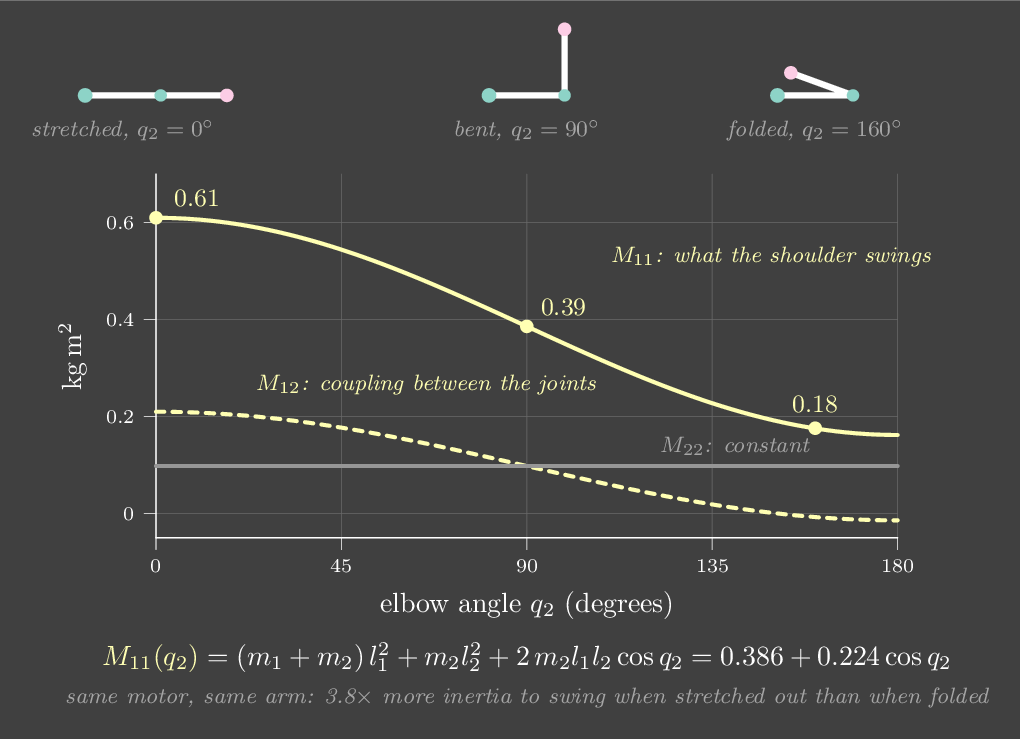
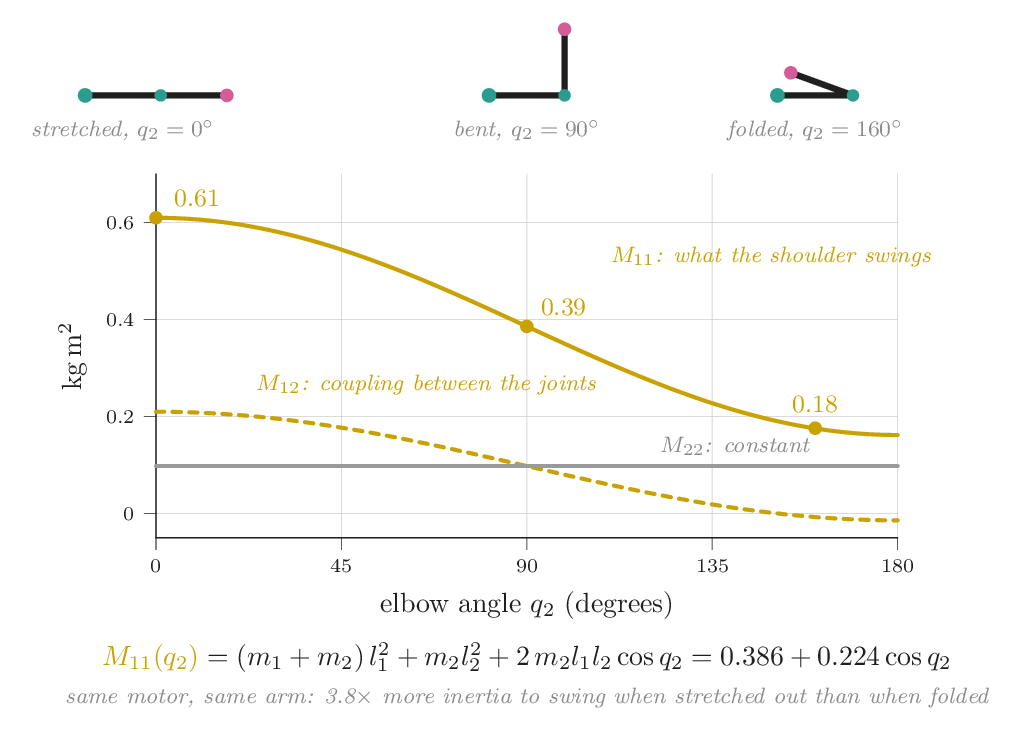
\(M(q)\) is symmetric and positive definite. Kinetic energy is positive for any motion, so \(\dot q^\top M \dot q > 0\) whenever \(\dot q \ne 0\). It also depends on the pose. With this book's arm (\(l_1 = 0.4\), \(l_2 = 0.35\) m, \(m_1 = 1.0\), \(m_2 = 0.8\) kg), \(M_{11}\) ranges from 0.16 to 0.61 kg·m². That 3.8× swing is why a fixed PD gain can never suit every pose.
Energy balances exactly. With \(C\) built the standard way (from Christoffel symbols), the matrix \(\dot M - 2C\) is skew-symmetric. Differentiate the total energy \(E = T + V\) along a motion and every term cancels except one:
Energy changes only through the power the motors put in or take out. With \(\tau = 0\) and no friction, \(E\) is constant. Add viscous friction \(\tau = -b\dot q\) and \(\dot E = -b\,|\dot q|^2 \le 0\), so energy only drains. Stability proofs for PD and impedance control rest on this identity.
The equation is linear in the physical parameters. Masses, lengths and inertias enter as products like \(m_2 l_1 l_2\). Collect those products into a vector \(\pi\), and the torque is a known matrix times it: \(\tau = Y(q,\dot q,\ddot q)\,\pi\). Logging \((q,\dot q,\ddot q,\tau)\) and solving a least-squares problem therefore recovers \(\pi\). That is how Chapter 22 identifies a real arm.
Forward and inverse dynamics
The same equation can be read in two directions. Forward dynamics asks what acceleration a given torque produces: \(\ddot q = M^{-1}(\tau - C\dot q - g)\). A simulator does this every step. Inverse dynamics asks what torque produces a desired acceleration: \(\tau = M\ddot q + C\dot q + g\). Computed torque and gravity compensation do this. For long chains you never form these matrices symbolically. The recursive Newton–Euler algorithm computes inverse dynamics in \(O(n)\) by sweeping velocities out from the base and forces back in. Featherstone's articulated-body algorithm does the same for forward dynamics. Pinocchio, Drake and MuJoCo (mj_inverse, mj_forward) implement both.
Let the arm fall and watch the energy
The two-link arm starts nearly horizontal and falls with no motor torque. It is integrated with RK4 at 1 ms. The heat map in the corner is \(M(q)\), live.
Try this
- Watch kinetic and potential energy trade places while the white total stays flat. The readout E − E₀ stays below a microjoule. Energy only enters through \(\dot q^\top\tau\), and τ is zero.
- Watch \(M_{11}\) in the heat map as the elbow folds and opens. It moves between about 0.16 and 0.61 kg·m².
- Set friction to 0.05 N·m·s/rad and press Drop again. The total now only falls: about 5 J lost in the first 5 s, then more slowly as the motion dies.
- Set friction back to zero and tick the twin, started 0.001 rad away. For several seconds the red twin is invisible behind the arm, while the separation plot creeps upward. Around 10 s it jumps to about 1 rad, and from then on the two arms move independently. A thousandth of a radian of initial error, and no model error at all, was enough.
Run it yourself: derive M(q) and g(q) with SymPy
import sympy as sp
t = sp.symbols("t")
m1, m2, l1, l2, g = sp.symbols("m1 m2 l1 l2 g", positive=True)
q1, q2 = sp.Function("q1")(t), sp.Function("q2")(t)
# point masses at the link ends, angles from the +x axis, y up
x1, y1 = l1*sp.cos(q1), l1*sp.sin(q1)
x2, y2 = x1 + l2*sp.cos(q1 + q2), y1 + l2*sp.sin(q1 + q2)
T = m1*(x1.diff(t)**2 + y1.diff(t)**2)/2 + m2*(x2.diff(t)**2 + y2.diff(t)**2)/2
V = m1*g*y1 + m2*g*y2
L = T - V
tau = [sp.expand(L.diff(q.diff(t)).diff(t) - L.diff(q)) for q in (q1, q2)]
qdd = [q1.diff(t, 2), q2.diff(t, 2)]
M = sp.Matrix(2, 2, lambda i, j: sp.simplify(tau[i].coeff(qdd[j])))
print(M)        # [[l1²m1 + l1²m2 + 2 l1 l2 m2 cos q2 + l2²m2, l2 m2 (l1 cos q2 + l2)], ...]
print(sp.simplify(tau[0].subs({qdd[0]: 0, qdd[1]: 0, q1.diff(t): 0, q2.diff(t): 0}))) # g1(q)Why must \(M(q)\) be positive definite for every pose?
Any nonzero joint velocity moves some mass, and moving mass has positive kinetic energy. The same fact guarantees that \(M\) is invertible, so forward dynamics always has a unique answer.
Chapter 11 · Part III · Dynamics and simulation
How simulators work
The one ideaA physics simulator is two things: an integrator that steps the equations of motion forward by a timestep, and a contact model that decides how hard surfaces push back. Both have a timestep, and both can quietly add energy that a real robot never has.
Every lab in this book is a small simulator, and so is MuJoCo, Isaac Sim or PyBullet. They all keep a state \(x = (q, \dot q)\) and use forward dynamics (Chapter 10) to get its rate of change, \(\dot x = f(x, u)\). Then they step forward in time. What separates a trustworthy simulator from a misleading one is how it takes that step, and what it does when two bodies touch.
Integrators: three ways to take a step
Explicit Euler uses the derivative at the start of the step: \(x_{k+1} = x_k + h\,f(x_k)\). It is the obvious method and the wrong one for mechanics. Apply it to a frictionless spring, \(\ddot x = -\omega^2 x\). One step maps \((x, v)\) through the matrix
The determinant above one means each step inflates the area of phase space, so the oscillation spirals outward and energy grows every single step, at any timestep.
Semi-implicit (or symplectic) Euler updates the velocity first and then moves the position with the new velocity: \(v_{k+1} = v_k + h\,a(x_k)\), then \(x_{k+1} = x_k + h\,v_{k+1}\). The matrix becomes \(\begin{bmatrix} 1 - \omega^2h^2 & h \\ -\omega^2 h & 1 \end{bmatrix}\), with determinant exactly 1. Energy is not conserved exactly, but it wobbles around the true value instead of drifting away. That holds as long as \(\omega h < 2\). Beyond that the step is unstable and the simulation explodes. This costs nothing extra, which is why most physics engines use it. Every lab in this book has used it.
Runge–Kutta 4 evaluates the derivative four times per step and combines them, making the error per step shrink like \(h^5\). It is far more accurate for smooth motion. It costs four times as much, and it gains little once contact makes the motion non-smooth.
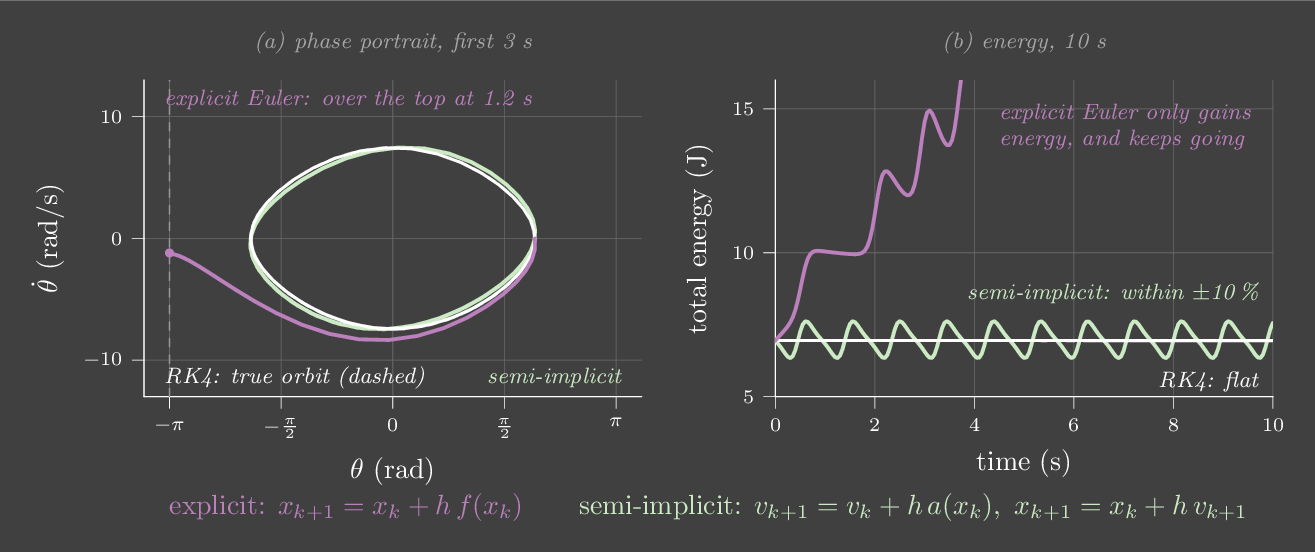
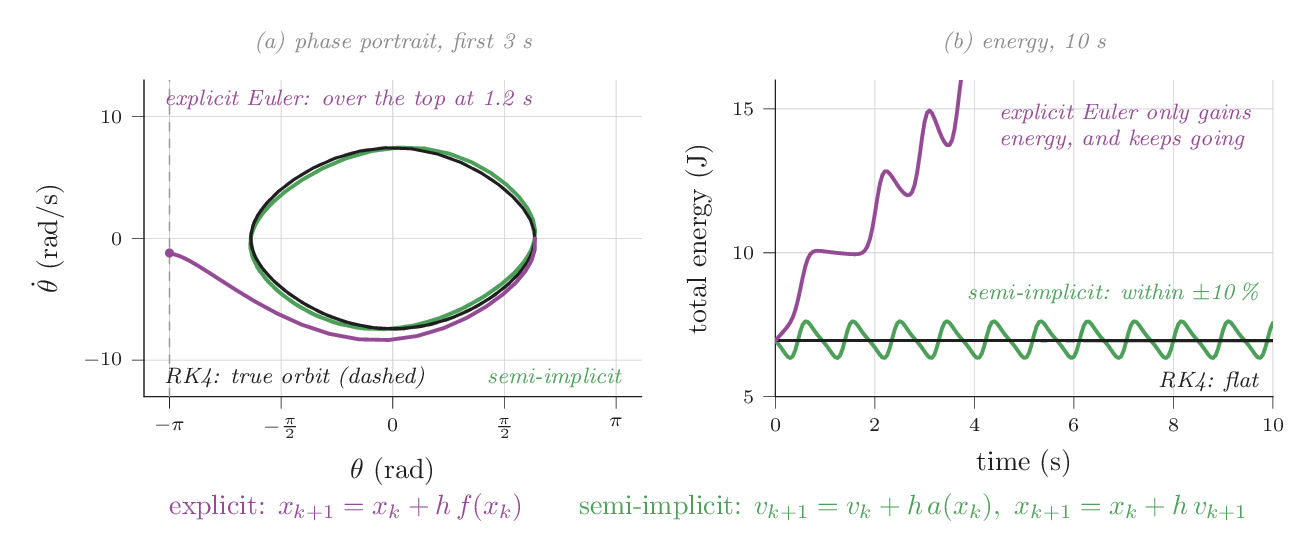
One pendulum, three integrators
Three copies of the frictionless pendulum start together and take steps of the same size. Only the update rule differs. The plot is each copy's total energy. The dashed line is the true, constant value.
Try this
- At 30 ms, explicit Euler (violet) climbs until the pendulum swings over the top, about 2 s in. Semi-implicit (mint) stays within about ±5%. RK4 (white) does not visibly move.
- Drop the step to 10 ms. Explicit Euler still goes over the top, it just takes about 6 s. Smaller steps delay the failure without fixing it.
- Push the step to 120 ms. Semi-implicit now swings by up to about 25% but stays bounded. RK4 now loses about 1% over 10 s: it is accurate, not energy-conserving.
Contact: where simulators really differ
Free motion is the easy part. The hard part is contact: a foot hitting the ground, fingers closing on a cup. Contact is nearly discontinuous. One millisecond there is no force, the next there is a large one, and it must never pull.
The simplest model is a penalty spring. When the ball's lowest point sinks a depth \(d\) below the floor, the floor pushes back with \(F = kd - c\dot d\). It is easy to write, but it hides a trade-off. A ball hitting at speed \(v\) sinks about \(v\sqrt{m/k}\) before stopping. So a realistic, hard floor needs a large \(k\). That makes the contact a fast oscillator, \(\omega = \sqrt{k/m}\), and the stability rule \(\omega h < 2\) then demands a tiny timestep. A 1 kg ball on \(k = 10^6\) N/m needs \(h < 2\) ms. On \(10^7\) N/m it needs \(h < 0.6\) ms.
Most engines instead treat non-penetration as a constraint. Each step they solve for contact forces \(\lambda\) that satisfy a complementarity condition: \(0 \le \lambda \perp \phi(q) \ge 0\), where \(\phi\) is the gap. The force is zero unless the gap is zero, the gap is zero or positive, and the force never pulls. Friction adds the requirement that the tangential force lies within the Coulomb cone (Chapter 17). Solving this at the velocity level, as impulses, stays stable at large steps. Bullet and PhysX do this with iterative solvers. MuJoCo solves a convex relaxation of the same problem, which makes contact slightly soft on purpose. Its solref parameter sets that softness as a time constant and damping ratio, default 0.02 s and 1, and its documentation advises keeping the time constant at least twice the timestep. MuJoCo's default timestep is 2 ms, and its default integrator is semi-implicit Euler, with RK4 and implicit variants available.
Drop a ball on a spring floor
A 1 kg ball falls 1 m onto a penalty floor, stepped with semi-implicit Euler. The top line shows \(\omega h\) for your settings: above 2, the contact spring is unstable at this timestep.
Try this
- At the defaults (\(k = 10^5\) N/m, ζ = 0.1, 2 ms) the ball sinks about 12 mm and bounces to about 0.6 m.
- Soften the floor to \(10^3\) N/m. The ball sinks about 13 cm, like landing on a mattress.
- Stiffen it to \(10^6\) N/m without changing the step. \(\omega h\) reaches 2, and the ball bounces to about 5 m, five times higher than it was dropped. Halve the step to 1 ms and it behaves again: 4 mm of penetration, a 0.9 m bounce.
- Back at \(10^5\) N/m, raise the step to 7 ms (ωh ≈ 2.2). Each bounce now adds energy, and the ball soon leaves the screen.
- Nudge the timestep between 1.8 and 2.2 ms. The bounce height jumps around by about ±10%. Each contact lasts only about five steps, so exactly where those steps fall changes the result.
- Set ζ = 0: the ball bounces back to about 1 m, sometimes slightly higher. The extra comes from the integrator, not from physics. Set ζ = 0.5: it barely bounces. In a penalty model, restitution is a tuning knob, not a property of the materials.
What else to know about your simulator
Speed versus accuracy. RL needs billions of steps, so GPU simulators (Isaac Gym, MuJoCo MJX, Genesis) run thousands of environments in parallel. To go fast they use large timesteps and few contact-solver iterations. Both are settings, and both change the physics your policy learns.
Determinism. A CPU simulator with fixed settings returns identical results for identical inputs, which makes bugs reproducible. GPU simulators often do not, because parallel floating-point sums depend on the order they are added in.
Substeps. The control period and the physics step need not match. A policy at 50 Hz over a 2 ms physics step means 10 physics substeps per action, with the torque or setpoint held constant across them, just as in Chapter 27.
Run it yourself: three integrators in NumPy
import numpy as np
I, mgl = 0.25, 4.905                       # the book's pendulum
acc = lambda th: -mgl * np.sin(th) / I
energy = lambda th, om: 0.5 * I * om**2 + mgl * (1 - np.cos(th))

def euler(th, om, h):  return th + h * om, om + h * acc(th)
def semi(th, om, h):   om = om + h * acc(th); return th + h * om, om
def rk4(th, om, h):
    f = lambda th, om: np.array([om, acc(th)])
    x = np.array([th, om]); k1 = f(*x); k2 = f(*(x + h/2*k1))
    k3 = f(*(x + h/2*k2)); k4 = f(*(x + h*k3))
    return tuple(x + h/6 * (k1 + 2*k2 + 2*k3 + k4))

h, E0 = 0.03, energy(2.0, 0.0)
for step in (euler, semi, rk4):
    th, om = 2.0, 0.0
    for _ in range(int(10 / h)):
        th, om = step(th, om, h)
print(f"{step.__name__:5s} energy after 10 s: {100*(energy(th, om)/E0 - 1):+7.1f} %")You double a penalty floor's stiffness to reduce penetration. What must happen to the timestep to keep the same stability margin?
Stability depends on \(\omega h\), and \(\omega = \sqrt{k/m}\). Doubling \(k\) raises \(\omega\) by \(\sqrt2\), so \(h\) must shrink by the same factor to keep \(\omega h\) unchanged.
Chapter 12 · Part III · Dynamics and simulation
Motors, gears and friction
The one ideaBetween your torque command and the joint sit a motor and a gearbox. A gear ratio \(N\) multiplies the motor's torque by \(N\), but it multiplies the motor's inertia and damping by \(N^2\). That is why a high-ratio servo is strong, slow and hard to push by hand, and why the robots that learned to walk use low ratios.
So far, \(\tau\) has been whatever the controller asked for. A real joint makes torque with an electric motor, usually through a gearbox, and both have physics of their own. Knowing that physics explains a lot of behaviour you will meet: why the SO-101's follower arm holds its pose when switched off, why its leader arm is easier to move, why torque commands on hobby servos are not available, and why a motor's current tells you the joint torque on some robots but not others.
The DC motor in two equations
A brushed or brushless DC motor turns current into torque, and speed into voltage, through the same constant:
The first says torque is proportional to current. The second says the applied voltage is split between pushing current through the winding resistance \(R\) and opposing the back-EMF \(k_e\omega_m\) that a spinning motor generates. (The winding inductance adds a lag of well under a millisecond, which we ignore.) Eliminate \(i\) to get the motor's torque–speed line at a fixed voltage:
At zero speed the motor gives its stall torque \(k_tV/R\). At zero load it spins at its no-load speed \(V/k_e\). In between, torque falls linearly with speed. Mechanical power peaks at half the no-load speed, and heat (\(i^2R\)) limits how long you can stay near stall.
Good motor drivers do not apply voltage directly. They run a fast current loop, often at 10–40 kHz, that adjusts the voltage so the current follows a command. Because torque is \(k_t i\), a current command is a torque command. This is the innermost loop of any torque-controlled robot, sitting beneath every controller in this book.
What a gearbox really does
Small motors are fast and weak: thousands of rpm and a few millinewton-metres. A gearbox with ratio \(N\) trades speed for torque. Seen from the output shaft:
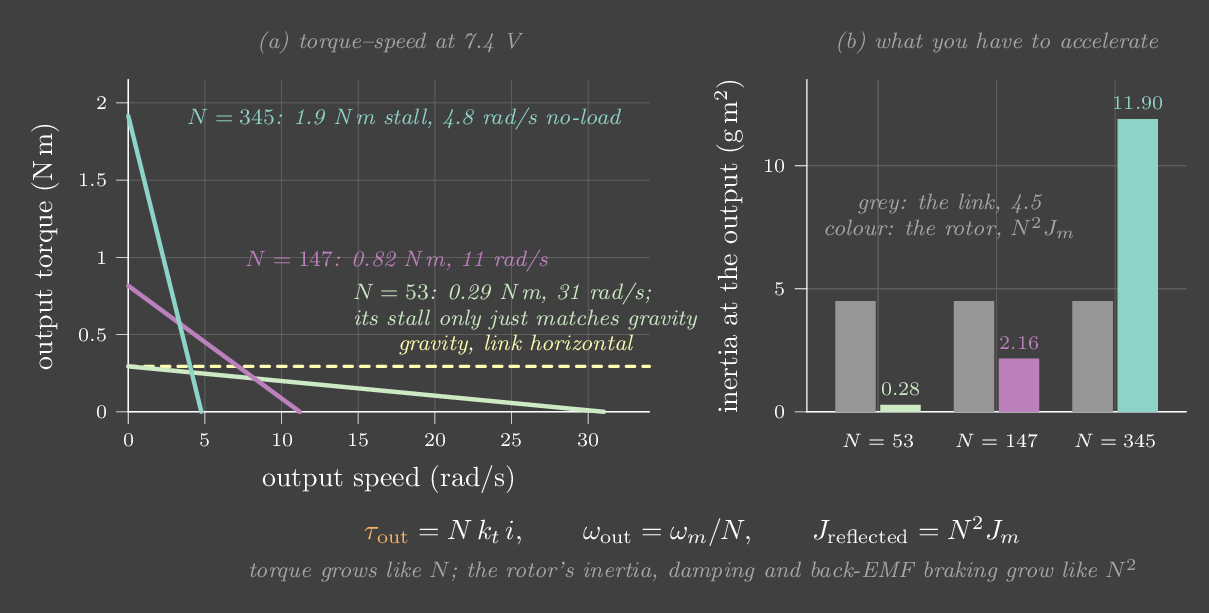
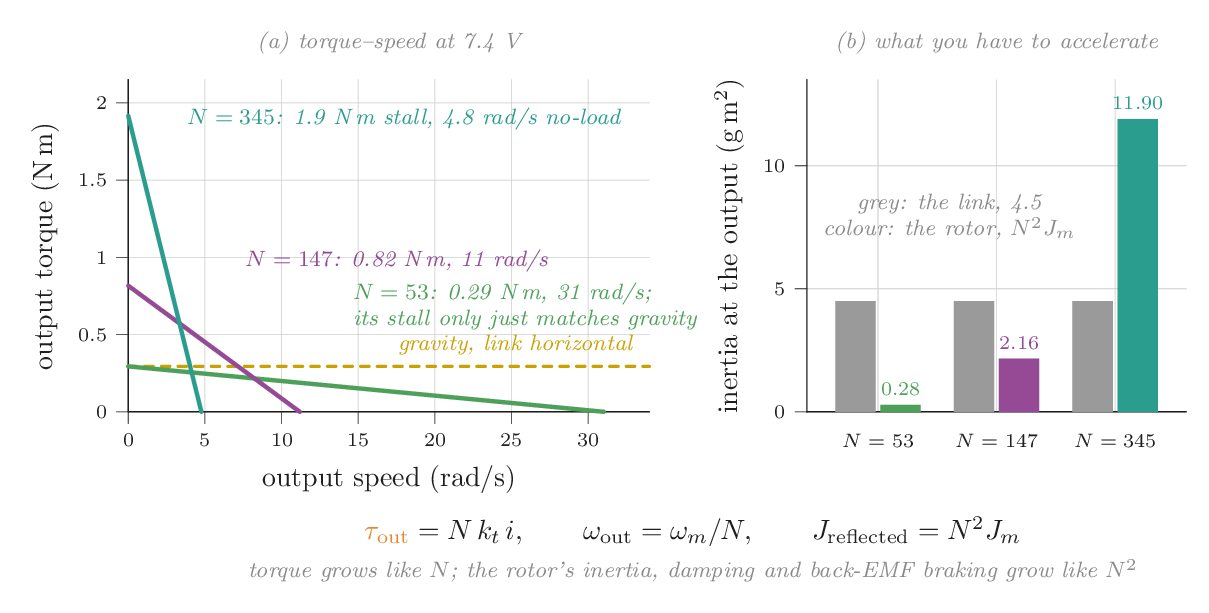
Torque grows by \(N\), less the gearbox efficiency \(\eta\). Inertia grows by \(N^2\): accelerating the output by α spins the rotor at \(N\alpha\), and that takes \(N\) times the torque at the motor, which the gears multiply by \(N\) again. Viscous damping, and the braking you get from back-EMF when the motor wires are shorted, scale by \(N^2\) for the same reason. Coulomb friction inside the motor and gears appears at the output multiplied by about \(N\).
Put numbers to it. The lab's motor is chosen so that at \(N = 345\) it lands near the SO-101's Feetech STS3215 at 7.4 V: about 1.9 N·m at stall and 4.8 rad/s with no load. Its rotor inertia of \(10^{-7}\) kg·m² looks negligible. Through a 345:1 gearbox it becomes \(345^2 \times 10^{-7} = 0.012\) kg·m², 2.6 times the inertia of the 0.2 kg forearm-sized link it drives. Half a millinewton-metre of motor-side friction becomes 0.17 N·m at the output. Shorting the motor's wires gives a braking torque of 0.40 N·m for every rad/s you try to turn it.
Backdrivability
Push on the output of a geared motor and you drive the motor backwards through the gears. You feel the reflected friction (×\(N\)), the reflected inertia (×\(N^2\)) and, if the driver shorts the windings, the back-EMF braking (×\(N^2\)). A low-ratio joint is backdrivable: a push moves it easily, and the motor's current tells you how hard the world is pushing. A high-ratio joint barely moves, and a disturbance shows up as position error, not as current.
This is a design choice, and robot builders choose both ways. Industrial arms use harmonic drives with ratios of 50 to 160 for precision and strength. Legged robots such as the MIT Mini Cheetah and Unitree's quadrupeds use quasi-direct-drive actuators: a large motor with a single-stage gear of about 6–10:1. Those joints are transparent enough to estimate torque from current and survive impacts. Series elastic actuators put a spring between the gearbox and the load and measure its deflection, turning a stiff geared motor into a torque source with a built-in force sensor, at the cost of bandwidth. ANYmal uses them.
Friction and backlash
Real friction is messier than the \(-b\dot q\) of earlier chapters. Coulomb friction is a constant torque opposing motion. Stiction is a slightly higher torque needed to start moving at all. The Stribeck effect is a dip in friction just after breakaway, which makes slow motion stick and slip. Viscous friction grows with speed. Gear trains also have backlash: a small dead zone, often a fraction of a degree in hobby servos, where the output can move without the motor turning. Each has consequences for control. Stiction plus integral action produces hunting, a small limit cycle around the target as the integral repeatedly builds up enough torque to break free and then overshoots. Backlash inside a stiff position loop produces chatter. Feedforward friction compensation (Chapter 13) and identification (Chapter 22) handle the predictable parts.
A motor, a gearbox and your hand
A small motor drives a 0.2 kg link through a gearbox you choose. It opens as a position servo stepping between 30° and 90°. Push by hand tries to move the link 60° further, using a soft hand of limited strength. The lower panel is the gearmotor's torque–speed line at full voltage, with the current operating point.
Try this
- As a servo at 345:1, the link lands about 2–3° below 90°. That is the proportional sag of Chapter 4, made by the servo's own loop. Push by hand while it holds 30°: it does not move measurably.
- Switch to "Off: motor wires open" and push. The link moves about 27° and stays there. Static friction (0.17 N·m at the output) is enough to hold it against gravity. This is why a switched-off SO-101 follower keeps its pose.
- Still switched off, lower the ratio to 191, then 147, and push again. The link now moves about 45–55°, and when the hand lets go it falls back down. The SO-101 leader arm uses lower-ratio versions of the same servo on some joints so it is easier to move by hand.
- Choose "Off: motor wires shorted" at 345:1. The same push now moves the link only about 10°. Back-EMF braking (0.40 N·m·s/rad) fights every bit of motion. At 100:1 the braking is about 12 times weaker, \((345/100)^2\), and the push gets through.
- Back in servo mode, lower the ratio. At about 53:1 the stall torque just equals the 0.29 N·m that gravity needs at 90°, and the link settles near 68°. At 30:1 it only reaches 36°. Gearing is what makes a small motor able to lift an arm at all.
Run it yourself: what N does to a joint
V, R, kt, Jm, tcm = 7.4, 6.0, 0.0045, 1e-7, 0.5e-3   # motor (SI units)
I_link, mgl = 0.2 * 0.15**2, 0.2 * 9.81 * 0.15        # 0.2 kg link at 0.15 m
print(" N   stall N·m  no-load rad/s  rotor/link inertia  friction N·m  short-brake N·m·s/rad")
for N in (1, 10, 53, 147, 345):
    print(f"{N:3d}  {N*kt*V/R:9.3f}  {V/(kt*N):13.1f}  {N*N*Jm/I_link:18.2f}"
          f"  {N*tcm:12.3f}  {N*N*kt*kt/R:21.4f}")
print(f"gravity torque at 90°: {mgl:.3f} N·m")You swap a joint's 100:1 gearbox for 300:1. By how much does the motor's rotor inertia, seen at the joint, grow?
Reflected inertia scales as \(N^2\): \((300/100)^2 = 9\). The stall torque only triples, so the joint gets stronger, but much more sluggish to accelerate and much harder to backdrive.
Chapter 13 · Part IV · Using a model
Feedforward and gravity compensation
The one ideaIf you know a force is coming, don't wait for it to cause an error. Cancel it directly with a model, and let feedback handle only what the model gets wrong.
The integral term discovers gravity slowly, by being wrong for a while. But gravity is not a mystery. For our joint it is exactly \(mgl\sin\theta\). So add it to the command:
If the model is right, gravity cancels exactly and the joint behaves like the gravity-free spring–damper from Chapter 3, at every angle. There is no sag, no waiting for an integral and no windup. If the model is a little wrong, say \(\hat m = 0.9\) while the real mass is 1.0, the leftover \(0.1\,gl\sin\theta\) is small, and the spring handles it with a small sag.
Gravity compensation is not just a precision trick, because it lets you lower the gains. Without it you need a stiff spring to fight gravity. With it, the spring only handles leftovers, so the arm can be soft. Soft arms are safer around people. They can also be pushed around by hand, which is how kinesthetic teaching and gravity-compensated "float" modes work, and they behave more gently in contact.
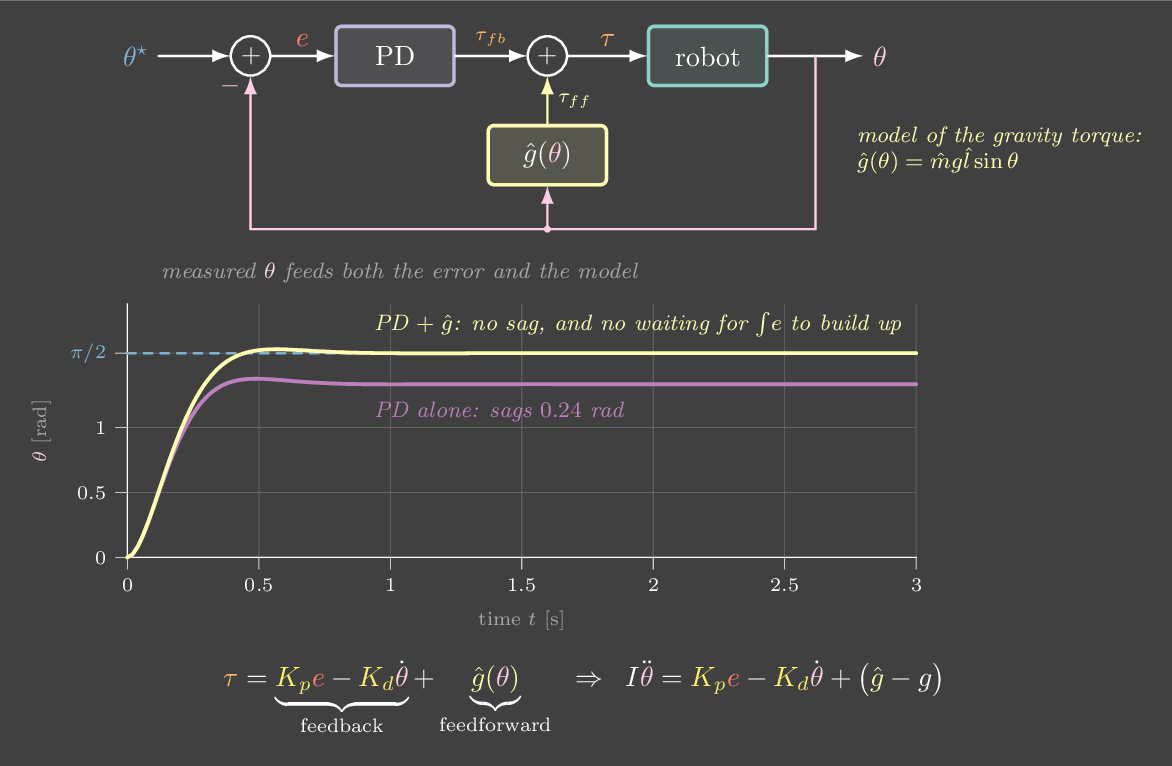
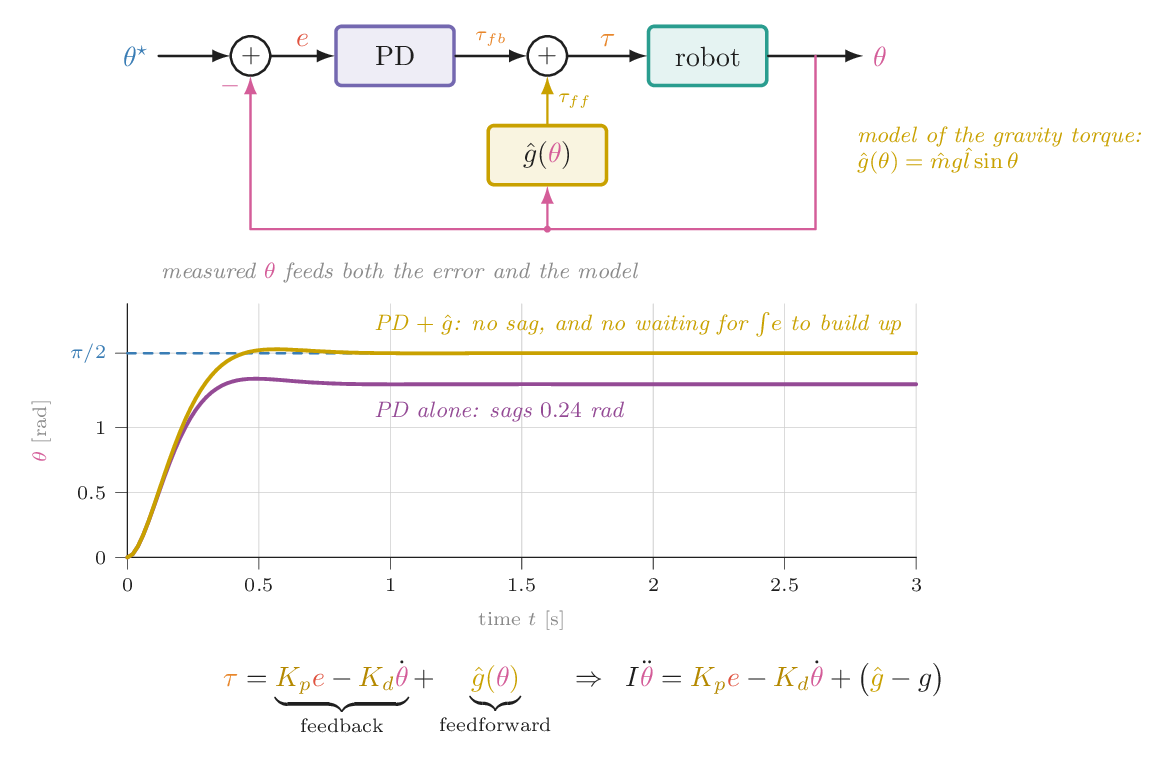
Cancel gravity with a model
The yellow line in the torque plot is the model's contribution, \(\hat g(\theta)\). The dashed yellow line is what gravity actually needs.
Try this
- Toggle gravity compensation off and on. With it on, the step to 90° lands exactly. Off, it sags about 14°.
- With compensation on, drop \(K_p\) to 4 and \(K_d\) to 0.6. The arm still holds its target but is now soft: press Push and watch it give way, then return.
- Make the model wrong: \(\hat m = 0.7\). The sag comes back, about 30% of what it was without compensation. Feedback covers the residual.
With perfect gravity compensation, what does the PD loop have left to do?
Feedforward cancels the predictable part. Pushes, payload changes, friction and the target itself still need feedback. With zero gains nothing would bring the arm back after a push.
Chapter 14 · Part IV · Using a model
Computed torque
The one ideaUse the full dynamics model to cancel all of the robot's nonlinear physics. What remains is, for every joint, a plain double integrator, \(\ddot q = v\). Then PD on that is easy and behaves the same in every pose.
A real arm has several joints, and they push on each other. All of rigid-body dynamics fits in one line, the manipulator equation, which Chapter 10 derives from energy:
\(M(q)\) is the inertia matrix. It depends on the pose, since a stretched-out arm is harder to swing than a folded one, and its off-diagonal terms mean that accelerating one joint drags on the others. \(C\dot q\) holds the Coriolis and centrifugal forces that appear when joints move together. \(g(q)\) is gravity, now pose dependent too.
Independent PD on each joint treats every joint as a single spring–damper with a fixed inertia. Here the inertia changes with pose and the joints are coupled, so gains tuned in one pose ring or crawl in another, and fast motions get pushed off course. The fix is to invert the model. Choose
Substitute into the manipulator equation. If the hats are exact, \(M\ddot q = Mv\), so \(\ddot q = v\), and the error obeys \(\ddot e + K_d\dot e + K_p e = 0\) for each joint separately. The arm now acts like a set of independent unit masses that you push with \(v\). Choose \(K_p = \omega_n^2\) and \(K_d = 2\zeta\omega_n\) once, and every joint gets the same response in every pose. The \(\ddot q^\star\) term is feedforward of the desired acceleration, so the loop does not have to wait for error to start moving.
The cost is the model. Whatever \(\hat M, \hat C, \hat g\) get wrong comes back as a disturbance, and the PD part has to absorb it.
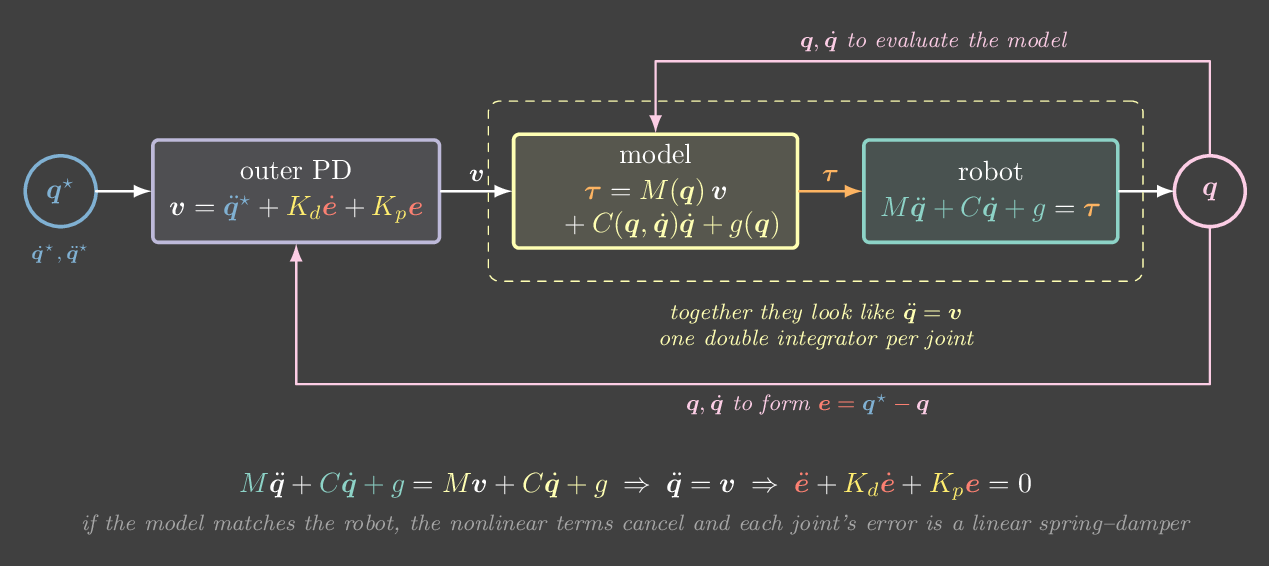
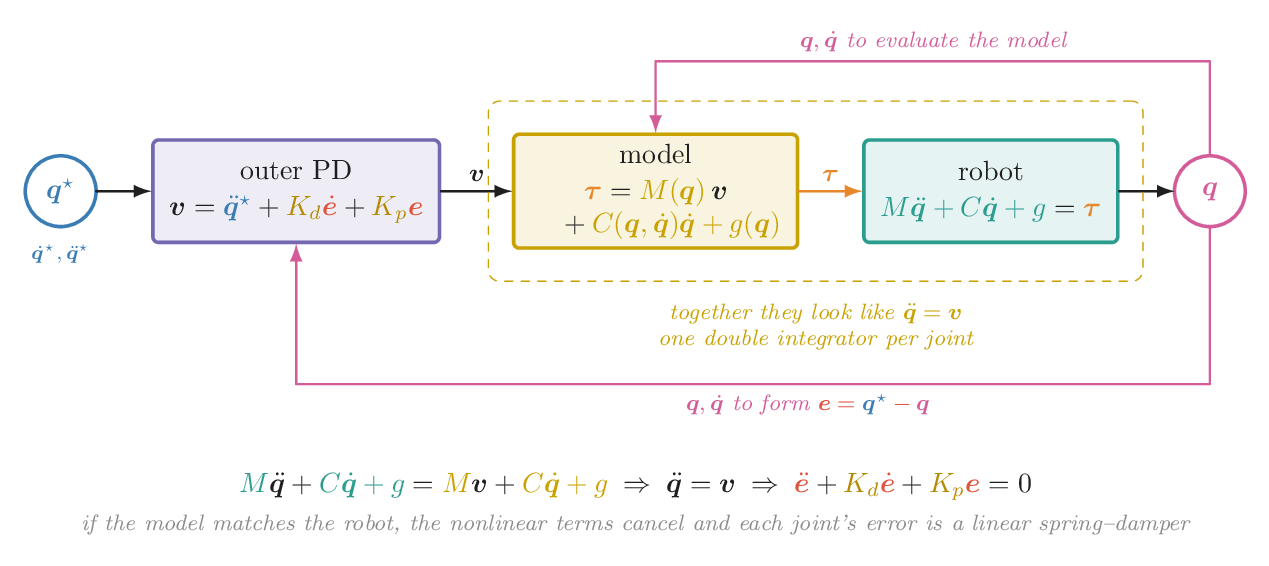
Trace a circle three ways
A two-link arm in a vertical plane traces the dashed blue circle. The plot shows how far the hand is from where it should be, in millimetres.
Try this
- Choose PD only. The hand sags several centimetres below the circle (gravity), and the error swings as the pose changes. Switch to PD + gravity: at 2 s per circle the error drops to under a centimetre, but at 1 s per circle it climbs back to several. That is the inertia and coupling PD does not know about.
- Switch to computed torque. The error drops below a millimetre, even at 1 s per circle.
- Add a 0.3 kg payload the model doesn't know about. Computed torque degrades to around a centimetre, because its model is now wrong, but its PD part keeps it on the circle. Raise \(\omega_n\) and the leftover error shrinks. At 1 kg the model is so wrong that it does no better than PD + gravity.
Run it yourself: computed torque for a two-link arm
import numpy as np
l1, l2, m1, m2, g = 0.4, 0.35, 1.0, 0.8, 9.81

def dynamics(q, dq):
    c2, s2 = np.cos(q[1]), np.sin(q[1])
    M = np.array([[(m1+m2)*l1**2 + m2*l2**2 + 2*m2*l1*l2*c2, m2*l2**2 + m2*l1*l2*c2],
                  [m2*l2**2 + m2*l1*l2*c2,                   m2*l2**2]])
    h = m2*l1*l2*s2
    Cdq = np.array([-h*(2*dq[0]*dq[1] + dq[1]**2), h*dq[0]**2])
    G = np.array([(m1+m2)*g*l1*np.cos(q[0]) + m2*g*l2*np.cos(q[0]+q[1]),
                  m2*g*l2*np.cos(q[0]+q[1])])
    return M, Cdq, G

wn = 15.0; Kp, Kd = wn**2, 2*wn               # zeta = 1 for every joint
def computed_torque(q, dq, q_ref, dq_ref, ddq_ref):
    M, Cdq, G = dynamics(q, dq)                # the model
    v = ddq_ref + Kd*(dq_ref - dq) + Kp*(q_ref - q)
    return M @ v + Cdq + G                     # robot now obeys  ddq = v

# simulate: ddq = M^-1 (tau - Cdq - G) with the true (possibly different) massesWith an exact model, what does each joint look like to the outer PD loop?
The model term \(\hat M v + \hat C\dot q + \hat g\) cancels everything in the manipulator equation except \(M\ddot q = Mv\). Since \(M\) is invertible, \(\ddot q = v\).
Chapter 15 · Part IV · Using a model
Impedance control
The one ideaPut the spring and damper at the hand instead of at the joints, and map the hand force to joint torques with \(J^\top\). The hand then behaves like a spring you design, stiff in some directions and soft in others.
Position control says "be here, no matter what". That is the wrong instruction for contact. Pressing a sponge on a table, inserting a peg or opening a door all involve a surface that is not quite where the model thinks it is. A perfectly stiff position controller pushes harder and harder against a misplaced surface until something breaks. Impedance control asks for a relationship instead: "if you are displaced by \(\Delta x\), push back with \(K\Delta x\)."
The law is PD written in hand coordinates:
Why \(J^\top\)? The Jacobian (Chapter 8) maps joint velocities to hand velocity, \(\dot x = J\dot q\). Power is the same whether you count it at the hand or at the joints, so \(F^\top\dot x = F^\top J \dot q = (J^\top F)^\top \dot q\). The torque that does the same work as a hand force \(F\) is therefore \(J^\top F\). No inverse kinematics is needed, and the mapping is well behaved even near singularities, where inverting \(J\) would blow up.
\(K\) is a matrix, so stiffness can differ by direction. To wipe a table you want the hand stiff side to side, so it follows the path, and soft up and down, so it presses gently and tolerates a table that is a centimetre off. Plain joint-space PD also gives the hand some stiffness, \(K_x = J^{-\top}K_qJ^{-1}\), but that stiffness changes with the pose and you don't get to choose it.
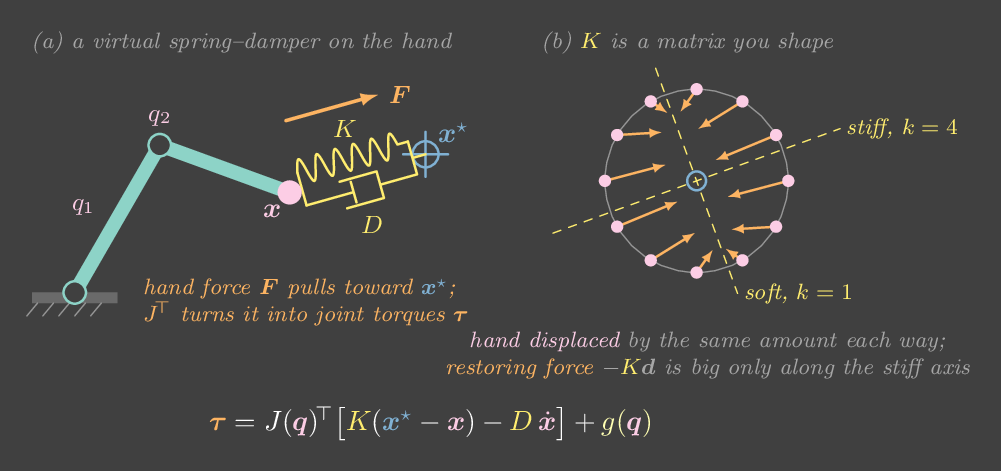
Push the hand around
Seen from above, so gravity plays no part. Drag the pink hand to push it with your cursor, or click elsewhere to move the target. The gold ellipse shows where a 10 N push in each direction would move the hand: long axis means soft.
Try this
- Push along the long and short axes of the ellipse. The same push moves the hand much further along the soft axis.
- Rotate the axes to 45° and push straight sideways. The hand moves diagonally, because the restoring force is \(K\Delta x\), and an anisotropic \(K\) does not point the force back along the push.
- Switch to joint-space PD and move the target around the workspace. The ellipse changes shape with the pose. Near full stretch it flattens into a thin sliver across the arm: pushing along a straight arm loads its structure, not its joints, so the hand is nearly rigid radially and soft sideways. You did not choose that; the pose did.
- Drop the damping ratio to 0.1 and press Flick. The hand rings like a struck spring. Damping matters here just as it did in Chapter 3.
You want the hand to follow a line on a table precisely while tolerating a table height error. How should you set \(K\)?
Stiffness buys accuracy where you need it. Compliance buys tolerance where the world is uncertain. An anisotropic \(K\) gives you both at once.
Chapter 16 · Part IV · Using a model
Force control
The one ideaAgainst a stiff surface, a tiny position error becomes a huge force. So when a task is about pushing, control the force or the relationship between force and motion, and let the position be whatever it needs to be.
Wiping a table, turning a screw, sanding, inserting a plug: these tasks are about how hard you push, not where your hand is. The surface decides where the hand ends up. Up to now every controller has had a position target. The trouble shows up the moment that target sits on the far side of a hard surface.
Why position control and contact don't mix
Model the surface as a spring of stiffness \(k_w\). A sponge might be 300 N/m, rubber 20 kN/m and steel well over 1 MN/m. Ask a stiff position controller, with gain \(K_p\), to put the hand a depth \(d\) past the surface. The controller and the surface are two springs pushing on the same hand, so it settles where their forces balance:
An industrial position loop has \(K_p\) around \(10^5\) N/m. Aim 10 mm too deep and you press a sponge with 3 N, rubber with about 170 N, and steel with about 900 N, more than most motors can give. The same small calibration error produces forces three orders of magnitude apart. The contact force is decided by a number you don't control, the environment's stiffness.
The fix is to make the robot's side of the spring soft and known. Chapter 15 already did this: impedance control replaces the stiff \(K_p\) with a stiffness \(K\) you chose. In the formula above, when \(K\) is much softer than the wall, \(F \approx K d\) whatever the wall is made of. Aim 10 mm deep with \(K = 1000\) N/m and you get about 10 N on rubber and on steel.
Three ways to regulate force
Explicit force control measures the contact force \(F\), usually with a force/torque sensor at the wrist, and runs PI on the force error, with damping on velocity to keep the approach calm:
It hits the target force exactly on any surface. Its weakness is the loop gain. The force sensor sees the hand through the surface's spring, so the effective gain of the force loop is \(k_f\) times the stiffness of whatever you touch. Tuned on rubber, the same gains on steel are effectively fifty times higher, and the hand chatters, bouncing on and off the surface. Stiff surfaces need low force gains, and low gains mean slow responses.
Admittance control turns causality around. It measures force and outputs motion. A virtual mass–damper is pushed by the force error, \(M_a\ddot x_r + D_a\dot x_r = F^\star - F\), and a stiff position loop makes the real hand follow \(x_r\). This is how most industrial arms do force control, because their joints are stiff, high-gear position servos that cannot output a clean torque anyway. Impedance is the opposite pairing: it measures motion and outputs force, and it suits robots with good torque control, such as direct-drive and quasi-direct-drive arms.
Hybrid position/force control splits the task by direction. On a table, control force along the surface normal and position along the surface. A selection matrix \(S\) picks the directions: \(u = S\,u_{\text{force}} + (I - S)\,u_{\text{position}}\). The force controller handles "press with 10 N" and the position controller handles "move along this line". The anisotropic stiffness of Chapter 15 is the soft version of the same idea.
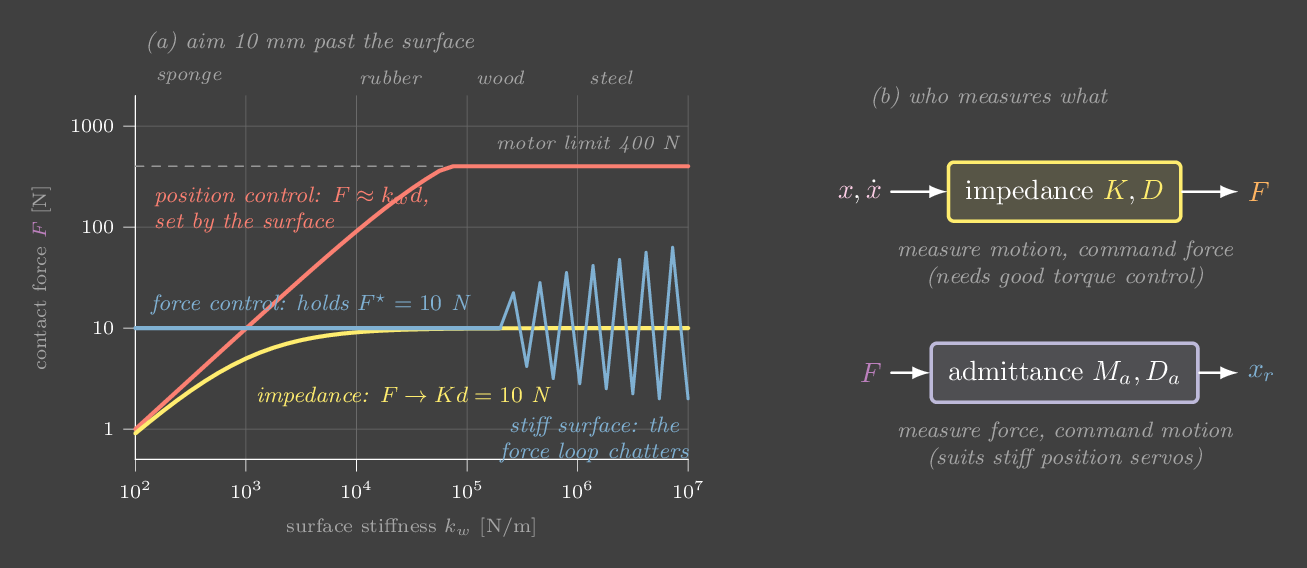
Press on sponge, rubber and steel
A 1 kg hand on a rail approaches a wall 100 mm away, presses for about 3 s, retracts, and repeats. The controller runs at 1 kHz. Arrows show the actuator force (orange) and the contact force (violet), on a log scale.
Try this
- Position control, aiming 10 mm deep. Drag the wall stiffness from sponge to steel. The steady force climbs from about 3 N to about 170 N on rubber, then the 400 N motor saturates on steel, with impact peaks over 1 kN.
- Switch to impedance with \(K = 1000\) N/m and repeat. About 10 N on rubber and steel, and 2.3 N on the sponge, where the sponge is the softer of the two springs.
- Force control with gain 1×: it holds 10 N on sponge and rubber. On steel it chatters. Lower the force-loop gain to 0.1× and it settles, but it is slow to correct.
- Admittance on steel at gain 1×: a clean 10 N. Raise the gain to 10×: the virtual mass moves faster, the hand arrives faster, and the impact spike grows into the hundreds of newtons. Approach speed is the price of a fast force loop.
Run it yourself: why force control chatters on steel
import numpy as np
m, dt, h = 1.0, 1e-3, 1e-4              # hand mass, controller period, physics step
def press(k_wall, kf, F_star=10.0, T=3.0):
    x, v, u, iF, F, forces = 0.0, 0.0, 0.0, 0.0, 0.0, []
    for k in range(int(T / h)):
        if k % int(dt / h) == 0:          # 1 kHz controller, held in between
            e = F_star - F
            iF += e * dt
            u = F_star + kf * e + 10 * kf * iF - 30 * v
        b = 0.1 * np.sqrt(k_wall * m)       # a little damping in the surface
        F = max(0.0, k_wall * (x - 0.1) + b * v) if x > 0.1 else 0.0
        v += (u - F) / m * h
        x += v * h
        forces.append(F)
    tail = np.array(forces[-int(0.3 / h):])
    return tail.mean(), tail.std()
for k_wall in [2e4, 1e6]:
    for kf in [0.1, 1.0]:
print(f"wall {k_wall:8.0f} N/m gain {kf}: F = %.1f ± %.1f N" % press(k_wall, kf))A force controller tuned on a rubber pad starts chattering when you move it to a steel plate. Why?
The sensor measures force through the surface's spring: a small motion produces \(k_w\) times as much force. Stiffer surfaces multiply the loop gain, and with the controller's sampling delay that gain eventually goes unstable. Lower the force gain, or add compliance (a soft pad or a series spring) between the robot and the world.
Chapter 17 · Part IV · Using a model
Contact and grasping
The one ideaA finger can only push, and only within a cone set by friction. Two fingers hold an object when the line between them lies inside both cones. That is the antipodal condition, and it is why a parallel-jaw gripper works.
Every grasp is a set of contacts, and every contact is a small set of forces the finger is allowed to apply. Knowing those sets is enough to decide whether an object will stay put, without simulating anything.
One contact: the friction cone
A rigid finger touching a rigid object at a point can push but never pull, so the normal component of its force is non-negative, \(f_n \ge 0\). It can also push sideways, up to the Coulomb friction limit:
Geometrically, the allowed forces fill a cone around the inward normal, with half-angle \(\alpha = \arctan\mu\). Rubber on cardboard might have \(\mu \approx 0.8\), so \(\alpha \approx 39°\). Plastic on smooth plastic is nearer 0.3, so \(\alpha \approx 17°\). A force inside the cone sticks. A force that would need to point outside it slides. Pushing harder doesn't change the cone's angle, only how far along it you are.
Two contacts: the antipodal condition
An object is held if the contact forces can balance any small disturbance: a nudge, a change of weight, an acceleration. This is force closure. With two point contacts in the plane, there is a clean test. The fingers can only squeeze each other through the object along the line that joins them, because any other internal force would leave a net torque. So the squeeze direction must be allowed at both ends:
That is the antipodal condition. Once it holds, squeezing harder makes the grasp more robust, because every newton of squeeze adds \(\mu\) newtons of sideways capacity at each contact. A parallel-jaw gripper closing on two parallel faces satisfies it with any \(\mu > 0\), which is why such a simple mechanism works so often. Faces that taper, like a wedge or a cone, need more friction than the taper angle: on a wedge whose sides lean 24°, you need \(\mu \ge \tan 24° \approx 0.44\). With less, squeezing harder doesn't help. The object squirts out, like a pip pinched between two fingers.
Form closure is the stronger notion: contacts placed so the object cannot move at all, even with zero friction, like a peg in a tight hole. It needs at least four contacts in the plane and seven in 3-D. Most robot grasps rely on friction instead.
Holding against gravity
Force closure answers "can it resist anything?". The practical question is usually "how hard must I squeeze to hold this weight?". Write each contact force as a non-negative combination of its two cone edges, then require the forces and the weight \(W\) to cancel and the torques to cancel. That gives three linear equations in four non-negative unknowns, which is a tiny linear program. For a 0.3 kg box held by two vertical faces with \(\mu = 0.4\), friction must carry the weight, so each finger needs \(f_n \ge W / (2\mu) = 3.7\) N. Halve the friction and you must double the squeeze.
Not every hold is force closure. A box resting on two fingers underneath it is held up by gravity alone, but a sideways flick knocks it off. In the lab you can make that grasp, and the readout says it holds without being antipodal.
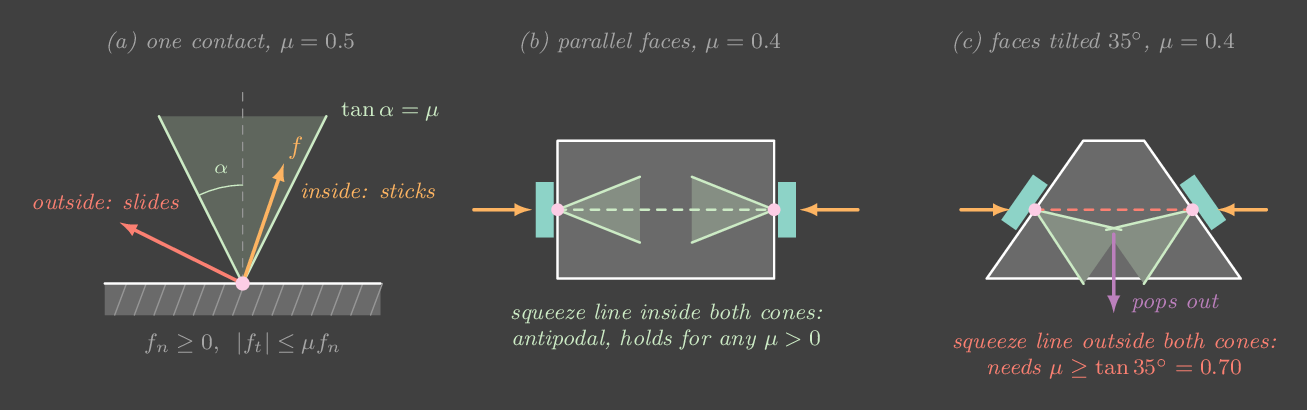
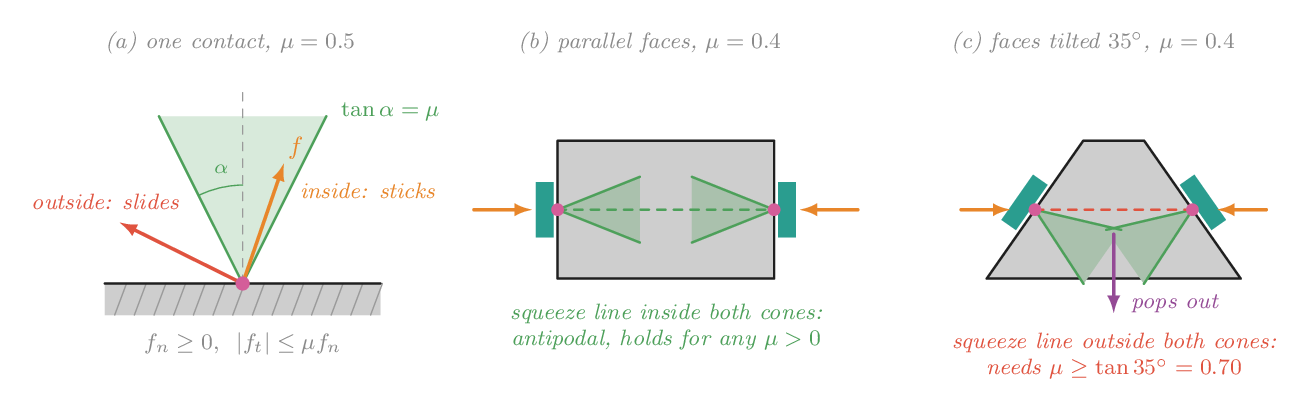
Place two fingers
Drag either finger along the object's edge. The mint wedges are the friction cones. The dashed line, the only direction the fingers can squeeze along, is mint when the grasp is antipodal and red when it isn't. With gravity on, the orange arrows are the smallest finger forces that hold the object up, from a linear program solved live.
Try this
- On the box, slide one finger up the side. The grasp stays antipodal until the line tilts past \(\arctan\mu\) (21.8° at \(\mu = 0.4\)). Watch "needs μ ≥" track the tilt.
- Press Grip straight across, then lower \(\mu\) from 0.4 to 0.2. The squeeze needed to hold the box doubles, from about 3.7 N per finger to 7.4 N. At \(\mu = 0\) nothing holds it.
- Pick the wedge. At \(\mu = 0.4\) the straight-across grip fails. Raise \(\mu\) slowly: just past 0.44 it holds, but only with an enormous squeeze, about 290 N per finger at 0.45. At 1.0 it needs 2.9 N.
- Put both fingers under the box's bottom face, either side of the centre. Gravity holds it ("squeeze to hold" is about 1.5 N each) but the grasp is not antipodal. Turn gravity off and it no longer holds anything.
Run it yourself: the antipodal test
import numpy as np
def antipodal(c1, n1, c2, n2, mu):
    """c: contact points, n: OUTWARD unit normals. True if the squeeze line
    lies inside both friction cones (two-finger force closure in the plane)."""
    alpha = np.arctan(mu)
    d = (c2 - c1) / np.linalg.norm(c2 - c1)
    ang1 = np.arccos(np.clip(d @ -n1, -1, 1))     # finger 1 pushes along +d
    ang2 = np.arccos(np.clip(-d @ -n2, -1, 1))    # finger 2 pushes along -d
    return ang1 <= alpha and ang2 <= alpha, np.tan(max(ang1, ang2))

# a wedge whose sides lean 24 degrees from vertical
tilt = np.radians(24)
n_left, n_right = np.array([-np.cos(tilt), np.sin(tilt)]), np.array([np.cos(tilt), np.sin(tilt)])
for mu in [0.4, 0.45]:
    ok, mu_needed = antipodal(np.array([-0.05, 0.0]), n_left, np.array([0.05, 0.0]), n_right, mu)
print(f"mu = {mu}: antipodal = {ok}, needs mu >= {mu_needed:.3f}")A parallel-jaw gripper keeps dropping a tapered bottle, however hard it squeezes. What is the most likely cause?
If the grasp is not antipodal, extra squeeze only adds force outside the cones, and that pushes the object out. Grip lower on the bottle where the faces are parallel, use higher-friction pads, or use softer fingers that wrap the surface.
Chapter 18 · Part V · Making motion
Trajectories and time scaling
The one ideaA path says where to go and a trajectory says when. Choosing how to move along the path in time decides the velocities, accelerations and jerks the motors must produce. Smooth time scaling is what makes a move something a controller can actually follow.
Every controller so far has chased a target \(\theta^\star\). Most of the labs stepped that target and let the controller sort it out. A step asks for an infinite velocity at one instant. No motor can deliver that, so the controller saturates, overshoots, or both. Real systems hand the controller a trajectory instead: a target that moves smoothly, together with its velocity and acceleration.
Path and time scaling
Split the problem in two. A path \(q(s)\), with \(s \in [0, 1]\), is the geometric curve, for example the straight line in joint space from \(q_0\) to \(q_1\), or the route a planner found in Chapter 19. A time scaling \(s(t)\), with \(t \in [0, T]\), says how fast to move along it. The trajectory is the composition \(q(s(t))\), and by the chain rule
For a straight-line path the second term vanishes, so the profile of \(s(t)\) becomes the profile of every joint, scaled by the distance \(\Delta\).
Polynomials from boundary conditions
Each smoothness requirement at the ends is one equation, and each equation buys one polynomial coefficient.
- Linear, \(s = \tau\), with \(\tau = t/T\). Constant velocity, but it jumps from zero to \(\Delta/T\) at the start: an impulse of acceleration.
- Cubic, \(s = 3\tau^2 - 2\tau^3\). Zero velocity at both ends (four conditions, four coefficients). Its acceleration jumps to \(6\Delta/T^2\) at the start, so its jerk is infinite there.
- Quintic, \(s = 10\tau^3 - 15\tau^4 + 6\tau^5\). Zero velocity and zero acceleration at both ends (six conditions). It is also the curve that minimizes total squared jerk, \(\int \dddot q^{\,2}\,dt\), which is why it is called minimum jerk. Human reaching movements follow it closely.
- Trapezoidal velocity: accelerate at \(a_{\max}\), cruise at \(v_{\max}\), brake. It is the fastest move under velocity and acceleration limits, which is why motor drives and CNC machines use it.
For the same duration, smoother profiles have higher peaks. For a 90° move in 0.8 s, the linear profile cruises at 113 °/s. The cubic peaks at 169 °/s and 844 °/s², the trapezoid at 150 °/s and 750 °/s², and the quintic at 211 °/s and 812 °/s². Smoothness is paid for in peak speed.
Why jerk matters
A jump in acceleration is a jump in force, and a jump in force rings every flexible part it touches: a long thin link, a belt, a gearbox, a cup of coffee on a tray. The more abruptly the force changes, the more high-frequency content it carries, and the more it excites those modes. A quintic's spectrum falls off faster than a cubic's or a trapezoid's, so it shakes the structure less in general. There is a second benefit. With a smooth reference you can feed forward the acceleration, \(\tau_{ff} = I\ddot\theta^\star\) (or \(M(q)\ddot q^\star\), as in Chapter 14), and then the feedback loop only has to correct small errors. You can't feed forward an impulse.
Through many waypoints, piecewise cubics or quintics are joined so that position, velocity and acceleration match at each junction. Those are splines. Libraries such as Ruckig or TOPP-RA go further and compute the fastest time scaling of a given path under per-joint velocity, acceleration and jerk limits.
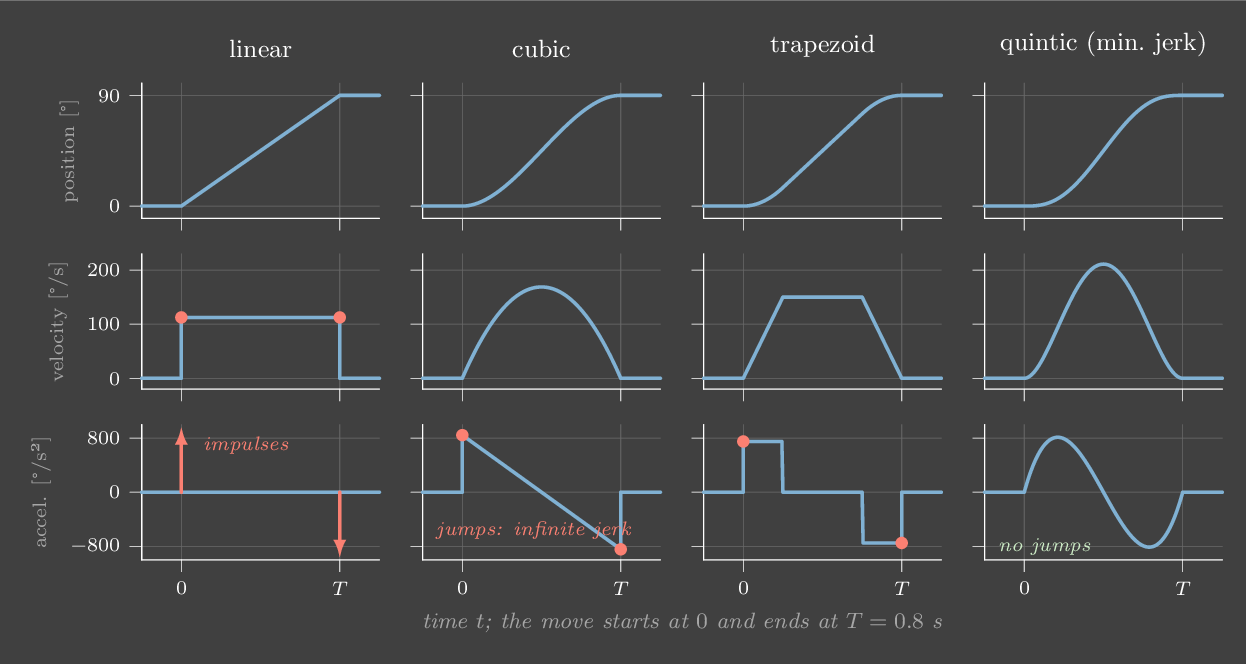
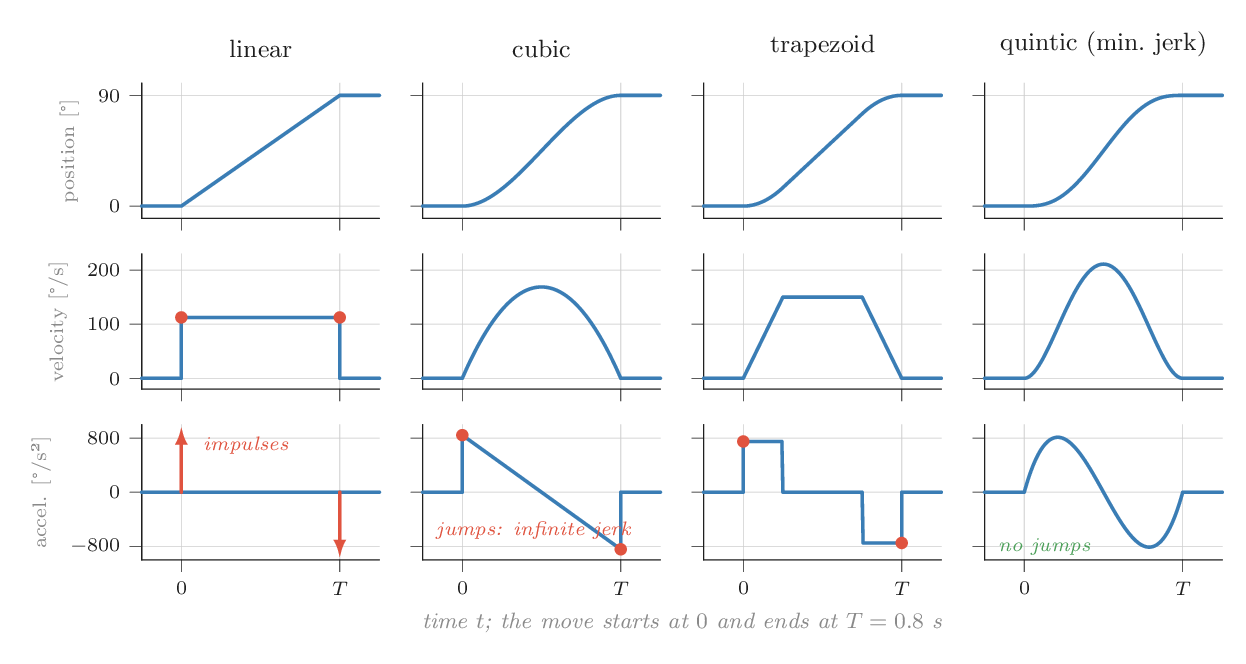
Feed a servo five kinds of move
The joint moves 30° → 120° and back, holding 1.2 s at each end. A gravity-compensated PD servo at 1 kHz follows the reference. The blue ticks around the dial mark the target every 50 ms: bunched ticks are slow, spread ticks are fast.
Try this
- Step: the 30 N·m motor saturates and the arm lags the target by the whole 90°. Linear: the velocity jump makes a torque spike of about 8 N·m beyond what gravity needs, twice the cubic's 3.7 N·m, and almost all of it from the \(K_d\) term.
- Compare cubic, trapezoid and quintic with feedforward off. All three lag by 4–5°. Quintic is slightly worse, because PD lag grows with speed and quintic has the highest peak speed.
- Turn on acceleration feedforward. Cubic, trapezoid and quintic now track to about 0.2–0.3°, while linear stays at 4.4°: its acceleration is an impulse that cannot be fed forward.
- Shorten the move to 0.4 s. Peak acceleration quadruples (it scales as \(1/T^2\)), and the torque beyond gravity climbs from about 4 to about 14 N·m. Halving a move's duration is expensive.
Run it yourself: a quintic between any two states
import numpy as np
def quintic(q0, q1, T, v0=0.0, v1=0.0, a0=0.0, a1=0.0):
    """Coefficients c of q(t) = sum c_k t^k matching position, velocity and
    acceleration at t = 0 and t = T: six conditions, six unknowns."""
    A = np.array([[1, 0, 0,    0,       0,        0],
                  [0, 1, 0,    0,       0,        0],
                  [0, 0, 2,    0,       0,        0],
                  [1, T, T**2, T**3,    T**4,     T**5],
                  [0, 1, 2*T,  3*T**2,  4*T**3,   5*T**4],
                  [0, 0, 2,    6*T,     12*T**2,  20*T**3]])
    return np.linalg.solve(A, [q0, v0, a0, q1, v1, a1])

c = quintic(np.radians(30), np.radians(120), T=0.8)
t = np.linspace(0, 0.8, 801)
vel = np.polyval(np.polyder(c[::-1]), t)
acc = np.polyval(np.polyder(c[::-1], 2), t)
print(f"peak velocity {np.degrees(abs(vel).max()):.0f} deg/s, peak acceleration {np.degrees(abs(acc).max()):.0f} deg/s^2")You halve the duration of a quintic move. By how much does its peak acceleration grow?
Peak acceleration is \(5.77\,\Delta/T^2\), so halving \(T\) multiplies it by 4. Peak velocity doubles, and peak jerk (\(60\,\Delta/T^3\)) grows eightfold. Fast moves are disproportionately expensive in torque and vibration.
Chapter 19 · Part V · Making motion
Motion planning
The one ideaPlan in configuration space, where the whole robot is a single point and every obstacle becomes a forbidden region. Collision-free motion is then a path for a point, and random sampling finds one surprisingly well.
Getting an arm from one pose to another without hitting anything sounds like geometry in the 3-D world. Every link sweeps a different volume, every obstacle is shaped differently, and the joints interact. The trick that makes the problem tractable is to stop thinking about the world.
Configuration space
A configuration is one value for every joint, \(q = (q_1, \dots, q_n)\). The set of all of them is the configuration space, or C-space. For the two-link arm it is a square: \(q_1\) across, \(q_2\) up. One point in that square is one entire pose of the arm, with every link placed. Forward kinematics (Chapter 7) maps the point to the pose.
Now colour every point of the square whose pose touches an obstacle. The coloured set is the C-obstacle. A small round obstacle in the workspace becomes a large, curved, oddly shaped blob in C-space. An obstacle near the base touches the arm for almost any \(q_2\) once \(q_1\) points at it, so it becomes a vertical band. One far out only touches the arm when the arm is stretched toward it, so it becomes a small island. The free space is everything else, and planning is now: find a curve from the start point to the goal point that stays in the free space.
Computing the C-obstacle exactly is hard in high dimensions. A 7-joint arm has a 7-D C-space, so you never build it. You only ever ask one question: is this configuration in collision? A collision checker answers it by placing the robot's geometry at \(q\) and testing it against the scene. Every planner below is built from that one query.
Sampling-based planning
A grid over a 7-D space with 100 cells per axis has \(10^{14}\) cells, far too many. Sampling-based planners skip the grid and only explore where they need to.
An RRT (rapidly-exploring random tree) grows a tree from the start:
- Sample a random configuration \(q_{\text{rand}}\). One time in ten, use the goal instead.
- Find the nearest node in the tree, and step a fixed distance \(\epsilon\) from it toward \(q_{\text{rand}}\).
- If the short edge is collision-free, add the new node. If it lands within \(\epsilon\) of the goal and can connect to it, stop.
Because the nearest node is always pulled toward random points, the tree is biased toward the large unexplored parts of the space, and it spreads out quickly. RRT is probabilistically complete: if a path exists, the chance of finding it goes to one as the samples grow. It is not optimal. The path it finds wanders, so you post-process it. Shortcutting picks two points on the path and replaces the stretch between them with a straight line whenever that line is free. A few hundred tries often remove half the path's length.
Variants follow the same pattern. RRT-Connect grows trees from both ends and tries to join them, and it is the workhorse in MoveIt. PRM (probabilistic roadmap) samples many free configurations once, connects neighbours, and reuses the graph for many queries in a static scene. RRT* rewires the tree as it grows, so its path converges to the shortest one.
Optimization-based planning
A different approach starts from a straight but colliding path and improves it. CHOMP and TrajOpt treat the path as a list of waypoints and minimize a cost: smoothness plus a penalty that pushes waypoints out of collision, using the gradient of a distance field. These planners produce smooth paths directly, but they can get stuck in a local minimum on the wrong side of an obstacle. In practice the two are combined: sample to find any path, then optimize it.
A planner returns a geometric path. To run it, you time-scale it (Chapter 18) and hand the result to a tracking controller. The lab executes its path with a quintic time scaling.
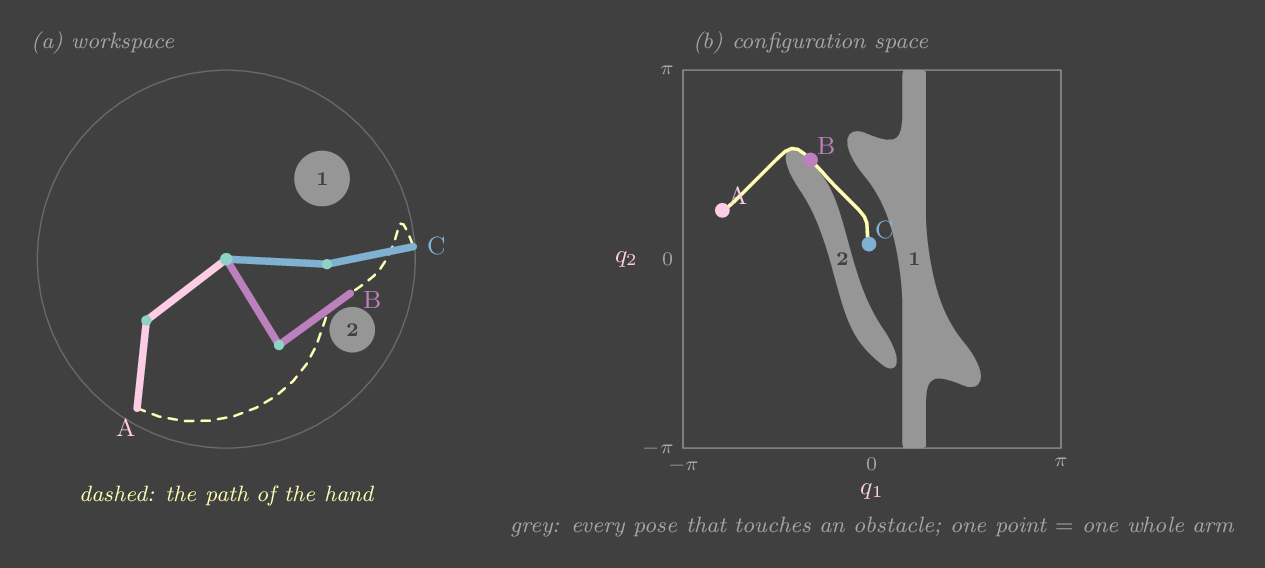
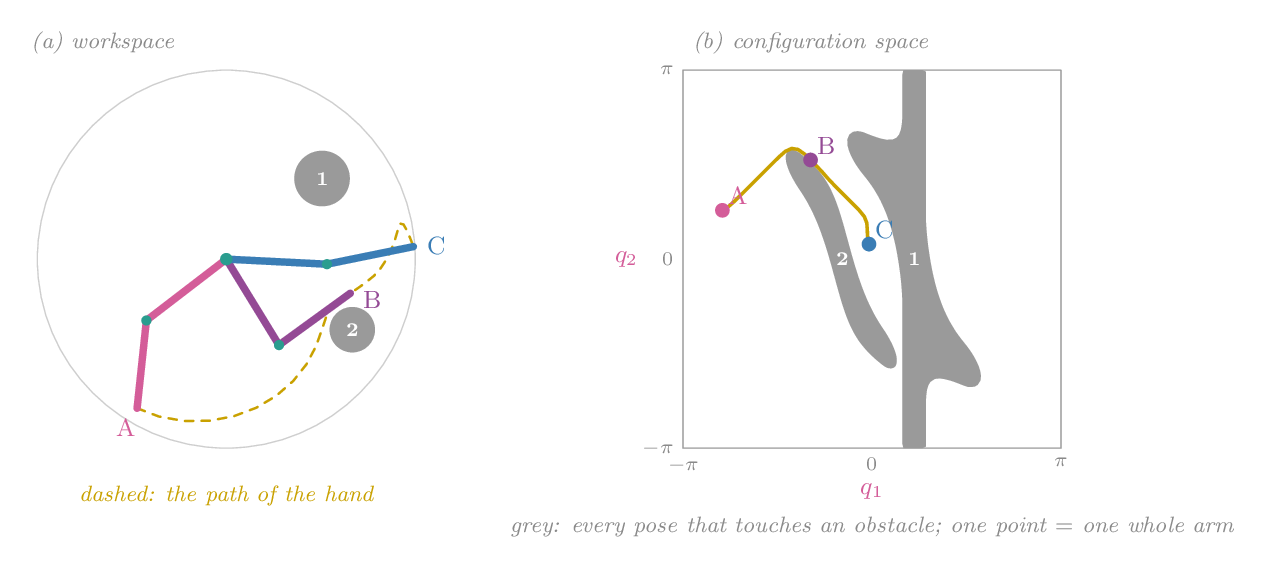
Plan in C-space, move in the world
Left: the workspace, seen from above, with three grey obstacles you can drag. Right: its C-space, where grey cells are configurations that touch an obstacle. Hover over the C-space to see that pose on the left. Drag the start (pink) or goal (blue) points. The RRT grows in grey, the path it finds is yellow (faint before shortcutting), and the arm then runs back and forth along it.
Try this
- Hover along the line from start to goal in C-space. Partway along it the ghost arm turns red: the straight move would hit obstacle 2. The planner has to go around.
- Press Plan again a few times. Different random samples find different routes, sometimes around the other side of an obstacle, with lengths from under 4 to over 6 rad. RRT finds a path, not the best one.
- Turn shortcutting off and on. The raw tree path zigzags; shortcutting typically removes a fifth to a quarter of its length and almost all of its corners.
- Drag obstacle 1 toward the base. Its C-obstacle stretches into a band across every \(q_2\): close to the base, it blocks a whole range of shoulder angles, whatever the elbow does. The joints here stop at ±180° instead of wrapping around, so a band that spans every \(q_2\) can cut the free space in two. If start and goal end up on different sides, no path exists, and the planner gives up after 20 000 samples. No sampling strategy can fix that.
- Set the step size to 0.05 rad: the tree needs a few thousand samples. At 0.6 rad it needs a few hundred. Big steps explore open space faster, but each longer edge is more likely to clip an obstacle, so in cluttered scenes they are rejected more often.
Run it yourself: an RRT in 30 lines
import numpy as np
rng = np.random.default_rng(0)
L1, L2, obstacles = 0.4, 0.35, [(0.38, 0.32, 0.11), (0.5, -0.28, 0.09), (-0.25, 0.42, 0.1)]

def seg_dist(a, b, c):
    t = np.clip(np.dot(c - a, b - a) / np.dot(b - a, b - a), 0, 1)
    return np.linalg.norm(a + t * (b - a) - c)

def collides(q):
    e = L1 * np.array([np.cos(q[0]), np.sin(q[0])])
    h = e + L2 * np.array([np.cos(q[0] + q[1]), np.sin(q[0] + q[1])])
    return any(seg_dist(np.zeros(2), e, np.array(o[:2])) < o[2] + 0.02 or
               seg_dist(e, h, np.array(o[:2])) < o[2] + 0.02 for o in obstacles)

def edge_free(a, b):
    n = max(1, int(np.ceil(np.linalg.norm(b - a) / 0.03)))
    return not any(collides(a + (b - a) * i / n) for i in range(1, n + 1))

def rrt(start, goal, step=0.15, iters=20000):
    nodes, parent = [start], [-1]
    for _ in range(iters):
        r = goal if rng.random() < 0.1 else rng.uniform(-np.pi, np.pi, 2)
        i = int(np.argmin([np.linalg.norm(n - r) for n in nodes]))
        d = r - nodes[i]
        q = nodes[i] + d * min(1, step / (np.linalg.norm(d) + 1e-12))
        if edge_free(nodes[i], q):
            nodes.append(q); parent.append(i)
            if np.linalg.norm(q - goal) < step and edge_free(q, goal):
                nodes.append(goal); parent.append(len(nodes) - 2)
                path, j = [], len(nodes) - 1
                while j >= 0: path.append(nodes[j]); j = parent[j]
                return path[::-1], len(nodes)
    return None, len(nodes)

path, n = rrt(np.array([-2.27, 0.7]), np.array([-0.19, 0.43]))
print(f"found a path with {len(path)} waypoints after growing {n} nodes")Why plan in configuration space rather than directly in the 3-D workspace?
C-obstacles are usually far more complicated shapes, and C-space can have more dimensions than the workspace (seven for a 7-DoF arm). The win is that the whole robot, with all its links, becomes one point, so a single path-finding algorithm works for any robot that has a collision checker.
Chapter 20 · Part VI · Sensing and estimation
Sensors and cameras
The one ideaA sensor never measures the state. It measures one quantity, with its own resolution, noise, bias and delay. A camera measures directions, not distances. Knowing what each sensor actually reports is the start of every estimator and every visuomotor policy.
Every controller so far has read \(\theta\) and \(\dot\theta\) as if they were simply known. On a robot they come from sensors, and each sensor has a specific way of being wrong. This chapter goes through the sensors a manipulator learner meets, from the joint outward.
Joint encoders
An encoder reports a joint angle as an integer count. Incremental encoders (optical discs with two offset tracks, called quadrature) count edges as the shaft turns. They are very precise, but they only know relative motion, so the robot must find a home switch at power-on. Absolute encoders read a coded disc or a magnet's field direction and know the angle immediately. Each SO-101 servo has a 12-bit magnetic absolute encoder: 4096 counts per turn, or 0.088° per count.
Quantization looks harmless. It isn't once you differentiate. If the angle is only known to within one count and you sample at 200 Hz, a finite-difference velocity jumps in steps of \(0.0015 / 0.005 = 0.31\) rad/s. A second difference for acceleration jumps in steps of 61 rad/s². That is why servos smooth velocity before using it in the \(K_d\) term (Chapter 27), and why Chapter 22 spends a whole section on differentiating carefully.
IMUs, force sensors and current
An IMU combines a gyroscope (angular rate) and an accelerometer (specific force). Integrating the gyroscope gives orientation that drifts, because a small constant bias of a few tenths of a degree per second integrates into a large angle error. The accelerometer measures gravity plus acceleration, so it gives a drift-free but noisy tilt when the body is not accelerating. Fusing the two is the first filter in Chapter 21.
Force/torque sensors sit at the wrist and measure all six components of the contact wrench with strain gauges. They are what impedance and force control (Chapter 15, Chapter 16) would like to feed back. Most low-cost arms have none. Instead they estimate torque from motor current, \(\tau \approx N k_t i\) for gear ratio \(N\) and torque constant \(k_t\) (Chapter 12). Gearbox friction blurs that estimate badly, by easily 10–30% of the reading on a small servo.
The pinhole camera
A camera is the robot-learning sensor. The pinhole model says each 3-D point travels in a straight line through one point, the optical centre, and lands on an image plane at focal distance \(f\). By similar triangles, a point at depth \(Z\) and height \(Y\) lands at \(y = fY/Z\). In pixels, with the principal point \((c_x, c_y)\) where the optical axis hits the sensor:
The extrinsics \([R\,|\,\bm t]\) are the transform from the world frame to the camera frame (Chapter 6). The intrinsics \(K\) describe the lens and sensor. The \(\simeq\) means "equal up to scale". You divide by the third component, which is the depth \(Z\), and the division is where depth disappears. Every point on a ray through the optical centre lands on the same pixel. One image gives you a direction to each point but not its distance.
Real lenses bend straight lines, worst near the image edges. The common model scales the normalized coordinates by \(1 + k_1 r^2 + k_2 r^4\), where \(r\) is the distance from the image centre. Calibration recovers \(K\) and the \(k_i\) by photographing a checkerboard of known square size from many angles and fitting the model to the detected corners (Zhang's method, in OpenCV as calibrateCamera).
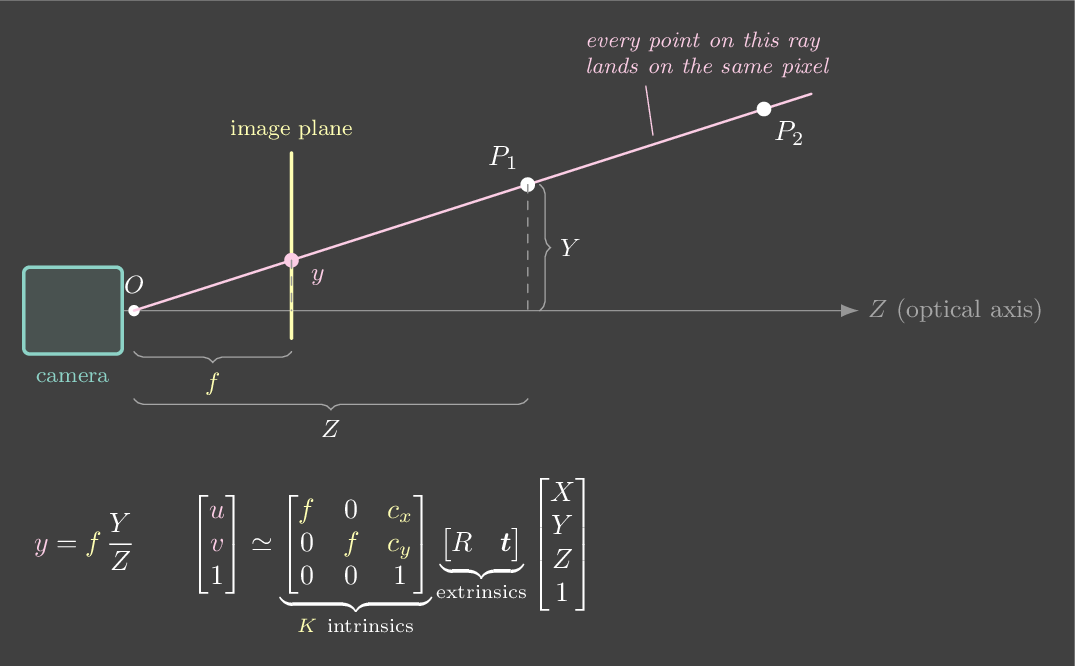
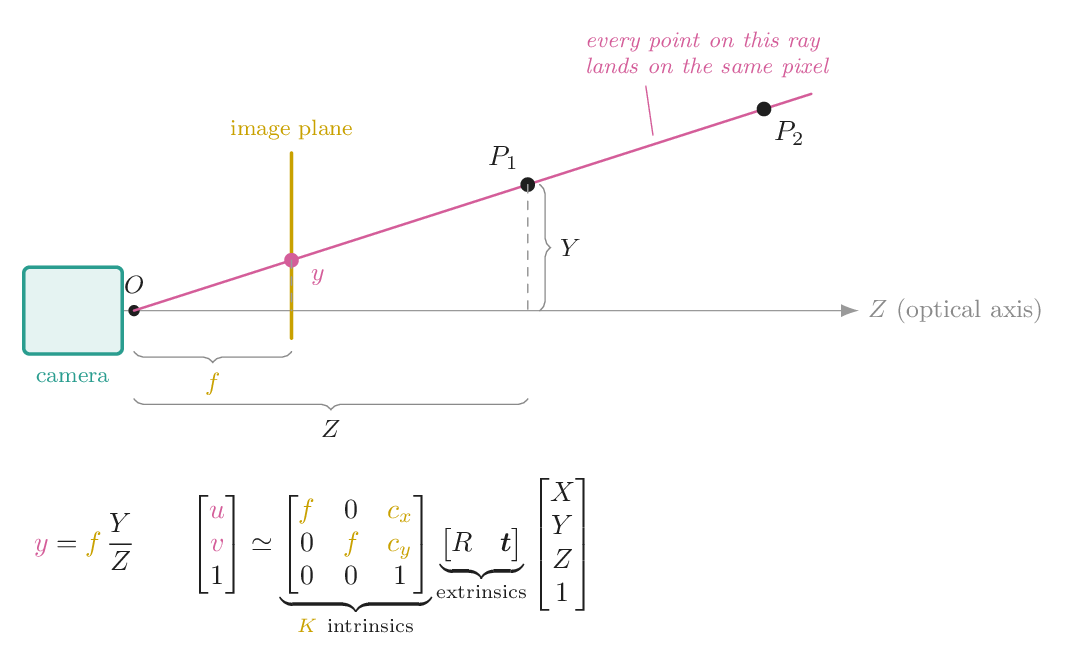
Where the camera is: hand–eye calibration
To act on what a camera sees, the robot needs the camera's pose in its own frames. A wrist camera (eye-in-hand) is rigidly attached to the gripper, so you need the fixed transform \(X\) from gripper to camera. A third-person camera (eye-to-hand) is fixed in the room, and you need its pose in the robot base frame. Either way, the robot moves to several poses while the camera watches a calibration target. Each pair of motions gives one equation \(AX = XB\): \(A\) is the gripper's motion from forward kinematics (Chapter 7), \(B\) is the camera's motion from the target, and \(X\) is the unknown. OpenCV's calibrateHandEye solves it.
Depth cameras recover the missing \(Z\) in one of three ways. Stereo matches pixels between two cameras a baseline \(b\) apart and uses \(Z = fb/d\), where \(d\) is the disparity. Structured light projects a known pattern. Time of flight times a light pulse. Stereo error grows with distance squared, \(\delta Z = Z^2\,\delta d/(fb)\), so a sensor that is millimetre-accurate at 30 cm is centimetre-noisy at 1.5 m.
Last, every sensor has a timestamp, and the timestamps disagree. A 30 Hz camera image is 30–100 ms old by the time a policy sees it, while joint readings are a few milliseconds old. If the robot moves at 0.5 m/s, a 60 ms mismatch puts the image 3 cm behind the arm.
A pinhole camera on a table
Left, the scene from above: a 10 cm cube on a checkerboard of 6 cm squares, and the camera's field of view. Right, what the camera sees. Click the image to cast that pixel's ray back into the scene. The pink dots on the ray are all points that land on that pixel.
Try this
- The lab opens with a ray through a top corner of the cube. Follow it in the top view: the corner, a point in mid-air and a point on the floor behind it all project to that one pixel.
- Double the focal length from 600 to 1200 px. The cube doubles in size and the field of view narrows from 56° to 30°. Same as moving closer? Not quite. Tick "keep the cube the same size" and change the distance. The cube stays put, but the checkerboard's perspective stretches or flattens. That is the "dolly zoom".
- Read "1 pixel at that depth": about 1.3 mm at 0.8 m with \(f = 600\). Move the camera to 2 m. A one-pixel detection error is now 3.3 mm sideways.
- Set \(k_1 = -0.3\) (barrel distortion). The checkerboard's straight edges bow outward, mostly near the image corners. A model that assumes straight lines would misplace objects near the edges.
Run it yourself: project and back-project with NumPy
import numpy as np
K = np.array([[600., 0, 320], [0, 600., 240], [0, 0, 1]])
# camera 0.8 m in front of the origin, looking along world +y, z up
R = np.array([[1., 0, 0], [0, 0, -1], [0, 1, 0]])   # rows: camera x, y, z in world coords
C = np.array([0., -0.8, 0.05]);  t = -R @ C
def project(X):                     # world point -> pixel
    p = K @ (R @ X + t)
    return p[:2] / p[2]
def backproject(u, v):              # pixel -> world ray (origin, direction)
    d = R.T @ np.linalg.solve(K, [u, v, 1.0])
    return C, d / np.linalg.norm(d)
X = np.array([0.05, 0.0, 0.10])
uv = project(X); print(uv)                          # [357.5 202.5]
o, d = backproject(*uv)
for s in [0.5, 0.8, 1.5]: print(project(o + s * d)) # same pixel at any depthA single calibrated camera sees a pixel on a red ball. What do you know about the ball?
Projection divides by depth, so every point on a ray through the optical centre maps to the same pixel. Recovering depth needs another view (stereo), a depth sensor, or prior knowledge such as the ball's real size or that it rests on the table.
Chapter 21 · Part VI · Sensing and estimation
Filtering and state estimation
The one ideaA good estimate combines a prediction from a model with a noisy measurement, and weights each by how much you trust it. The Kalman filter does exactly that, keeping a mean and an uncertainty, and it gives you velocity, which no sensor measured.
A controller needs the state: position and velocity, now. Sensors give something else. Readings are noisy (Chapter 20), they arrive late or not at all, and usually only position is measured. Estimation is the step that turns readings into a usable state.
Averaging, and why it lags
The obvious fix for noise is to average. A moving average over the last \(N\) readings divides the noise variance by \(N\). But it describes where the object was on average over the window, which is \((N-1)\Delta t/2\) in the past. At 50 Hz a 10-sample window lags by 90 ms. For anything that moves, that lag is a systematic error. Make the window longer and the noise falls while the lag grows, until the lag dominates. Every low-pass filter makes this trade between noise and lag, because it doesn't know how the object moves.
Fusing two imperfect sensors
The IMU tilt problem shows the way out. A gyroscope gives tilt rate \(\omega\) with little noise but a slowly drifting bias. An accelerometer gives tilt directly from gravity's direction, without drift but with a lot of noise. The complementary filter uses the gyro for fast changes and the accelerometer to pull back the slow drift:
The first term is a prediction from a model: integrate the rate. The second is a correction from a measurement. The constant \(\alpha\) says how much to trust each. The Kalman filter keeps this structure but computes the weight from the uncertainties.
The Kalman filter, from Bayes
Track a cart on a rail. Its state is \(x = [p,\ v]\). Over one step \(\Delta t\) it moves according to a constant-velocity model, plus an unknown acceleration we treat as white noise:
That is the predict step. The belief is a Gaussian with mean \(\hat x\) and covariance \(P\). Pushing it through the motion model moves the mean, and \(Q\) widens the covariance because the cart might have accelerated. Then a reading \(z = p + \text{noise}\) arrives, with noise variance \(R\). By Bayes' rule the new belief is the product of two Gaussians, the prediction and the likelihood of the reading, and the product of two Gaussians is again Gaussian:
with \(H = [1,\ 0]\), since we measure position only. In one dimension the gain is \(\sigma^2_{\text{pred}}/(\sigma^2_{\text{pred}} + \sigma_z^2)\): the share of the surprise \(z - \hat p\) you believe. A sure prediction means a small gain. A sure sensor means a gain near 1. The velocity row of \(K\) is where velocity comes from. A position surprise that keeps having the same sign means the velocity estimate is wrong, and the filter corrects it, without ever differencing two noisy readings.
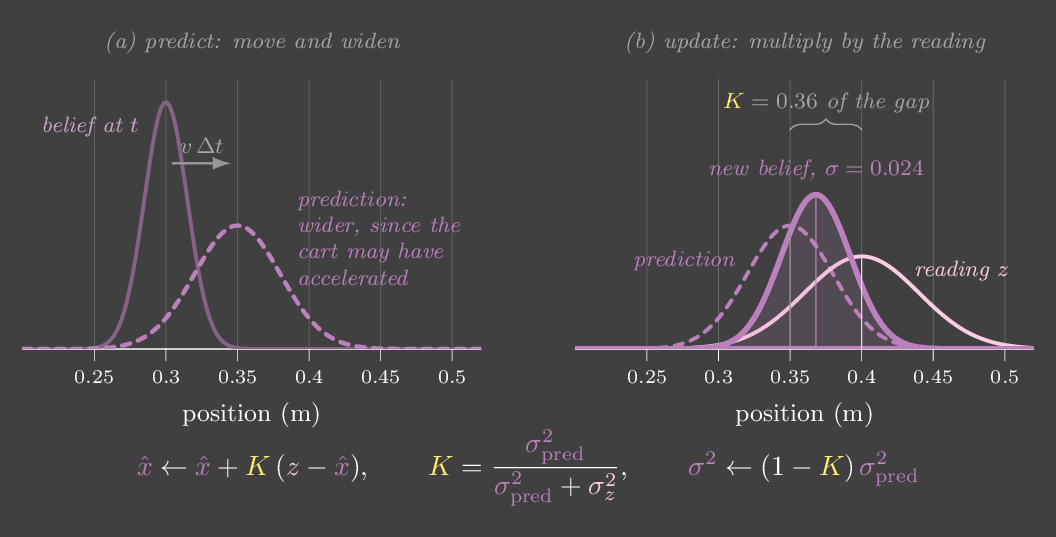
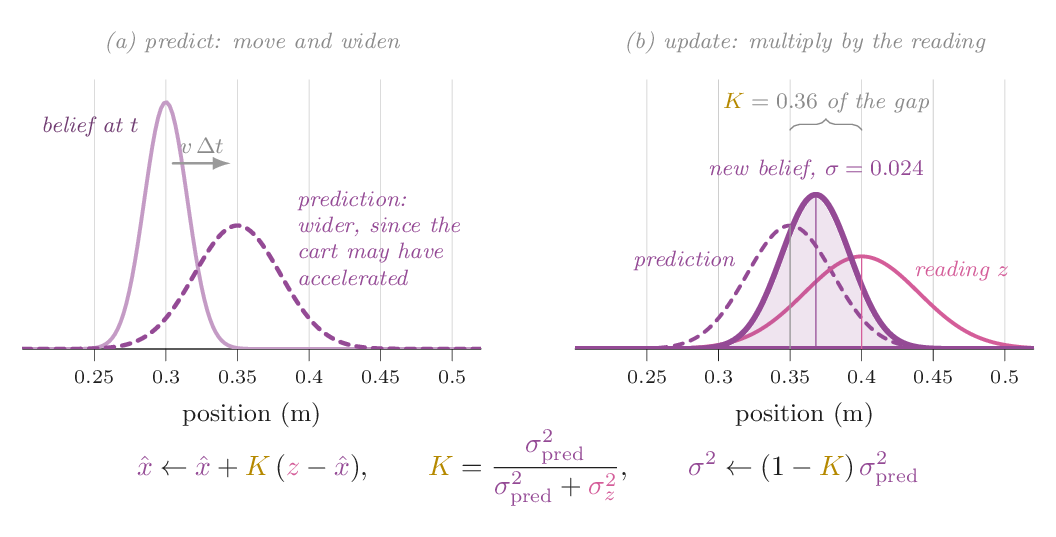
Two knobs set the behaviour. \(Q\) says how much the cart might accelerate, and \(R\) says how noisy the sensor is. Their ratio sets the gain, so it sets how quickly the estimate follows. Their absolute size sets the reported uncertainty \(P\). Get the ratio wrong and the estimate lags or chatters. Get the scale wrong and the estimate is fine but its error bars lie. When readings drop out, you simply skip the update: the prediction carries on and \(P\) grows until the next reading arrives.
For nonlinear models, such as a pendulum's \(\sin\theta\) or a camera's projection, the extended Kalman filter linearizes the model around the current estimate at every step, using its Jacobian, and then runs the same equations. The unscented filter and particle filters handle stronger nonlinearity at more cost.
Track a cart through noise
A cart is pushed by random forces. A 50 Hz sensor reads its position with noise (pink dots). The moving average (mint) and the Kalman filter (violet, with its ±2σ band) both try to recover position, and the Kalman filter also estimates velocity. The readout shows errors over the last 10 s.
Try this
- At the defaults, compare the position errors. Raw is about 5 cm, the moving average 3–4 cm and Kalman about 2 cm. The velocity gap is far larger: differencing the readings gives errors over 3 m/s, while the filter's error is under 0.2 m/s.
- Set the moving-average window to 40. The mint line goes smooth but trails behind every turn, and its error roughly triples. Set it to 1 and it is just the raw reading.
- Drop \(Q\) to 0.003. The filter now believes the cart barely accelerates: it lags, and its band no longer covers the truth (it is overconfident). Raise \(Q\) to 300 and it chases the noise, with velocity error around 1.4 m/s.
- Multiply \(Q\) and \(R\) by the same factor, say \(Q = 30\) and \(R = 0.25\). The estimate is identical, because the gain only depends on the ratio, but the ±2σ band balloons. Uncertainty is only meaningful if \(R\) is the sensor's real variance.
- Tick "lose half the readings". Kalman predicts through the gaps (watch the band breathe) and stays near 3 cm, while the moving average degrades to about 6 cm.
Run it yourself: a constant-velocity Kalman filter
import numpy as np
rng = np.random.default_rng(0)
dt, q, r = 0.02, 0.3, 0.05**2
F = np.array([[1, dt], [0, 1]]); H = np.array([[1.0, 0.0]])
Q = q * np.array([[dt**3 / 3, dt**2 / 2], [dt**2 / 2, dt]])
x_true = np.zeros(2); x = np.zeros(2); P = np.eye(2)
err, raw = [], []
for k in range(2000):
    x_true = F @ x_true + [0, rng.normal(0, np.sqrt(q * dt))]   # random acceleration
    z = x_true[0] + rng.normal(0, np.sqrt(r))
    raw.append(z - x_true[0])
    x = F @ x; P = F @ P @ F.T + Q                      # predict
    S = H @ P @ H.T + r; K = P @ H.T / S                # gain
    x = x + (K * (z - H @ x)).ravel(); P = (np.eye(2) - K @ H) @ P   # update
    err.append(x - x_true)
print("raw reading error:", np.sqrt(np.mean(np.square(raw))))          # ~0.050 m
print("Kalman position, velocity error:", np.sqrt(np.mean(np.square(err), axis=0)))Your Kalman estimate lags behind the real motion every time it turns. What should you change?
Lag means the filter trusts its constant-velocity prediction too much. A larger \(Q/R\) raises the gain, so each reading moves the estimate further. Pre-averaging would add more lag on top.
Chapter 22 · Part VI · Sensing and estimation
System identification
The one ideaRobot dynamics are linear in the physical parameters, so you can measure the parameters with ordinary least squares. The hard part is not the regression. It is collecting motion rich enough that every parameter actually shows up in the data.
Gravity compensation (Chapter 13) and computed torque (Chapter 14) both need a model: masses, inertias, friction. CAD files give you guesses that are often 20% off, and they know nothing about friction or the motor's rotor inertia. System identification measures these numbers from the robot itself.
Dynamics are linear in the parameters
Write our pendulum joint with friction. The real joint has a rotor and a gearbox, so add viscous friction \(b\dot\theta\) and Coulomb friction \(f_c\operatorname{sgn}\dot\theta\), a constant drag that flips with direction:
The motion terms are nonlinear in \(\theta\), but the equation is linear in the parameters \(\bm p = [I,\ b,\ f_c,\ a]\). Every logged sample gives one row of a regression, \(\tau_k = Y_k\,\bm p\), with features \(Y_k = [\ddot\theta_k,\ \dot\theta_k,\ \operatorname{sgn}\dot\theta_k,\ \sin\theta_k]\). Stack \(N\) samples and solve:
This is not special to one joint. For a full arm the manipulator equation is linear in ten inertial parameters per link: mass, the three first moments \(m\bm c\), and the six inertia-tensor entries. Friction adds a few more. Some combinations never affect the torques, such as the inertia of a link about an axis it cannot rotate around. Those are dropped, and what remains are the base parameters, which least squares can estimate.
Excitation: the data must move
The covariance formula says how good the estimate can be: the noise \(\sigma^2\) times \((Y^\top Y)^{-1}\). If a column of \(Y\) is tiny, or nearly a copy of another column, \(Y^\top Y\) is nearly singular and that parameter's variance explodes. Concretely, a slow, small motion has \(\ddot\theta \approx 0\). The inertia column is all zeros up to noise, so no amount of data can tell you \(I\). The motion must persistently excite every term: accelerate hard for inertia, move at several speeds in both directions to separate viscous from Coulomb friction, and visit many angles for gravity. Industrial practice optimizes the excitation trajectory itself, often as a sum of sines, to make \(Y^\top Y\) well conditioned.
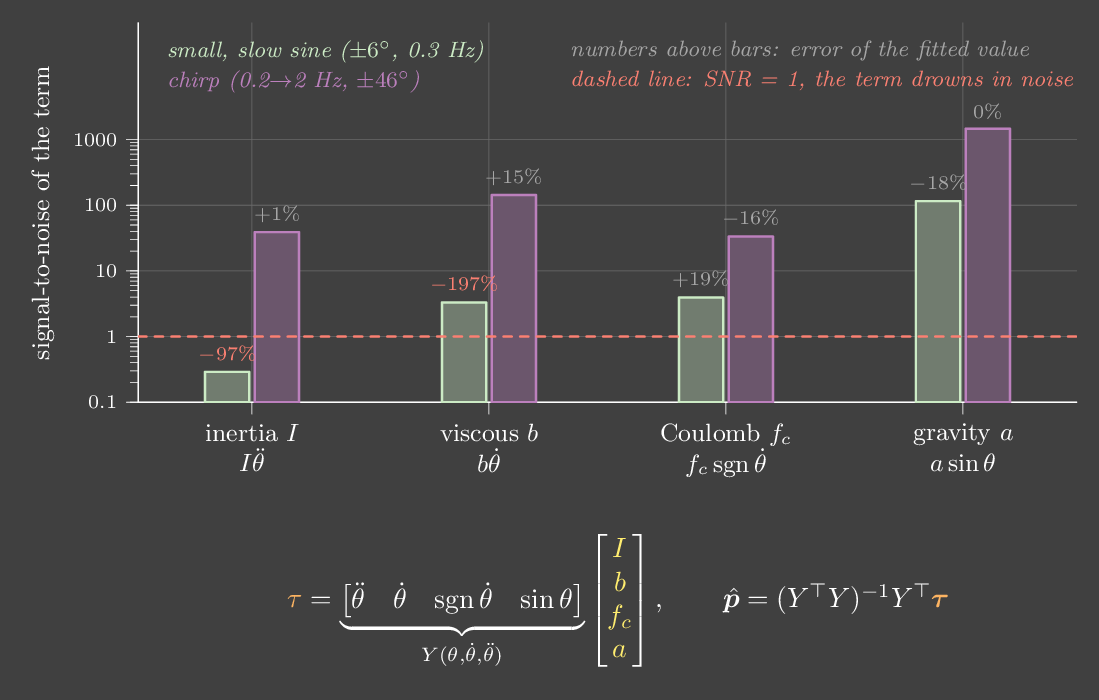
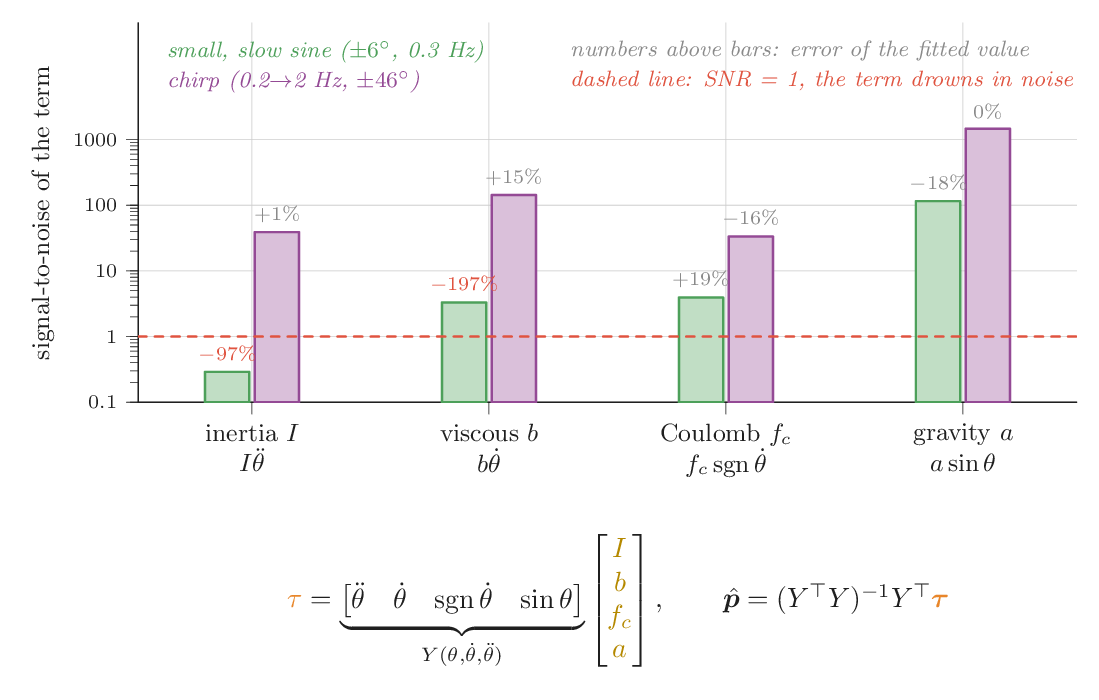
Differentiate carefully
You log \(\theta\) from the encoder and \(\tau\) from the motor current or the command. \(\dot\theta\) and \(\ddot\theta\) you have to compute, and differentiating amplifies noise (Chapter 20). One count of quantization at 200 Hz is 61 rad/s² of noise in a raw second difference, more than most real accelerations. The cure is to smooth before differentiating, for example by fitting a local polynomial to a short window of samples (a Savitzky–Golay filter). The window must still be fast compared with the motion you want to keep. Apply the same filter to the torque as well. Because the model is linear, filtering both sides keeps \(F(\tau) = F(Y)\,\bm p\) exact. Filter only one side and you introduce a bias.
Noise in \(Y\) itself causes a second, subtler problem. Least squares assumes the features are exact. Noisy \(\ddot\theta\) features bias \(\hat I\) toward zero, a regression-dilution effect you will see in the lab when smoothing is off.
Validate on motion you did not fit
A low residual on the training data proves little: with four free parameters, a fit can soak up noise. The test is prediction on a different motion. Predict the torque the identified model needs for a new trajectory and compare it with what was measured. Then use it: put \(\hat a\sin\theta\) into the gravity term of Chapter 13, or \(\hat I\) and the friction terms into computed torque (Chapter 14). The tracking error tells you whether the model is good enough for the job.
Identify a joint you can't see inside
A joint with hidden parameters is driven by PD along an excitation for 8 s, logging a 12-bit encoder and noisy torque at 200 Hz. At the end it fits \(\hat{\bm p}\) by least squares. Then it runs a different 4 s motion: the yellow dashed line is the torque the fitted model predicts, and orange is what was measured.
Try this
- With the chirp, all four estimates land close to the truth. Inertia and gravity are within a few percent. Viscous and Coulomb friction are off by about 15%, in opposite directions. Why opposite? Both resist motion in the direction of travel, so the data can partly trade one for the other.
- Untick smoothing. The fit collapses: \(\hat I\) shrinks toward zero and \(\hat a\) can even turn negative, and the validation error jumps from about 0.4 to over 10 N·m. Differentiating raw encoder counts twice is mostly noise.
- Choose the small, slow sine. The fit residual looks excellent, under 0.1 N·m, but \(\hat I\) is nearly zero and validation fails badly. Look at "peak |θ̈|": about 5 rad/s², against 160 for the chirp. A good training fit with bad validation is overfitting.
- Return to the chirp and raise the encoder noise to 4 ticks. The estimates degrade gracefully, because a rich excitation leaves margin for noise.
Run it yourself: least-squares identification
import numpy as np
from scipy.signal import savgol_filter
I, b, fc, a = 0.27, 0.08, 0.15, 5.15                 # the "unknown" joint
dt, h = 0.005, 0.0005
rng = np.random.default_rng(0)
th, om, log = 0.0, 0.0, []
for k in range(int(8 / h)):                          # 8 s chirp under PD
    t = k * h
    if k % int(dt / h) == 0:
        ref = 0.5 + 0.8 * np.sin(2 * np.pi * (0.2 * t + 1.8 * t * t / 16))
        tau = 60 * (ref - th) - 3 * om + 5 * np.sin(th)
        tick = 2 * np.pi / 4096
        log.append((np.round((th + tick * rng.normal()) / tick) * tick, tau + 0.05 * rng.normal()))
    om += (tau - b * om - fc * np.tanh(om / 0.01) - a * np.sin(th)) / I * h
    th += om * h
q, tau = np.array(log).T
tau = 0.5 * (tau + np.roll(tau, 1))                  # torque is held between samples
S = lambda x, d=0: savgol_filter(x, 17, 3, deriv=d, delta=dt)
v = S(q, 1)
Y = np.c_[S(q, 2), v, S(np.tanh(v / 0.02)), S(np.sin(q))][20:-20]
p, *_ = np.linalg.lstsq(Y, S(tau)[20:-20], rcond=None)
print(dict(zip(["I", "b", "fc", "a"], p.round(3).tolist()))) # close to 0.27, 0.08, 0.15, 5.15Your identified inertia is wildly off but the fit residual is tiny. Most likely?
If \(\ddot\theta\) is near zero, the inertia column of \(Y\) is near zero and any value of \(I\) fits equally well. More of the same data doesn't help. A motion that accelerates does.
Chapter 23 · Part VII · Optimize, plan, learn
LQR: gains from a cost
The one ideaStop hand-tuning. Write down what you care about as a quadratic cost, and the optimal feedback gains fall out of the Bellman equation with a quadratic value function. This is where control and reinforcement learning become the same subject.
Hand-tuning works for one joint. It falls apart for systems where a single input must manage several things at once. Take the cart-pole: you push a cart left and right to balance a pole on top. There is one force, four state variables (cart position, pole angle and both velocities), and the state variables fight each other. To move the cart right you must first push left, so that the pole tips right and you can drive underneath it. No sensible PD on the angle alone does this.
So we optimize. Linearize the dynamics around upright, \(x_{t+1} = Ax_t + Bu_t\), and choose a cost that says what matters:
\(Q\) says how much you dislike being away from the goal in each state direction, and \(R\) says how much you dislike using effort. Now write the Bellman equation for the optimal cost-to-go \(V\):
Guess that \(V\) is quadratic, \(V(x) = x^\top P x\). Then the bracket is quadratic in \(u\), so set its gradient to zero:
Substitute back and require both sides to match for every \(x\). That gives the discrete Riccati equation, \(P = Q + A^\top P A - A^\top P B (R + B^\top P B)^{-1} B^\top P A\). Iterate it to a fixed point, which is value iteration restricted to quadratic functions, and you get \(P\) and \(K\). The guess was self-consistent, so it was right. The optimal policy for a linear system with quadratic cost is linear state feedback, \(u = -Kx\). It is PD in disguise, a gain on every position and every velocity, with the gains chosen by the cost.
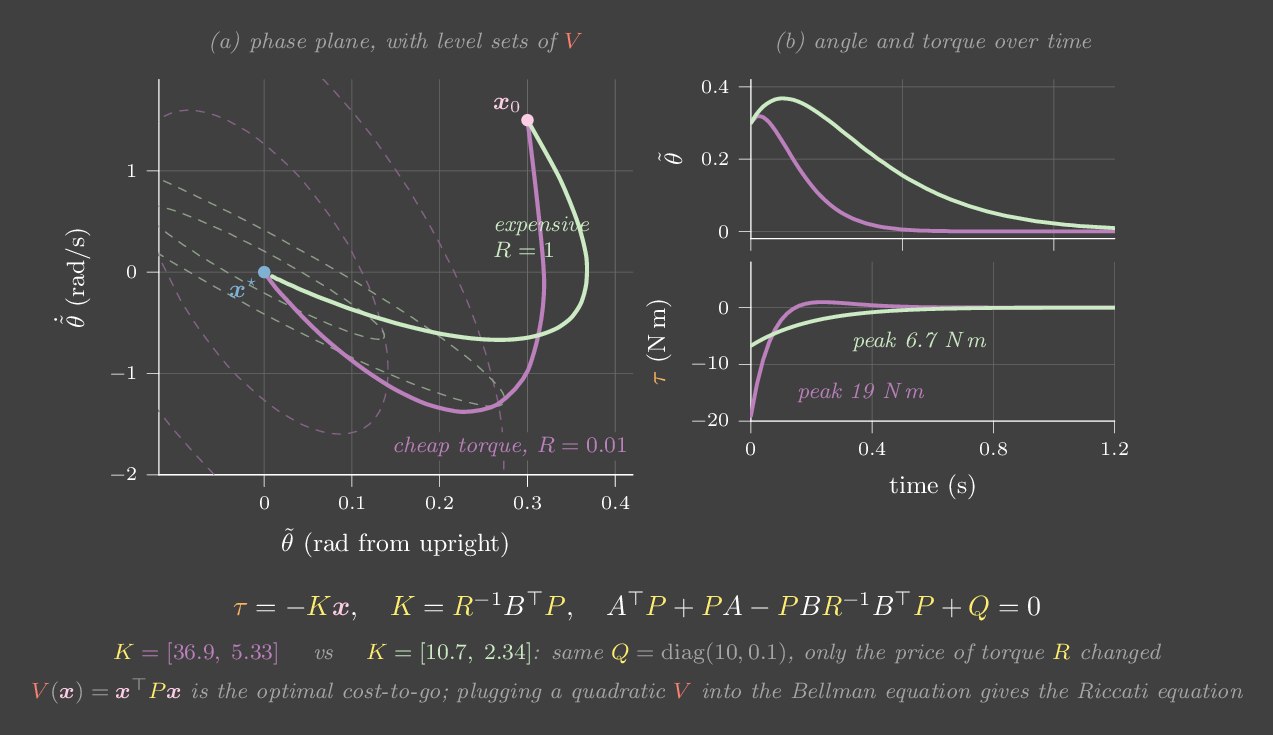
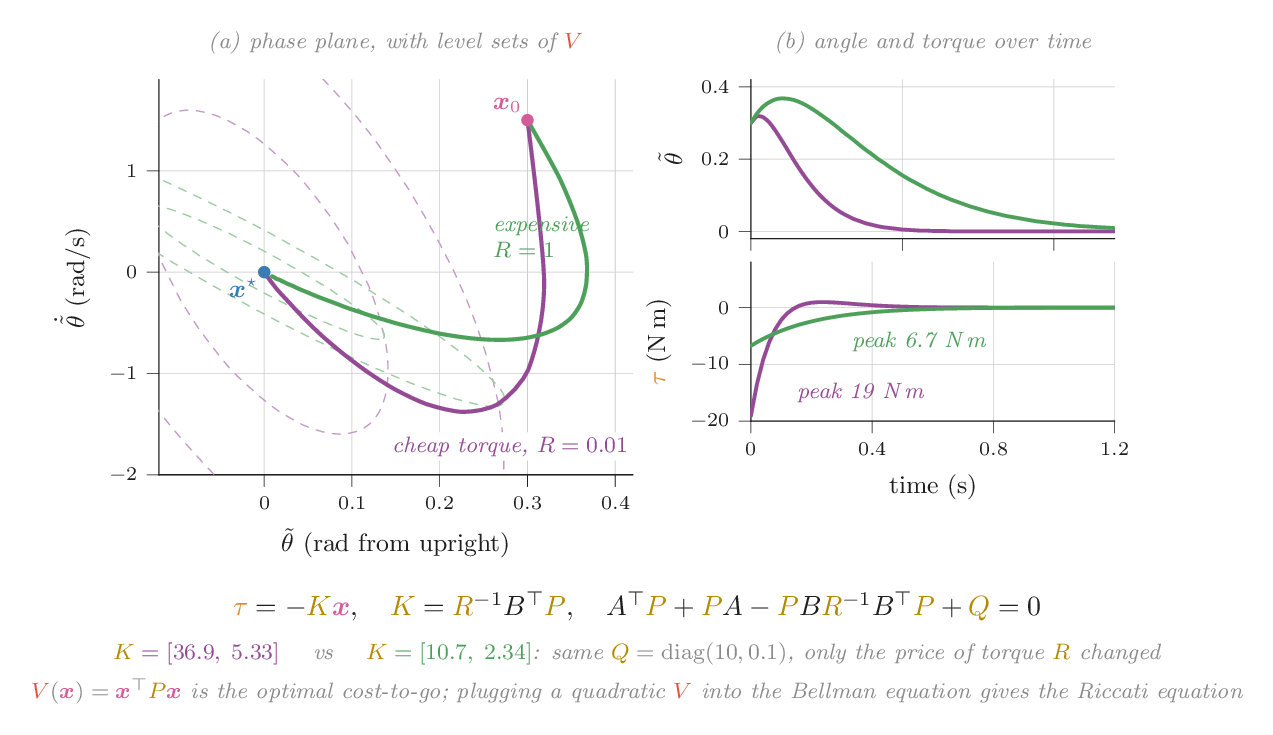
Balance a cart-pole with three numbers
The gains are recomputed by iterating the Riccati equation every time you move a weight. The readout shows \(K\).
Try this
- Press Push and watch closely. To recentre, the cart first moves the wrong way. Nobody programmed that; it is what minimizing the cost looks like.
- Make effort cheap (\(R = 0.001\)): gains jump and recovery is violent. Make it expensive (\(R = 5\)): recovery is lazy and the cart wanders far.
- Set the cart-position weight to 0.01. The pole stays balanced but the cart barely cares where it is. That is exactly what you asked for.
- Switch to PD on the pole angle only. The pole stays up for a while, but nothing manages the cart, which drifts into a wall.
Run it yourself: LQR with SciPy
import numpy as np
from scipy.linalg import solve_continuous_are
mc, mp, l, g = 1.0, 0.3, 0.6, 9.81
# cart-pole linearized about upright; state x = [x, phi, xdot, phidot]
A = np.array([[0, 0, 1, 0],
              [0, 0, 0, 1],
              [0, mp*g/mc, 0, 0],
              [0, (mc+mp)*g/(l*mc), 0, 0]])
B = np.array([[0], [0], [1/mc], [1/(l*mc)]])
Q, R = np.diag([1, 10, 1, 1]), np.array([[0.1]])
P = solve_continuous_are(A, B, Q, R)
K = np.linalg.solve(R, B.T @ P)          # u = -K x
print(K.round(2), np.linalg.eigvals(A - B @ K).round(2)) # all real parts < 0You increase \(R\) tenfold. What happens to the gains \(K\)?
Only the ratio of \(Q\) to \(R\) matters. Raising \(R\) makes force expensive relative to error, so the optimal policy acts more gently. Its gains drop and its response slows.
Chapter 24 · Part VII · Optimize, plan, learn
MPC: plan, act, replan
The one ideaUse a model to plan a short trajectory, execute only the first action, then plan again from wherever you actually ended up. Replanning turns a plan into feedback. This is what planning with a learned world model is.
LQR gives a fixed linear policy, which is ideal near one operating point. It knows nothing about torque limits, obstacles or far-away states where the linearization is wrong. Take a weak motor that can give only 2 N·m, against a pendulum whose gravity torque reaches 4.9 N·m. No direct path gets it upright. It must swing back and forth, pumping energy in, and then catch the pendulum at the top. No linear gain does that.
Model predictive control solves a fresh optimization problem at every control step:
It executes \(u_0\), measures the new state, shifts the plan by one step and solves again. Each plan is open loop, but the sequence of plans is closed loop: every new plan starts from the measured state. A push, or a model error, just becomes a different starting point next time.
The solver can be anything that minimizes the cost. The lab uses one of the simplest, MPPI (model predictive path integral control). It samples dozens of noisy variations of the current plan, rolls each through the model, and averages them with weights \(\propto e^{-\text{cost}/\lambda}\), so cheap futures count more. It needs no gradients and no linearization, only the ability to simulate.
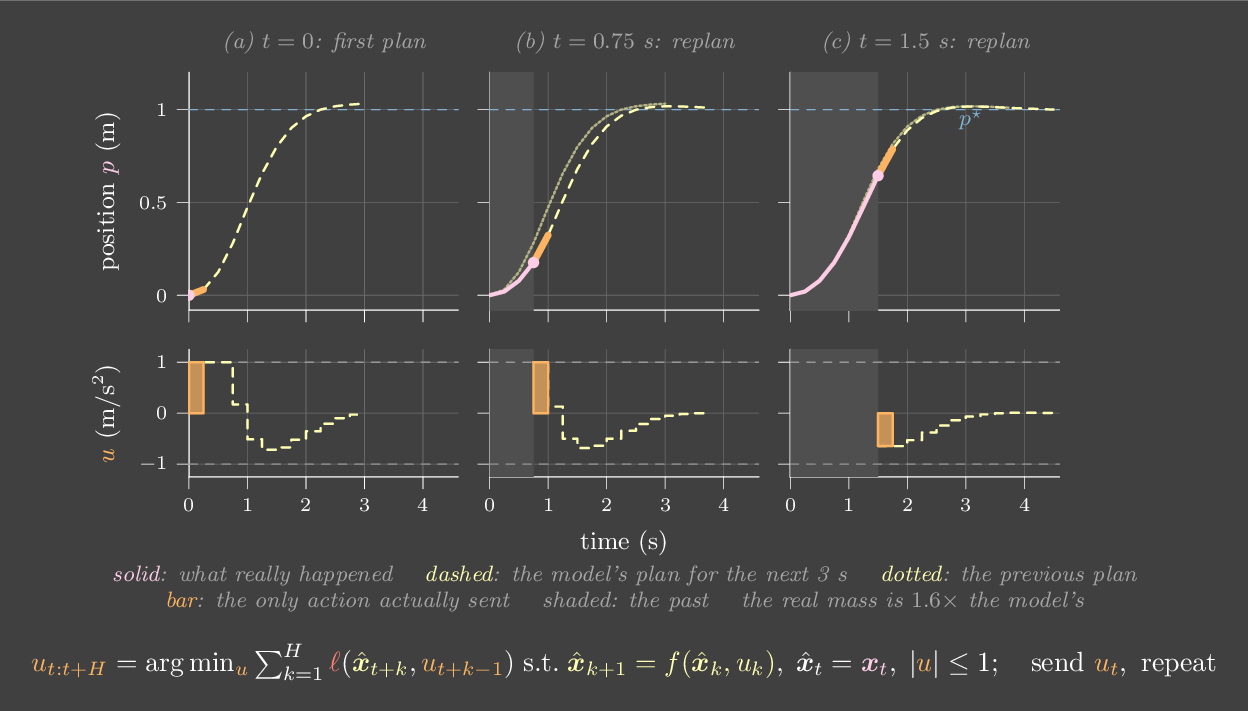
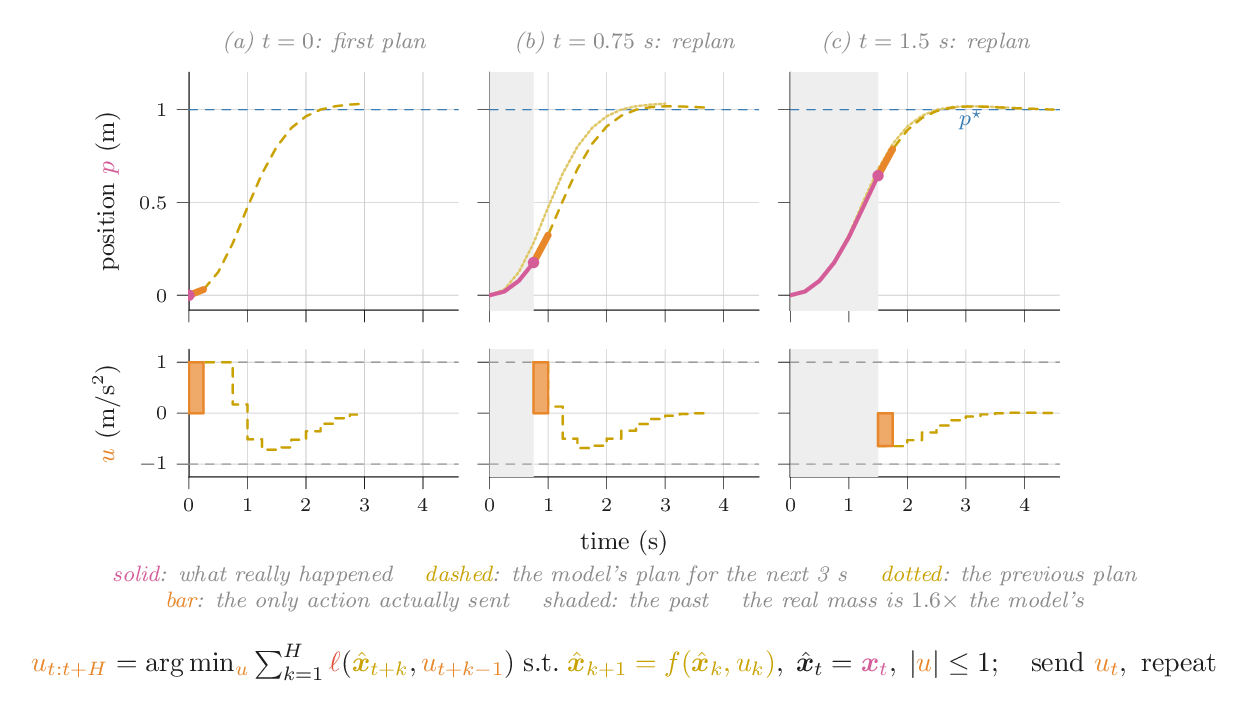
Swing up a pendulum with a weak motor
Grey fans are the sampled futures the planner imagined this step, and the dashed yellow line is the plan it settled on. In the plot, the dashed line continues to the right of "now": that is the plan's prediction.
Try this
- Watch it pump: two or three swings, then a catch at the top. Press Push once it is balanced. It recovers, or swings around once and catches again.
- Shorten the horizon to about 12 steps (0.24 s). The planner can no longer see that swinging away now leads to the top later, so it gets greedy and stalls.
- Make the model wrong: model mass 0.8 kg. MPC still works, because each replan corrects for what the model got wrong.
- Switch to "plan once" with the model mass at 1.00 kg. The planner runs MPC on the model for 6 s, then replays those torques blind. It reaches the top, then falls about a second later: balancing upright is unstable, and a replayed plan cannot react. Now set the model mass to 0.95. A 5% error and it never gets there at all.
Each MPC plan is computed open loop. Why is MPC still a feedback controller?
The action at time \(t\) is a function of the state measured at time \(t\), via the optimizer. That function is the policy, which MPC computes on demand instead of storing.
Chapter 25 · Part VII · Optimize, plan, learn
Learned policies
The one ideaA learned policy is a feedback law fitted from data instead of derived from a model. It still sits in a loop, and in most real robots it sits on top of the PD loops from Part I, so their gains shape what the policy can do.
Every controller in this book is a function \(\pi\) from state, or observations, to action. Chapters 2–24 built \(\pi\) from physics and a cost. Reinforcement learning skips the physics. It tries policies, measures the cost, and improves them. On a problem where both approaches apply, they should agree, and on the cart-pole you can check that they do.
Random search is about the simplest RL algorithm there is. Start with gains \(K\). Pick a random direction \(\delta\) and try \(K + \nu\delta\) and \(K - \nu\delta\) on real rollouts. Step toward whichever did better, and repeat with several directions at once. It never looks at \(A\) or \(B\). Mania, Guy and Recht showed in 2018 that this, done carefully, is competitive with deep RL on MuJoCo locomotion.
Learn the cart-pole gains from rollouts
The policy is \(u = -Kx\) with four numbers, starting from zero (it can't balance at all). Each iteration tries 8 random directions, two rollouts each. The gold dashed line is LQR's cost, computed from the model.
Try this
- Press Train 10 iterations two or three times. The cost falls about fifty-fold and reaches the LQR line after a few hundred rollouts.
- Compare the learned \(K\) with LQR's \(K\). They are close but not identical: the cost is flat in some directions, so many gains are nearly as good.
- Count. LQR needed zero rollouts and one model. Random search needed hundreds of rollouts and no model. That trade is the whole argument between model-based and model-free RL, in four parameters.
Where the policy plugs in
In practice, robot-learning policies rarely output torques. A typical stack runs the policy at 10–50 Hz and has it output target joint positions. A PD loop, often inside each servo, runs at 1 kHz or more and turns those targets into torque. The policy's "action" is the \(\theta^\star\) of Chapter 2.
That has consequences. The gains of the inner loop decide what an action means. With stiff gains, the joint snaps to each new target, so the arm follows a staircase of policy outputs, jerking at every step. With soft gains, the joint smooths the staircase but lags behind it, and a push moves the arm away from where the policy thinks it is. Two policies trained with different servo gains have, in effect, been trained on different robots. Chapter 18 covers how to turn a staircase of targets into a smooth motion, and Chapter 26 covers what else differs between the robot you trained on and the one you deploy on.
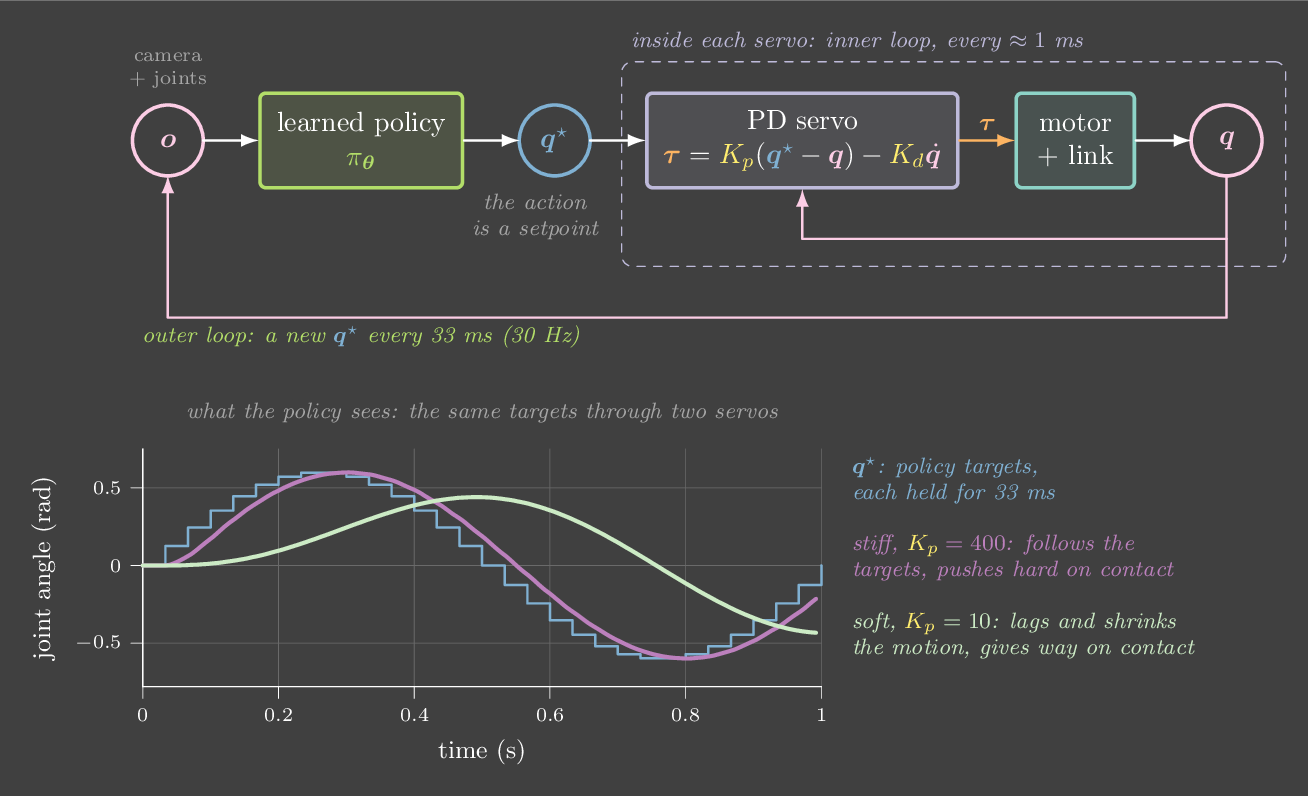
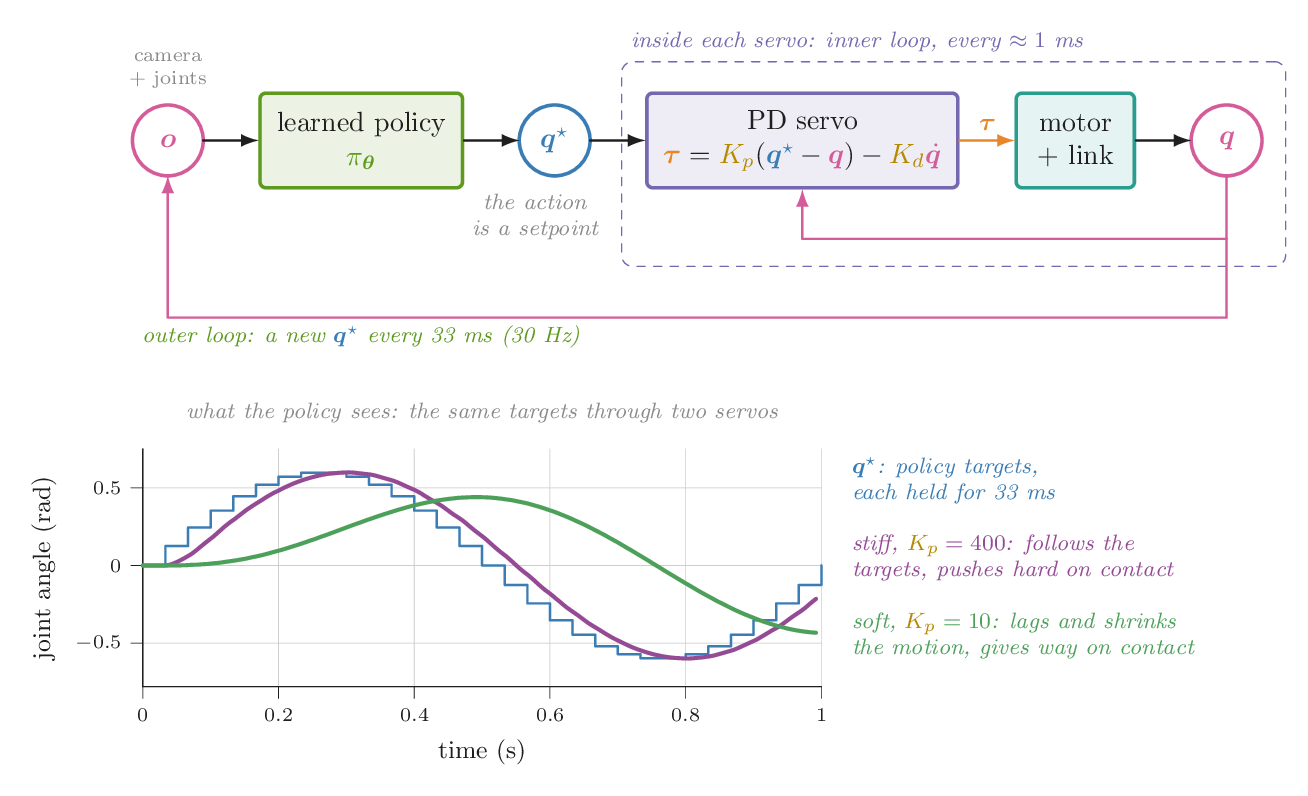
A policy talking to a servo
A stand-in "policy" wants the faint dashed path. It can only send a new target (blue staircase) at its own rate. The servo's PD loop runs at 1 kHz with gravity compensation. The pink line is what the joint actually does.
Try this
- At 10 Hz with \(K_p = 40\), the joint jumps to each new target, overshoots a little and waits. Drop \(K_p\) to 5: the motion gets smoother but lags well behind the intended path.
- Tick "interpolate between policy outputs". Now the servo is given a ramp instead of a step. Smoothness improves without softening the gains, at the cost of one policy step of delay.
- Raise the policy rate to 50 Hz. The staircase almost disappears. That is one reason high-frequency action chunks and interpolation help in practice.
You deploy a policy trained in sim, and it is sluggish on hardware. A likely cause?
The same target sequence produces different motion under different PD gains. Matching the inner loop, meaning gains, rate and delay, is often the cheapest sim-to-real fix.
Chapter 26 · Part VII · Optimize, plan, learn
Sim-to-real
The one ideaA policy is tuned to the world it trained in, including that world's mistakes. You close the gap in three ways: make the simulator match the robot (identification), train on many simulators so the policy can't rely on any one of them (randomization), or let the policy measure the world and adjust (adaptation).
Simulation is cheap, safe and parallel. Robots are none of those. So most learned controllers are trained in a simulator and deployed on hardware, and the difference between the two, the reality gap, decides whether they work. An optimizer exploits whatever the simulator offers. If the simulated motor responds instantly, the policy learns gains that only work with instant motors. If friction is zero, it learns motions that need zero friction. From the robot's side, the policy was optimized for a different robot.
Where the gap comes from
- Parameters. Masses, inertias, link lengths, friction and payloads, which Chapter 22 can measure.
- Actuators. The motor is not an ideal torque source. Current loops, gearbox backlash, torque–speed limits and the servo's own PD loop (Chapter 12, Chapter 25) all sit between the policy's action and the joint.
- Timing. Control rate, sensing and actuation latency, and jitter. Chapter 27 showed that 20 ms of delay can turn a well-damped stiff loop unstable.
- Contact. Simulated contact is an approximation (Chapter 11). Stiffness, friction coefficients and penetration all differ from reality, which matters most for grasping and walking.
- Sensing. Noise, bias, camera pose and intrinsics, lighting and textures (Chapter 20).
Three strategies
Identify. Measure the robot and make the simulator match it: masses and friction by least squares, latency by timing a step command, the actuator's response by logging it. This is the cheapest strategy and should always be done first. It has limits, because some things vary from one run to the next, and some aren't in any model.
Randomize. Instead of one simulator, train on a distribution of them, sampling the parameters \(\xi\) (pole mass, latency, friction, camera pose) for every episode:
A policy that must work across the whole distribution cannot exploit any one quirk. If the real robot is inside the distribution, it is just one more sample. The price is conservatism: the policy gives up some performance on any specific world to be safe on all of them. For a feedback controller this usually shows up as softer gains, and Chapter 27 explains why: softer loops tolerate more delay and more model error. Domain randomization made OpenAI's in-hand Rubik's cube transfer, and it is standard in legged locomotion.
Adapt. A policy that sees a history of observations and actions can infer the world it is in: how heavy the load is, how slippery the floor is. Then it can act accordingly. That is online system identification inside the policy. Rapid Motor Adaptation (RMA) trains a policy that takes the true \(\xi\) in simulation, then trains a second network to estimate a latent version of \(\xi\) from recent history, so that on hardware no one has to tell the policy what \(\xi\) is. A recurrent or history-conditioned policy trained with randomization learns the same thing implicitly. It is a learned filter (Chapter 21) over the world's parameters.
The approaches combine. ANYmal's controllers identify a neural actuator model from logged motor data, so that the simulator's motors behave like the real ones. Then they randomize what is left and train a history-conditioned policy.
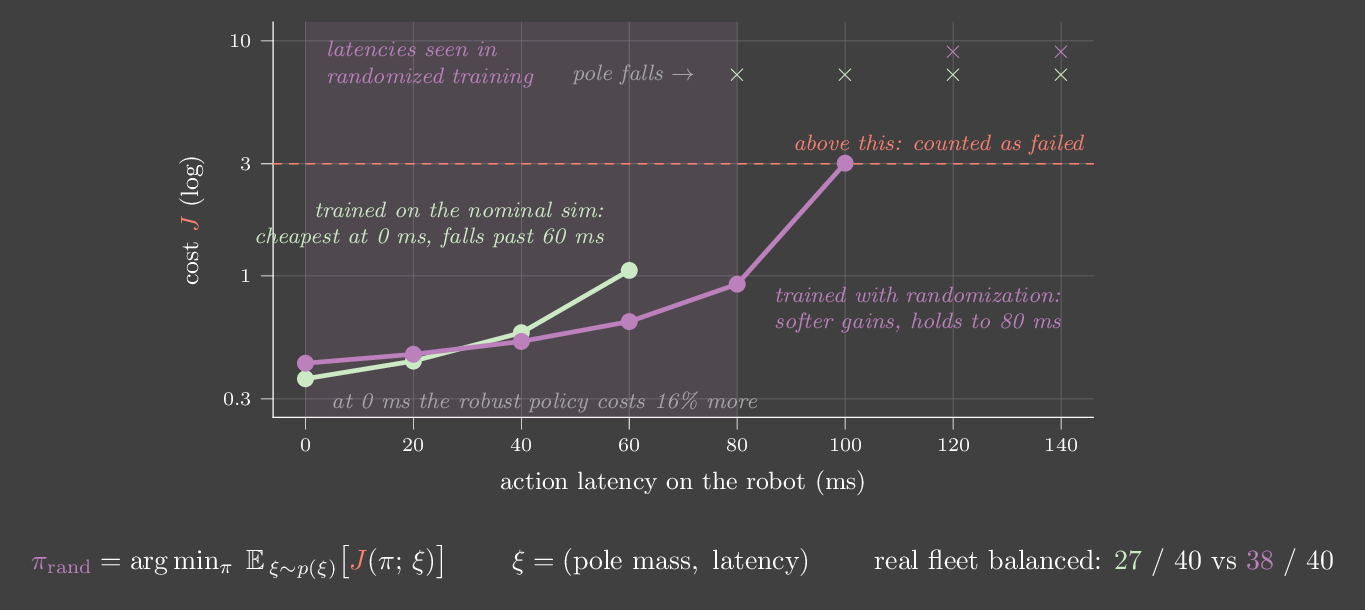
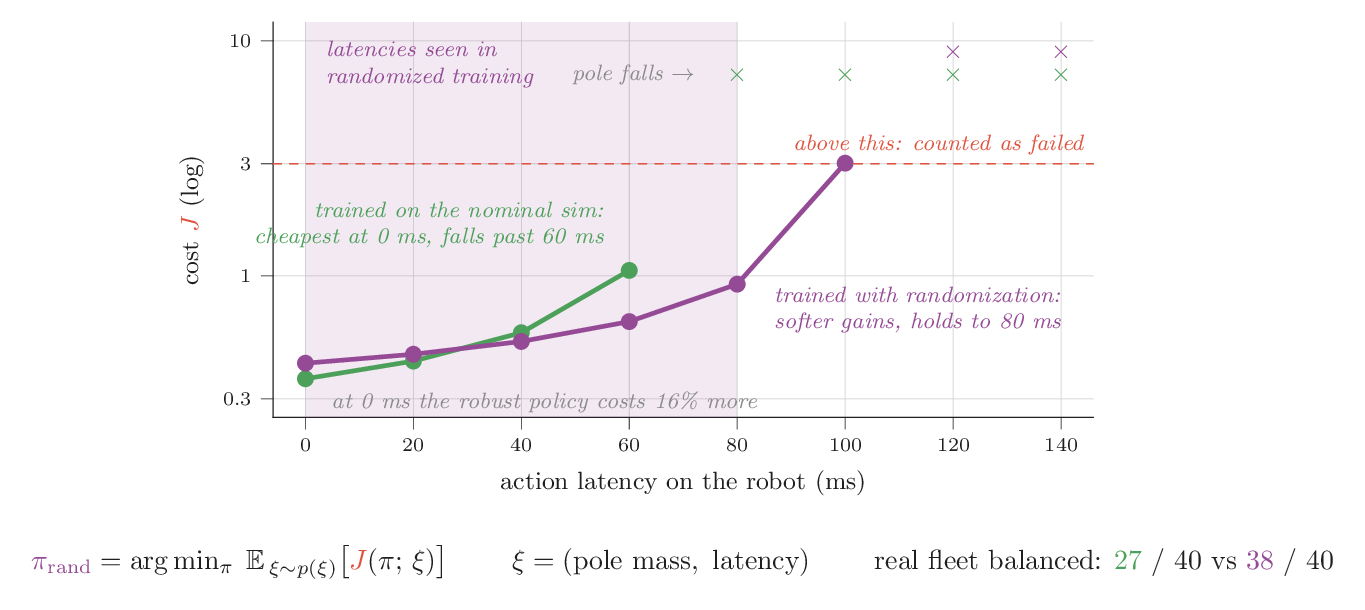
Train in sim, deploy on 40 robots
Random search (Lab 25a) trains a linear cart-pole policy twice, for 60 iterations each. One run uses the nominal simulator. The other randomizes pole mass and latency. Both are then deployed on a fleet of 40 "real" cart-poles with pole masses from 0.15 to 0.65 kg, carts from 0.8 to 1.4 kg, and 20–100 ms of latency. The maps below show each robot as a dot (balanced) or a red ✗ (fell). The two animations run both policies on the robot circled in blue.
Try this
- Compare the maps once training ends. The nominal-trained policy balances 27 of 40 robots and fails on nearly every one with 80 ms of latency or more. The randomized policy balances 38.
- Compare the two gain vectors. The randomized policy's gains are a third to a half smaller, roughly [−1.3, 32, −2.9, 8.1] against [−3.0, 48, −5.5, 12.3]. Nobody told it to be gentle. Gentleness is what survives latency.
- Untick "randomize latency" and keep only mass randomization. The robust policy now fails as often as the nominal one. Randomizing the wrong thing buys nothing, so you have to know which gap matters.
- Look at the 100 ms column. Even the randomized policy fails on some of those robots, because training only went up to 80 ms. Randomization covers the distribution you chose, not beyond it.
- Press Next real robot until both cart-poles balance. The nominal-trained one usually settles a little faster. It is the better controller for robots it understands.
Run it yourself: tune gains on one world vs many
import numpy as np
from collections import deque
rng = np.random.default_rng(0)

def sample_world():                       # one draw from the randomization distribution
    return dict(m=rng.uniform(0.7, 1.4), delay=int(rng.integers(0, 4)))  # latency 0-60 ms

def cost(kp, kd, world, dt=0.02, T=4.0):  # mean |error| holding the arm horizontal
    m, l, g = world["m"], 0.5, 9.81
    th, om, J = np.pi / 2 - 0.3, 0.0, 0.0
    queue = deque([0.0] * world["delay"])
    for _ in range(int(T / dt)):
        queue.append(kp * (np.pi / 2 - th) - kd * om + 1.0 * g * l * np.sin(th))  # assumes 1 kg
        tau = queue.popleft()             # the command arriving now was sent `delay` steps ago
        for _ in range(10):               # physics at 2 ms
            om += (tau - m * g * l * np.sin(th)) / (m * l * l) * dt / 10
            th += om * dt / 10
        J += min(abs(th - np.pi / 2), 3.0) * dt / T
    return J

grid = [(kp, kd) for kp in [10, 20, 40, 80, 160] for kd in [1, 2, 3, 5, 8]]
nominal = dict(m=1.0, delay=0)
train = [sample_world() for _ in range(40)]
best_nom = min(grid, key=lambda g: cost(*g, nominal))
best_dr = min(grid, key=lambda g: np.mean([cost(*g, w) for w in train]))
test = [sample_world() for _ in range(200)]           # fresh "real" robots
for name, g in [("tuned on nominal", best_nom), ("tuned with randomization", best_dr)]:
    c = np.array([cost(*g, w) for w in test])
    print(f"{name:26s} kp, kd = {g}   mean error {c.mean():.3f} rad   worst {c.max():.3f} rad")
# tuned on nominal           kp, kd = (160, 8)   mean error 1.612 rad
# tuned with randomization kp, kd = (20, 3) mean error 0.068 radA policy trained with heavy domain randomization works on the robot but is noticeably slower than one trained on a tuned simulator. Why?
Robustness has a price. Gains or motions that are optimal for one exact world are fragile in others, so the expected-cost optimum is more conservative. Identifying the robot well lets you narrow the randomization and recover performance.
Chapter 27 · Part VIII · Real hardware
Clocks, delay and limits
The one ideaReal controllers measure, compute and act on a clock, with some delay. Every millisecond of delay adds phase lag, and phase lag erodes damping. That is what limits how stiff you can make a real joint.
Until now the controller has run at 1 kHz with perfect sensors. Real loops sample at a fixed period \(\Delta t\), hold the command constant in between (a zero-order hold), and see the world slightly late: USB or CAN round trips, filtering, computation. Three effects follow.
Sampling and delay add lag. A hold of period \(\Delta t\) acts like a delay of about \(\Delta t/2\), on top of any sensing latency. A delay \(T\) at frequency \(\omega\) shifts the phase by \(\omega T\) radians, and phase lag eats damping. Take the stiff servo from Figure 27, \(K_p = 400\) and \(K_d = 14\): \(\omega_n = 40\) rad/s with ζ = 0.7. At 1 ms it is clean. With 15 ms of latency it overshoots by a third, and at 20 ms it is unstable. A common rule of thumb is to run the loop at least 10–20 times faster than the bandwidth you want, and stiffer gains need faster loops.
Derivatives amplify noise. Velocity is estimated by differencing encoder counts, \((\theta_k - \theta_{k-1})/\Delta t\). A small, harmless angle noise becomes a large velocity noise, and \(K_d\) multiplies it into the torque. That is the buzzing you hear from an over-tuned servo. Chapter 21 shows how to estimate velocity better.
Actuators saturate. A commanded torque above the motor's limit is clipped, and the limit itself falls as the motor speeds up (Chapter 12). Clipping breaks the linear analysis, invites windup (Chapter 4), and means high gains help less than the equations promise.
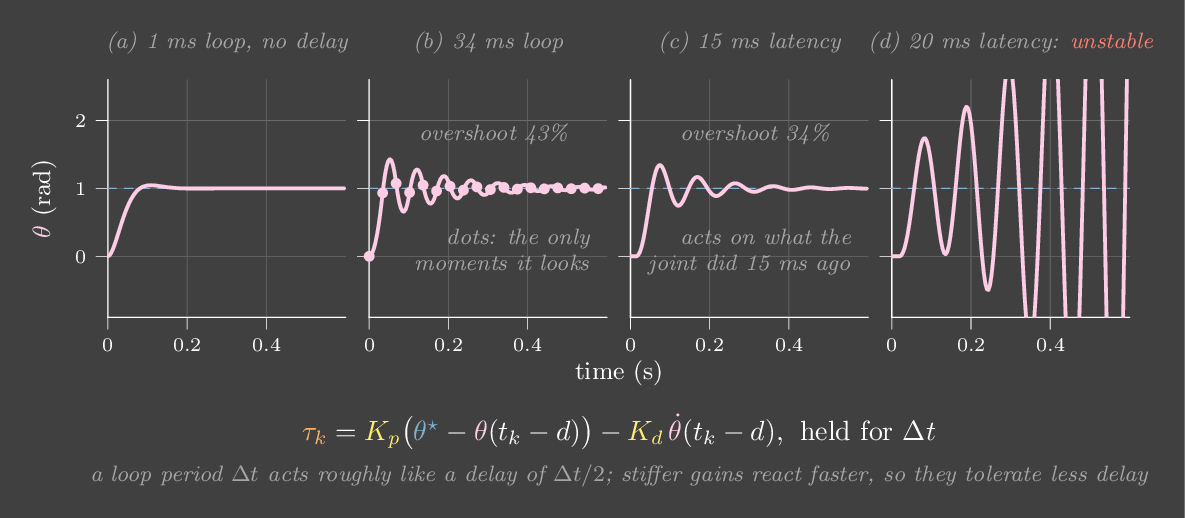
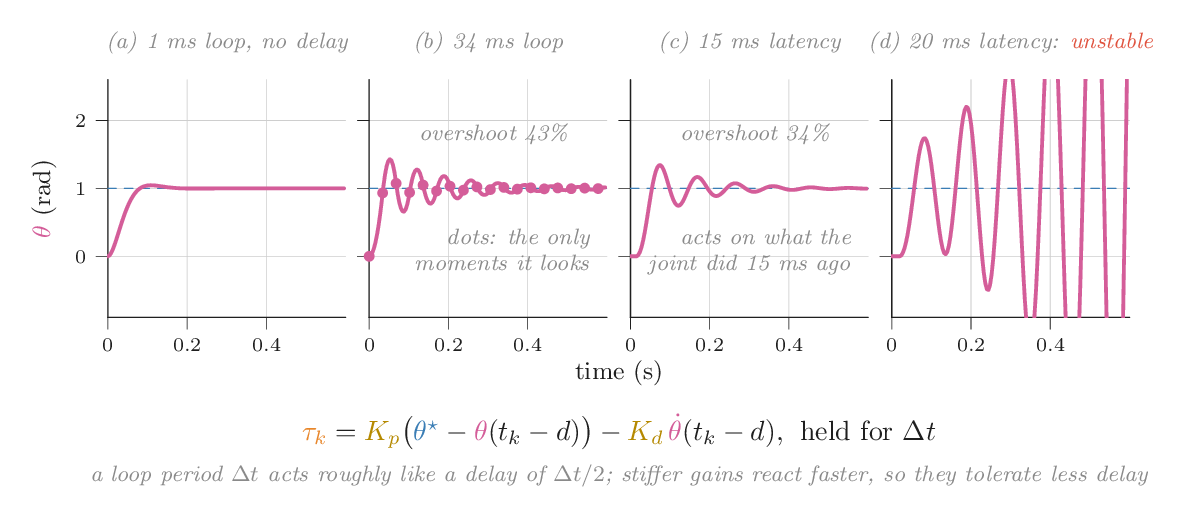
Slow the clock, add latency
A gravity-compensated joint with the stiff gains from Figure 29, well damped at 1 kHz. Velocity now comes from differencing the measured angle, as it would on a real servo.
Try this
- Raise the control period step by step: 5, 10, 15, 20 ms. Somewhere past 10 ms the steps start to ring, and by 20 ms they no longer settle. That is sooner than Figure 29, because here the velocity is a finite difference, which adds another half-period of lag.
- Reset to 1 ms and add sensing latency instead: 10, 15, then 20 ms. Compare with Figure 29, panels (c) and (d).
- With 20 ms of latency, lower \(K_p\) to 100 and \(K_d\) to 7. It behaves again. Softer gains tolerate more delay, which is why slow or remote loops must be gentle.
- Add 0.2° of encoder noise. Watch the torque plot fill with noise, then lower \(K_d\) and watch it calm down.
Your joint buzzes at rest. Which is the most likely culprit?
At rest the error is tiny, but the velocity estimate is noise divided by \(\Delta t\). A big \(K_d\) turns that into torque noise you can hear.
Chapter 28 · Part VIII · Real hardware
Wheeled robots
The one ideaA differential-drive base cannot move sideways, so it has to steer by choosing a curvature. It knows where it is only by adding up wheel rotations. Every small error gets added up too, so odometry always drifts, and feedback on a drifting estimate cannot fix the drift.
Most indoor robots, from vacuum cleaners to warehouse carts to many mobile manipulators, roll on two driven wheels on a common axle, with a caster for balance. Call the wheel separation \(b = 0.3\) m and the wheel radius \(r = 0.05\) m. The motor controllers (Chapter 4) make each wheel spin at a commanded rate, \(\omega_L\) or \(\omega_R\). Each wheel's contact point then moves forward at \(r\omega\), and the body's motion follows:
The right-hand equations are the unicycle model. They are the standard abstraction for any base that rolls without slipping, cars and tracked vehicles included, up to a change of inputs. Equal wheel speeds drive straight. Opposite speeds spin in place. Anything else drives an arc of radius \(v/\omega\) around a point on the axle line, the instantaneous centre of rotation.
The constraint you can't integrate
Rolling without slipping forbids sideways motion: the velocity across the axle is zero.
This constrains velocity, not position. Compare a joint that can only move along a rail. That position constraint removes a dimension from the places you can be. This one doesn't: a car can still reach every position and heading. It just can't get there directly. That is parallel parking: a few back-and-forth arcs that add up to a sideways shift. Constraints like this are called nonholonomic. They have a sharp consequence for control. Brockett showed in 1983 that no smooth feedback law depending only on the state can drive a unicycle to a fixed pose and stop there. Practical controllers sidestep this by tracking a moving path, or by using laws that switch or vary with time.
Following a path: pure pursuit
A path-following controller has to turn "where the path is" into a curvature. Pure pursuit does it with one picture. Pick the point on the path a fixed distance \(L\) ahead, the lookahead. Find the circular arc that leaves the robot tangent to its heading and passes through that point, and drive it. If the point sits at lateral offset \(y_r\) in the robot's frame, the arc's curvature is
This is feedback on lateral error, with a gain of about \(2v/L^2\), and \(L\) is the tuning knob, like \(K_p\) in Chapter 2. A short lookahead is a stiff gain: tight tracking, but twitchy at speed. A long lookahead is a soft gain: smooth, but it cuts corners. In the lab, at 0.4 m/s, \(L = 0.1\) m keeps the robot within 1.6 cm of the path. \(L = 0.25\) m cuts up to 8 cm off the tight ends, and \(L = 0.8\) m cuts nearly 60 cm.
Odometry, and why it drifts
The robot estimates its pose by integrating the same kinematics with its encoder readings and the wheel radius it believes. That is odometry. Every error is integrated with it. A wheel radius that is off by a little, from tyre wear or an uneven load, makes a heading error that grows linearly with distance, and so a position error that grows faster than linearly. A left wheel that is really 1% larger turns a drive the robot believes is a straight 5 m into one that ends 42 cm off the line, 10° off in heading. Slip on smooth floors adds a random walk on top. Neither shows up in the encoders.
The lab makes the trap concrete. Pure pursuit steers by the odometry estimate, because that is all the robot has. The violet ghost, its belief, stays right on the path. The real robot drifts away from it, 35 cm and 15° after one 7.5 m lap with a 1% radius error. The feedback loop works perfectly; it is just closed around the wrong quantity. Only an outside measurement fixes this: lidar or camera localization against a map, fiducials, GPS outdoors, or motion capture in a lab. Combining that measurement with odometry is the job of the filters in Chapter 21.
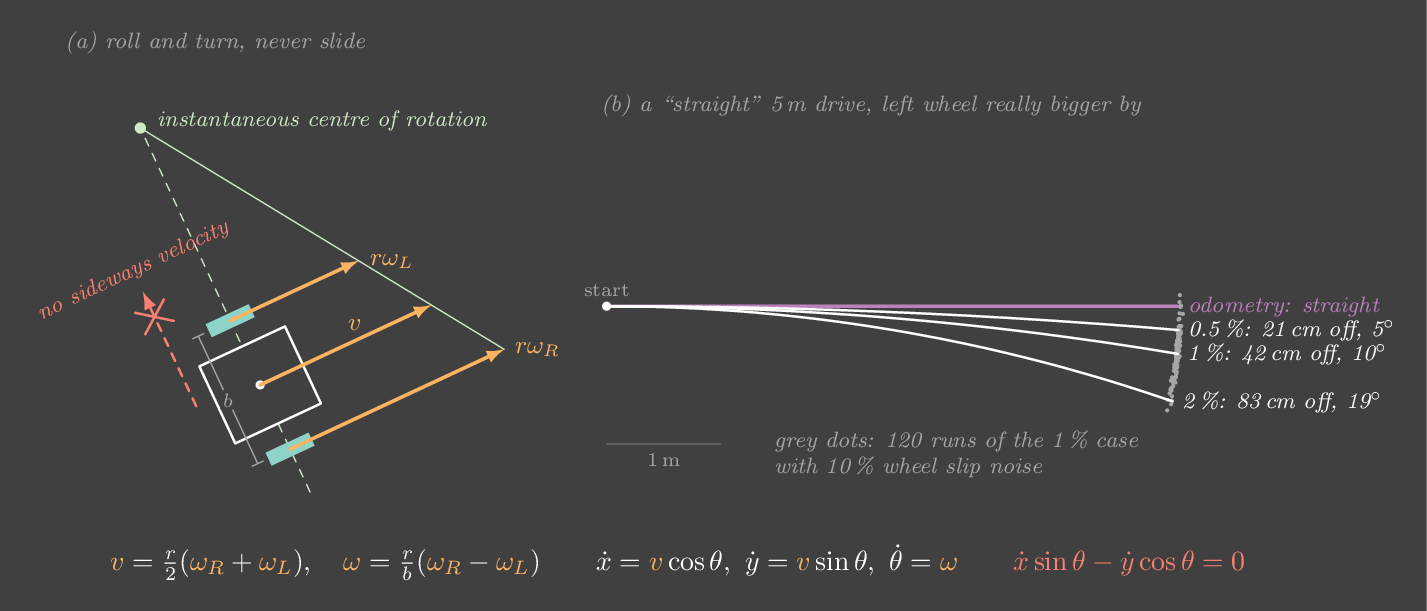
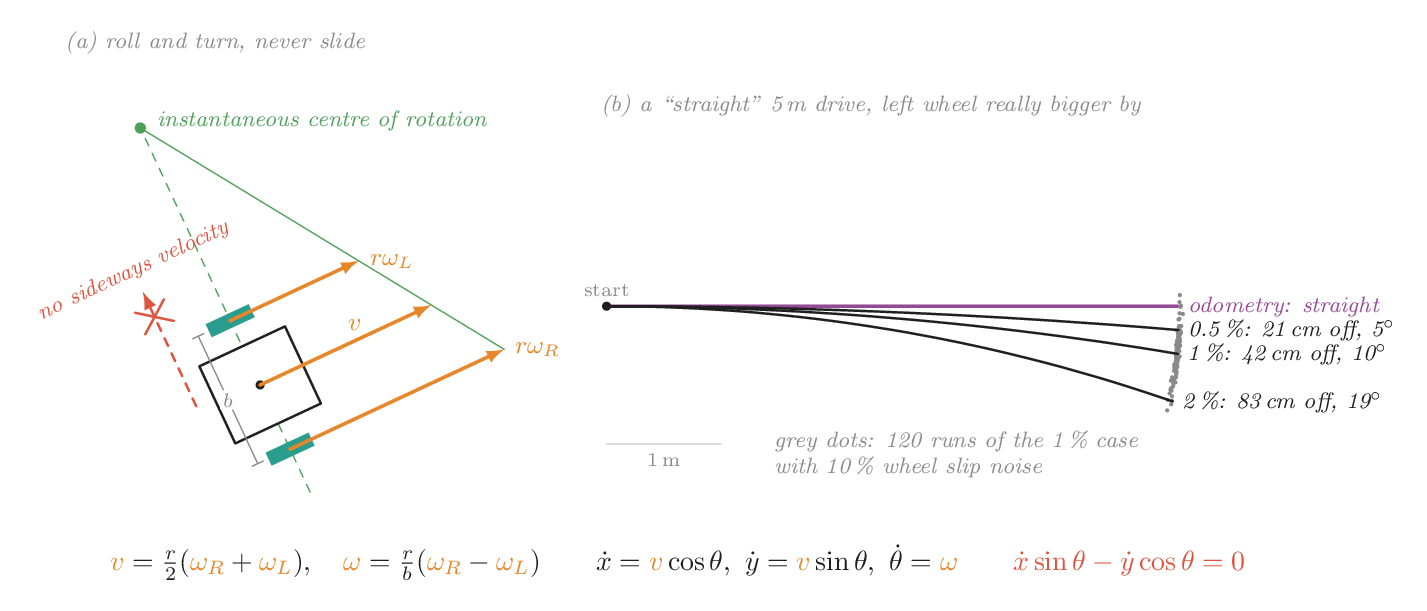
Follow a loop, believe your wheels
Seen from above. The solid robot is where the robot really is, and the violet outline is where its odometry thinks it is. The yellow dot is the pure-pursuit lookahead point. The green dot, when it is on screen, is the instantaneous centre of rotation.
Try this
- Let it run one lap (about 19 s). The violet belief sits on the dashed path, but the real robot has drifted about 35 cm and 15° away. Press Re-localize: the belief snaps to the truth, and the robot swings back onto the path.
- Switch to "steering by ground truth". Now the real robot stays within about 8 cm of the path, while the odometry it is no longer using keeps drifting on its own.
- With ground-truth steering, set \(L = 0.1\) m, then \(L = 0.8\) m. Tight tracking versus wide corner-cutting. Then raise the speed to 0.8 m/s and shrink \(L\) to 0.03 m: the steering gets busy and the error grows again. (Gain \(\approx 2v/L^2\): stiff gains plus speed mean twitchiness.)
- Set the radius error and the slip to zero. Odometry is now exact, and the two robots stay together. Raise only the slip: the error now wanders randomly instead of growing steadily.
- Choose "set each wheel's speed". Equal speeds drive straight, with the centre of rotation at infinity. Opposite speeds spin in place, with it at the robot's centre. Watch the green dot move along the axle line as you change them.
Run it yourself: odometry from wheel encoders
import numpy as np
b, r = 0.30, 0.05                      # wheel separation, believed wheel radius (m)

def odometry(pose, dphi_L, dphi_R):
    """pose = (x, y, theta); dphi = encoder angle change of each wheel (rad)."""
    x, y, th = pose
    dL, dR = r*dphi_L, r*dphi_R        # what the robot thinks each wheel rolled
    ds, dth = (dL + dR)/2, (dR - dL)/b
    a = th + dth/2                     # midpoint heading
    return (x + ds*np.cos(a), y + ds*np.sin(a), th + dth)

true, est = (0, 0, 0), (0, 0, 0)
for k in range(1250):                  # 5 m at 0.4 m/s, 10 ms steps
    dphi = 8.0 * 0.01                  # both wheels commanded 8 rad/s
    est = odometry(est, dphi, dphi)    # believes: straight line
    # reality: the left wheel is 1% bigger, which looks like 1% more rotation at r
    true = odometry(true, dphi*1.01, dphi)
print("estimate", np.round(est, 3), " truth", np.round(true, 3))The robot steers by its odometry and stays perfectly on the path in its own estimate, but the real robot drifts away. Why doesn't the feedback loop correct it?
Feedback drives the measured error to zero, and here the "measurement" is the odometry estimate. The drift is the gap between the estimate and reality, and no signal in the loop contains it. Only an external measurement of position can close that gap.
Chapter 29 · Part VIII · Real hardware
Your SO-101
The one ideaEach SO-101 joint is a Feetech servo running its own position PID loop. You can read and change its gains, and feeling a joint go springy or jittery as you do teaches more than a chapter does.
The SO-101 uses Feetech STS3215 serial bus servos. Each one contains a motor, a gearbox, a magnetic encoder and a microcontroller that closes a position loop internally. When LeRobot sends an action it writes Goal_Position, which is \(\theta^\star\). The servo's own PID turns the error into motor effort, many times faster than your Python loop could. The gains live in the servo's control table, as P_Coefficient, I_Coefficient and D_Coefficient. They are unitless integers in the firmware's internal scaling, not N·m/rad.
LeRobot's SO-100/SO-101 setup writes \(P = 16\), below the factory value of 32, to reduce shaking, with \(I = 0\) and \(D = 32\). In this book's terms: a moderately stiff spring, a fair amount of damping, no integral and no gravity model. So you should expect some sag under load (Chapter 4) and a limit on how far \(P\) can go before the servo jitters (Chapter 27).
Bench experiments
Do these on the follower arm, with the arm clamped down and nothing fragile within reach. Change one gain at a time and write down what you feel. Put the defaults back when you are done.
- Feel the spring. Hold the elbow at 90° with torque on and push the forearm gently by hand. Try \(P = 8\), 16 and 32. The resisting force grows with \(P\), as Hooke's law says it should.
- Measure the sag. Stretch the arm out horizontally and command a pose. Read
Present_Positionand compare it withGoal_Position. Halve \(P\) and the gap should roughly double (Chapter 4). - Feel the damper. Set \(D = 0\) and flick the joint: it rings. Restore \(D = 32\) and it stops cleanly. Push \(D\) much higher and listen for the buzz from differentiated encoder noise (Chapter 27).
- Log a step response. Command a 20° step and record
Present_Positionas fast as the bus allows. Plot it next to Figure 5 and estimate ζ from the overshoot. - Watch what your policy experiences. Replay a recorded episode with \(P = 8\), then \(P = 32\). Same actions, different motion: Lab 25b on real hardware.
A sketch: changing servo gains through LeRobot
# Register names are those in LeRobot's Feetech control table. The bus API
# has changed between LeRobot releases, so check your version's
# lerobot/motors/feetech code for the exact calls.
from lerobot.motors.feetech import FeetechMotorsBus   # path varies by version

bus = ...   # the follower arm's bus, as built by your robot config
bus.connect()
for name in ["elbow_flex"]:
    print(name, {r: bus.read(r, name) for r in
                 ["P_Coefficient", "I_Coefficient", "D_Coefficient"]})
    bus.write("P_Coefficient", name, 8)      # softer spring: try 8, 16, 32
    bus.write("D_Coefficient", name, 32)

# log a step response
import time
t0, log = time.time(), []
start = bus.read("Present_Position", "elbow_flex")
bus.write("Goal_Position", "elbow_flex", start + 200)   # raw encoder ticks
while time.time() - t0 < 1.5:
log.append((time.time() - t0, bus.read("Present_Position", "elbow_flex")))After · Reading path
Where to go next
Each resource below goes deeper on one part of the map. If you only do two things, watch Brian Douglas for intuition, and read Modern Robotics alongside Tedrake's Underactuated Robotics with the labs here open. Everything marked free is free online.
Intuition first
- Brian Douglas, Control Systems Lectures and the MATLAB Tech Talks Understanding PID ControlShort, visual and light on maths. Pairs with Part I and Chapter 27.
- Steve Brunton, Control BootcampLinearization, controllability, LQR and Kalman filters, using the linear algebra you already know. His book Data-Driven Science and Engineering leans toward ML. Pairs with Chapter 23 and Chapter 21.
Kinematics and dynamics (Parts II–IV)
- Lynch & Park, Modern RoboticsFree. The main textbook companion to this book: rigid motions and screws (book ch. 3), forward kinematics with the product of exponentials (4), velocity kinematics (5), inverse kinematics (6), dynamics (8), trajectories (9), planning (10), robot control (11) and grasping (12). It has lecture videos and a Coursera course.
- Siciliano, Sciavicco, Villani & Oriolo, Robotics: Modelling, Planning and ControlThe classical engineering reference, strong on interaction and force control. Pairs with Chapter 16. Spong, Hutchinson & Vidyasagar's Robot Modeling and Control and Craig's Introduction to Robotics are gentler alternatives.
- Solà, Deray & Atchuthan, A micro Lie theory for state estimation in roboticsFree. Rotations and transforms as Lie groups, in 17 pages, with the Jacobians you need for optimization. Read it after Chapter 5 and Chapter 6.
- Zhou et al., On the Continuity of Rotation Representations in Neural NetworksFree. Why networks should not regress Euler angles or raw quaternions, and the 6-D alternative. Pairs with Chapter 5.
- Featherstone, Rigid Body Dynamics AlgorithmsHow simulators compute dynamics in O(n): recursive Newton–Euler and the articulated-body algorithm. For after Chapter 10.
Simulation, hardware and sim-to-real
- MuJoCo documentation, "Computation" chapterFree. How a modern simulator integrates, and how it models soft contact through solref and solimp. Pairs with Chapter 11.
- Tobin et al., Domain Randomization, Hwangbo et al., Learning agile and dynamic motor skills for legged robots, Kumar et al., RMAFree. Three approaches to the reality gap: randomize, model the actuator, adapt online. Pairs with Chapter 12 and Chapter 26.
Optimal control, planning and learning (Parts V and VII)
- Russ Tedrake, Underactuated RoboticsFree MIT textbook with lectures: LQR, trajectory optimization, MPC, and their links to RL and learned models. The most relevant text if you work on world models. Pairs with Chapter 23–24. His Robotic Manipulation notes cover perception, grasping and planning for arms.
- Ben Recht, A Tour of Reinforcement Learning: The View from Continuous ControlFree. The ML bridge, with the LQR ↔ RL connection made explicit. Random search is from Mania, Guy & Recht (2018). Pairs with Chapter 23 and Chapter 25.
- Steven LaValle, Planning AlgorithmsFree. The reference for configuration spaces, collision checking and sampling-based planners such as RRT and PRM. Pairs with Chapter 19.
Sensing and estimation (Part VI)
- Roger Labbe, Kalman and Bayesian Filters in PythonFree Jupyter book. The most hands-on route through Kalman filters, the EKF and the UKF. Pairs with Chapter 21.
- Thrun, Burgard & Fox, Probabilistic RoboticsBayes filters, localization and SLAM: the estimation side of mobile robots. Pairs with Chapter 21 and Chapter 28.
- Hartley & Zisserman, Multiple View Geometry, and Peter Corke, Robotics, Vision and ControlCameras, calibration and geometry. Corke's book comes with Python toolboxes you can use for every chapter of this one. Pairs with Chapter 20.
A four-week plan
| Week | Read here | Build |
|---|---|---|
| 1 | Chapter 0 to Chapter 4; Chapter 5 and Chapter 6. Douglas's PID videos; Modern Robotics ch. 3 | A NumPy pendulum with P, PD, PID and gravity. A small transform library with tests (compose, invert, quaternion ↔ matrix). |
| 2 | Chapter 7, Chapter 8, Chapter 9, Chapter 10, Chapter 11. Modern Robotics ch. 4–6 and 8 | FK, Jacobian and damped-least-squares IK for the two-link arm. Load the SO-101 URDF in MuJoCo and compare its FK with yours. |
| 3 | Chapter 12 to Chapter 19. Modern Robotics ch. 9–11 | Computed torque and impedance on the two-link arm in MuJoCo. A quintic trajectory between IK solutions. An RRT in the arm's configuration space. |
| 4 | Chapter 20 to Chapter 29. Tedrake's LQR and MPC chapters; Recht's survey | LQR on the cart-pole, MPPI swing-up, a Kalman filter on encoder data, least-squares identification of one SO-101 joint, and the bench experiments. |